IGNOU Assignment Result: IGNOU assignments are a crucial part of the evaluation system at Indira Gandhi National Open University. For every academic programme—whether undergraduate, postgraduate, diploma, or certificate—assignments carry significant weightage and directly affect the final result. After submitting assignments, students eagerly wait for the IGNOU assignment result to be updated so they can track their academic progress and eligibility for examinations or degree completion.
Because IGNOU evaluates assignments through study centres and uploads marks in phases, delays and partial updates are common. This often leads students to search for accurate information regarding assignment results, checking procedures, update timelines, and what to do if marks are missing. This article provides a detailed, step-by-step explanation of everything related to IGNOU assignment results.
What Is IGNOU Assignment Result?
The IGNOU assignment result reflects the marks obtained by a student in their submitted assignments for a particular course and academic session. These marks are an essential component of the final evaluation and are later merged into the IGNOU grade card.
Assignments generally carry 30% weightage, while the Term End Examination carries 70% weightage. Without valid assignment marks, a student’s course is considered incomplete.
Why IGNOU Assignment Result Is Important?
The assignment result is important for several reasons:
- Determines eligibility for Term End Examination results
- Contributes significantly to final grades
- Required for completion of courses
- Reflected in the IGNOU grade card
- Necessary for applying for degree or certificate
Students who do not submit assignments or whose assignment results are not updated may face academic delays.
Official Link to Check IGNOU Assignment Result
IGNOU provides an online facility for students to check their assignment submission and evaluation status.
Students can check their IGNOU assignment result using the link below:
https://isms.ignou.ac.in/changeadmdata/StatusAssignment.asp
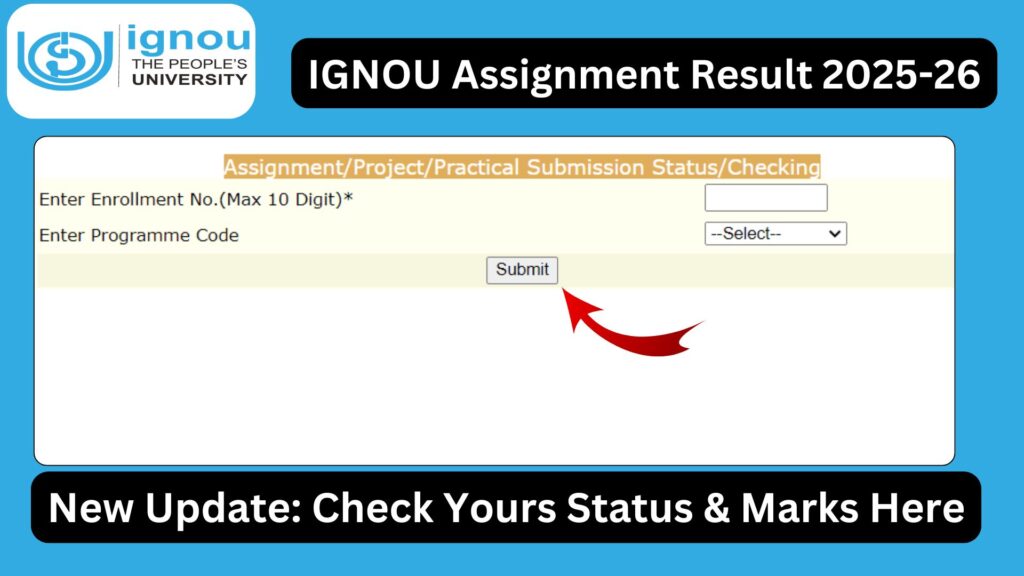
This page allows students to view course-wise assignment status using their enrollment number and programme details.
Important Links and Information
| Description | Details |
|---|---|
| IGNOU Assignment Result Check Link | https://isms.ignou.ac.in/changeadmdata/StatusAssignment.asp |
| Required Information | Enrollment Number, Programme Code |
| Assignment Weightage | 30% |
| Evaluation Authority | Study Centre |
| Marks Display Location | Assignment Result Page and Grade Card |
| Applicable For | All IGNOU Programs |
How to Check IGNOU Assignment Result Online?
Checking the IGNOU assignment result is a simple online process.
Step-by-Step Process
- Open the assignment result status page
- Enter your Enrollment Number
- Select your Programme Code
- Submit the details
- View assignment marks and status
The page displays course-wise details of submitted assignments and their evaluation status.
What Details Are Shown in IGNOU Assignment Result?
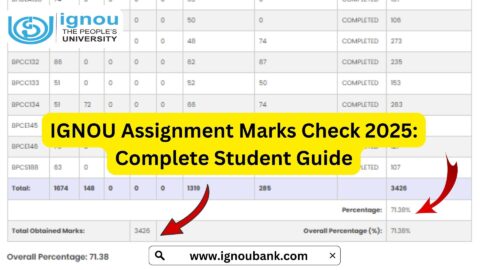
When you check your assignment result, you will typically see:
- Course Code
- Assignment Marks
- Status (Received / Not Received / Evaluated)
- Session Details
These details help students verify whether their assignments have been properly evaluated.
How Long Does It Take for IGNOU Assignment Result to Be Updated?
IGNOU assignment results are not updated immediately after submission. The timeline depends on multiple factors.
Typical Evaluation Timeline
| Stage | Approximate Duration |
|---|---|
| Assignment Submission | As per deadline |
| Evaluation by Study Centre | 30–45 days |
| Upload of Marks | 1–2 weeks after evaluation |
| Reflection in Grade Card | After assignment result update |
Delays may occur due to high volume of assignments or administrative processing.
Reasons for Delay in IGNOU Assignment Result
Several factors may cause delay in assignment result updates:
- Late submission by students
- Heavy workload at study centres
- Incomplete assignment details
- Incorrect enrollment number or course code
- Technical issues during mark upload
Most delays are temporary and resolved during regular update cycles.
Difference Between Assignment Result and Grade Card
| Aspect | Assignment Result | Grade Card |
|---|---|---|
| Shows | Assignment marks only | Complete academic record |
| Update Mode | Study centre-based | Centralized |
| Weightage | 30% | 100% record |
| Used For | Verification | Degree completion |
Assignment results are later integrated into the grade card.
What to Do If IGNOU Assignment Result Is Not Showing?
If your assignment result is not visible even after sufficient time:
- Verify assignment submission receipt
- Wait at least 45 days after submission
- Contact your study centre coordinator
- Approach regional centre if required
- Submit proof of submission if asked
Students should avoid repeated queries before the standard evaluation period.
Common Errors in IGNOU Assignment Result
Some common issues faced by students include:
- Marks shown for one course but missing for another
- Incorrect marks
- Status showing “Not Received” despite submission
- Session mismatch
Such issues should be reported with supporting documents.
Can Assignment Marks Be Improved?
IGNOU generally does not allow re-evaluation of assignments. However:
- If marks are incorrectly uploaded, corrections can be requested
- If assignment is rejected, re-submission may be allowed in the next session
Students are advised to write assignments carefully and follow guidelines strictly.
How Assignment Results Affect Term End Examination Results?
Even if a student performs well in the Term End Examination, failure to secure assignment marks can result in:
- Incomplete course status
- Lower final grade
- Delay in result declaration
Assignment results must be available for final marks calculation.
Importance of Keeping Assignment Submission Proof
Students should always keep:
- Assignment submission receipt
- Online submission confirmation
- Photocopy or scanned copy of assignments
These documents are essential if discrepancies arise.
Tips to Ensure Timely Assignment Result Update
- Submit assignments well before deadline
- Use correct front page format
- Write enrollment and course codes clearly
- Confirm submission mode
- Follow study centre instructions
Attention to detail reduces evaluation delays.
FAQ about IGNOU Assignment Result
What is IGNOU assignment result?
It shows the marks obtained in submitted assignments for each course.
Where can I check IGNOU assignment result?
You can check it using the official link:
https://isms.ignou.ac.in/changeadmdata/StatusAssignment.asp
How long does it take for assignment marks to update?
Usually 30–45 days after submission, but delays are possible.
Why is my assignment result not showing?
It may be under evaluation or pending upload by the study centre.
Are assignment marks mandatory?
Yes, assignment marks are compulsory and carry 30% weightage.
Can I appear for exams without assignment marks?
You may appear, but final results will not be completed without assignment marks.
Conclusion
IGNOU assignment results are a critical part of the academic evaluation process and directly impact course completion and final grades. Since assignment evaluation is handled by study centres and updates are done in phases, students must exercise patience and regularly check their status using the official link.
By submitting assignments correctly, keeping proof of submission, and monitoring assignment results on time, students can avoid unnecessary academic delays. Understanding how the assignment result system works ensures a smoother and more confident academic journey at Indira Gandhi National Open University.