The IGNOU assignment front page is an important part of submitting assignments for students enrolled in Indira Gandhi National Open University (IGNOU). A properly completed front page helps identify the student, programme, course and study-related details associated with the assignment.
Before submitting an IGNOU assignment, students should make sure that the required information is entered correctly and that the front page is attached to the assignment in the appropriate manner. Missing or incorrect details can make it difficult to identify an assignment during the evaluation and submission process.
In this article, you will find information about the IGNOU assignment front page, the details that need to be filled in, how to download the front page, how to fill it correctly, and important points to remember before submitting your assignment.
Download IGNOU Assignment Front Page
Students looking for an IGNOU assignment front page can download the PDF provided below.
Download IGNOU Assignment Front Page:
https://ignoubank.com/wp-content/uploads/2023/05/IGNOU-Assignment-Front-Page-IGNOUBANK.COM_.pdf
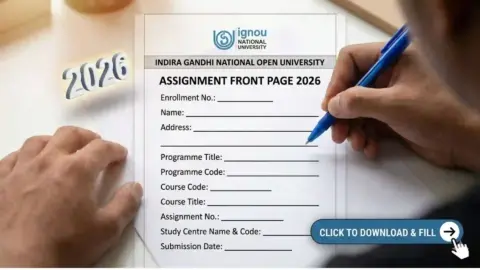
The downloadable front page contains fields for important student and assignment information, including enrolment number, name, address, programme, programme code, course title, course code, regional centre, study centre, assignment number, phone number, email address, date and signature.
What Is the IGNOU Assignment Front Page?
The IGNOU assignment front page is the first page attached to an assignment submitted by an IGNOU student. It contains basic information that helps identify the student and the particular course assignment.
An assignment may contain answers to several questions, but the evaluator also needs to know who submitted the assignment and which programme and course it belongs to. This is why students should provide accurate details on the front page.
The front page generally includes information such as:
- Enrolment number
- Student name
- Address
- Programme
- Programme code
- Course title
- Course code
- Regional centre
- Study centre
- Assignment number
- Phone number
- Email ID
- Date
- Student signature
The downloadable PDF available through the link above contains these fields in a ready-to-use format.
Important Information for IGNOU Assignment Front Page
The following table provides a quick overview of the information students generally need to enter on the assignment front page.
| Information | What to Enter |
|---|---|
| Enrolment No. | Your IGNOU enrolment number |
| Name | Your full name |
| Address | Your complete correspondence address |
| Programme | Name of your IGNOU programme |
| Programme Code | Code of your programme |
| Course Title | Name/title of the course |
| Course Code | Course code such as BCOC-131, BEGLA-136, etc. |
| Regional Centre | Your allotted IGNOU Regional Centre |
| Study Centre | Your allotted study centre |
| Assignment No. | Relevant assignment number |
| Phone No. | Your active mobile number |
| E-mail ID | Your active email address |
| Date | Date of completing/submitting the assignment |
| Signature | Your signature |
The exact fields shown on the downloadable front page include enrolment number, name, address, programme, programme code, course title, course code, regional centre, study centre, assignment number, phone number, email ID, date and signature.
Why Is the Assignment Front Page Important?
The assignment front page is important because it provides essential identification details along with the assignment. IGNOU students submit assignments for individual courses, and students may have several assignments for different subjects.
For example, a student enrolled in a bachelor’s programme may need to submit assignments for multiple courses. If the assignment does not contain proper identification details, it can create unnecessary problems during the submission and evaluation process.
The front page therefore acts as an identification sheet for the assignment.
Students should not treat the front page as an optional decorative page. It should be completed carefully with information matching their official IGNOU records.
Details to Fill on IGNOU Assignment Front Page
1. Enrolment Number
Enter your correct IGNOU enrolment number in the enrolment number field.
The enrolment number is one of the most important details because it identifies your student record. Check the number carefully before submitting the assignment.
Avoid entering an incorrect number or accidentally omitting any digit.
2. Name
Write your full name as recorded in your IGNOU admission or student records.
Try to maintain consistency with the name associated with your IGNOU enrolment details.
3. Address
Enter your complete address in the address section.
The downloadable front page provides space for the address across multiple lines.
Make sure the handwriting is clear if you are filling the printed form manually.
4. Programme
Enter the name of your IGNOU programme.
For example, depending on your enrolment, this could be a bachelor’s, master’s, diploma, certificate or other programme.
5. Programme Code
Enter the correct programme code.
Do not confuse the programme code with the course code. They are different fields and should be filled separately.
6. Course Title
Enter the full title of the course for which you are submitting the assignment.
The course title should correspond to the course code written on the front page.
7. Course Code
Enter the correct course code.
This is particularly important because IGNOU students usually have multiple courses in their programme. A correct course code helps identify the specific assignment.
8. Regional Centre
Write the name of your allotted IGNOU Regional Centre.
Students should use the Regional Centre associated with their enrolment rather than randomly entering the name of a nearby centre.
9. Study Centre
Enter the name or details of your allotted study centre.
If you are unsure about your study centre, check your IGNOU student records before completing the assignment front page.
10. Assignment Number
Enter the relevant assignment number.
If the assignment instructions specify a particular assignment number, use that number on the front page.
11. Phone Number
Enter an active phone number.
The front page includes a dedicated phone number field.
Use a number that you normally use for your IGNOU-related communication.
12. Email ID
Enter your active email address.
Check the spelling carefully because an incorrectly entered email address may make communication difficult.
13. Date
Enter the appropriate date in the date field.
The provided front page contains a date field in the format of day/month/year.
14. Signature
Finally, sign the front page in the designated signature area.
Your signature should be clear and placed within the appropriate space.
How to Download IGNOU Assignment Front Page?
Downloading the IGNOU assignment front page is simple.
Follow these steps:
- Open the IGNOU assignment front page PDF link.
- The PDF will open in your browser or PDF viewer.
- Download the PDF to your computer or mobile device.
- Open the downloaded PDF.
- Print the front page if you want to fill it manually.
- Fill in all the required information carefully.
- Attach the completed front page with your assignment.
IGNOU Assignment Front Page PDF:
https://ignoubank.com/wp-content/uploads/2023/05/IGNOU-Assignment-Front-Page-IGNOUBANK.COM_.pdf
The PDF currently contains one page with the assignment identification fields listed above.
Can I Fill the IGNOU Assignment Front Page by Hand?
Yes, students can generally print the front page and fill in the required information by hand when preparing a physical assignment.
If you are handwriting the details, make sure your writing is neat and readable. Avoid using extremely small handwriting or writing over the printed fields.
Before submitting the assignment, carefully check every field.
A simple mistake in an enrolment number, programme code or course code can cause unnecessary confusion.
Can I Type the Details on the Front Page?
If you are preparing your assignment digitally, you may be able to enter the details electronically depending on the PDF and your preferred workflow.
However, students should ensure that the final document is readable and contains all required information.
If you print the front page after entering the details digitally, check the printed version before attaching it to your assignment.
IGNOU Assignment Front Page Checklist
Before submitting your assignment, use the following checklist:
| Checklist | Status to Check |
|---|---|
| Enrolment number | Correct |
| Student name | Correct |
| Address | Complete |
| Programme name | Correct |
| Programme code | Correct |
| Course title | Correct |
| Course code | Correct |
| Regional centre | Correct |
| Study centre | Correct |
| Assignment number | Correct |
| Phone number | Active |
| Email ID | Correct |
| Date | Entered |
| Signature | Added |
| Assignment answers | Attached |
| Pages | Properly arranged |
This checklist can help students avoid common identification mistakes.
Common Mistakes to Avoid
Students should be careful while preparing the assignment front page. Some common mistakes include entering an incorrect enrolment number, using the wrong course code, leaving the signature field blank, or entering incomplete centre information.
Entering the Wrong Enrolment Number
Always check your enrolment number before final submission.
Confusing Programme Code and Course Code
Programme code identifies your programme, while course code identifies the individual course. Make sure both fields contain the correct information.
Leaving Important Fields Blank
Do not leave important fields blank unless the information genuinely does not apply to you.
Using an Incorrect Course
If you are submitting assignments for multiple courses, make sure the front page corresponds to the assignment placed behind it.
Forgetting the Signature
The downloadable front page includes a signature field. Make sure you complete it before submission.
Poor Handwriting
If the front page is handwritten, use clear and readable handwriting.
IGNOU Assignment Front Page for Different Programmes
The same general type of assignment identification information can be useful across different IGNOU programmes, but students should always ensure that the information they enter matches their own programme and course.
For example, students enrolled in BA, BCom, BCA, BBA, MA, MCom, MCA, MBA, diploma and certificate programmes may have different programme codes and course codes.
Therefore, students should not copy another student’s programme or course information.
Your assignment front page should contain your own enrolment details and the details of the specific course for which the assignment is being submitted.
What Should Be Written After the Front Page?
After completing the front page, students should attach or prepare the assignment answers according to the applicable IGNOU assignment instructions.
The front page should clearly identify the assignment before the evaluator reaches the answers.
Students should also make sure that the assignment answers are arranged in the correct order and that the relevant course information matches the front page.
Important IGNOU Assignment Links
Here is a useful reference table for students preparing IGNOU assignments.
| Resource | Link/Information |
|---|---|
| IGNOU Assignment Front Page | https://ignoubank.com/wp-content/uploads/2023/05/IGNOU-Assignment-Front-Page-IGNOUBANK.COM_.pdf |
| IGNOU Assignment Front Page Guide | Use the fields provided on the downloadable PDF |
| Assignment Submission Information | Check the applicable IGNOU instructions for your programme |
| Assignment Status | Use the official assignment status service where applicable |
| IGNOU Assignment Downloads | Check the relevant IGNOU resources for your programme |
| Student Enrolment Details | Use your IGNOU admission/student records |
| Study Centre Details | Use your allotted study centre information |
| Regional Centre Details | Use your allotted regional centre information |
Conclusion
The IGNOU assignment front page is an important part of preparing an assignment because it provides the basic information needed to identify the student and the specific assignment. Students should fill in their enrolment number, name, programme, programme code, course title, course code, regional centre, study centre, assignment number, phone number, email ID, date and signature carefully.
The downloadable PDF provided for the IGNOU assignment front page contains these fields in a simple one-page format.
Students can download the IGNOU Assignment Front Page PDF here:
https://ignoubank.com/wp-content/uploads/2023/05/IGNOU-Assignment-Front-Page-IGNOUBANK.COM_.pdf
Before submitting an assignment, carefully verify all the information on the front page, particularly the enrolment number, programme code, course code and assignment number. A properly completed front page can make the assignment easier to identify and helps you present your submission in an organized manner.