IGNOU Registration Status 2026: The Indira Gandhi National Open University (IGNOU) offers undergraduate, postgraduate, diploma, and certificate programmes through open and distance learning and online education. After submitting an admission application, students often want to confirm whether their registration has been accepted and whether their admission details are available in the university’s records.
The IGNOU Registration Status 2026 facility helps students check their admission and registration information online. By using the university’s admission status portal, students can review the available details associated with their enrolment number and programme code.
Checking your registration status is important if you have recently applied for admission, received an enrolment number, or are waiting for confirmation of your programme details. It can also help you identify discrepancies in your academic records and determine whether you need to contact IGNOU for clarification.
In this article, you will learn how to check IGNOU registration status online, understand the information displayed on the portal, resolve common problems, and find the important links required to manage your admission.
IGNOU Registration Status 2026: Important Links and Information
The following table contains useful links and information for students checking their IGNOU admission or registration status.
| Particulars | Details |
|---|---|
| University name | Indira Gandhi National Open University |
| Status checking year | 2026 |
| Service name | IGNOU Admission and Registration Status |
| Registration status link | Check IGNOU Registration Status 2026 |
| Official university website | IGNOU Official Website |
| Details required | Enrolment number and programme code |
| Additional verification | Enter the verification code displayed on the portal, if requested |
| Students concerned | IGNOU applicants and registered students |
| Information available | Admission and registration details recorded by the university |
| Fresh admission portal | IGNOU Admission Portal |
| Online programme portal | IGNOU Online Programmes |
| Re-registration portal | IGNOU Re-registration |
| Student identity card | IGNOU Student Portal |
| Study material information | IGNOU Official Website |
| Support | Contact the relevant IGNOU regional centre or university office |
The registration status page is intended for checking admission and registration information. If you have not yet received an enrolment number, you may need to check your fresh admission application through the admission portal instead.
What Is IGNOU Registration Status 2026?
IGNOU registration status refers to the information available about a student’s admission or registration in the university’s academic system.
When a student applies for an IGNOU programme, the university processes the application and the relevant admission details. Students can subsequently use the designated status-checking facility to review the information associated with their enrolment number and programme.
This facility is useful for students who want to verify their registration details without visiting a regional centre in person.
Depending on your admission stage and the information recorded by IGNOU, you may be able to check details associated with your enrolment number and programme code.
Students should understand that checking registration status is different from checking examination results, assignment marks, or study material dispatch information. Each service serves a different purpose, and you should use the appropriate portal for your requirement.
How to Check IGNOU Registration Status 2026 Online?
Follow these steps to check your IGNOU admission and registration details.
Step 1: Visit the Official Registration Status Link
Open the following link in your browser:
https://isms.ignou.ac.in/changeadmdata/AdmissionStatusNew.ASP
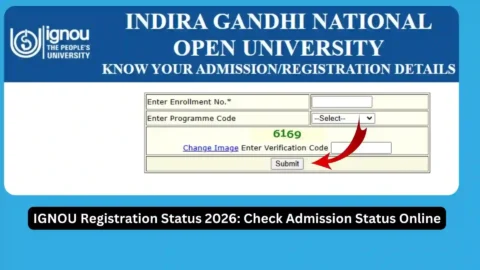
The page is titled “Know Your Admission/Registration Details” and provides a facility for checking registration information.
Step 2: Enter Your Enrolment Number
Find the field labelled “Enter Enrollment No.” and enter your IGNOU enrolment number.
Make sure the number is correct before proceeding. An incorrect enrolment number may prevent the system from retrieving your registration details.
If you have only recently submitted an application and have not received an enrolment number, check your application confirmation and the fresh admission portal first.
Step 3: Select Your Programme Code
Choose the programme code associated with your IGNOU registration from the available options.
For example, students enrolled in different bachelor’s, master’s, diploma, or certificate programmes must select the code corresponding to their own programme.
Selecting the wrong programme code may prevent you from viewing the appropriate record.
Step 4: Enter the Verification Code
The portal may display a verification image and ask you to enter the code shown. Enter the characters carefully.
If the code is difficult to read, use the available option to refresh the image, if provided.
Step 5: Submit Your Information
After completing the required fields, submit the form.
The portal will attempt to retrieve the admission or registration details associated with the information you entered.
Step 6: Review Your Registration Details
Carefully review the information displayed on the screen. Check whether your enrolment number and programme details match your registration records.
If the information is missing or appears incorrect, verify the details you entered and try again. If the problem continues, contact the relevant IGNOU office for assistance.
Step 7: Save the Information for Future Reference
If the portal provides a print or download option, save a copy of the displayed information.
You should also keep your original admission confirmation, application acknowledgement, fee payment receipt, and enrolment-related communications for future reference.
How to Check IGNOU Fresh Admission Status?
Students who have recently applied for admission may need to check their fresh admission application rather than the registration details page.
IGNOU offers admission through designated portals for programmes offered in different modes.
For programmes offered through open and distance learning, visit the IGNOU Fresh Admission Portal.
For programmes offered through online mode, visit the IGNOU Online Programme Portal.
Follow the instructions on the portal where you submitted your application. Use your registered login details or application information as requested.
If your application is still being processed, keep your application acknowledgement and payment receipt. These documents can help you explain your situation when contacting the university.
Do not submit a duplicate application solely because your status has not changed immediately. First verify your existing application and payment records, then seek clarification if necessary.
What Information Can You Check Through the IGNOU Registration Portal?
The registration status portal helps students retrieve admission and registration information associated with their enrolment number and programme code.
Depending on your record, the portal may provide details relevant to your registration. The exact information available can vary according to your admission stage and the university’s records.
Students should verify the following information wherever it is displayed:
- Enrolment number
- Programme code
- Admission or registration details
- Other information associated with the registered programme
If your programme information is incorrect or a required detail is missing, keep a screenshot of the displayed information and contact the appropriate university office.
Remember that the registration status page is not necessarily a complete record of every academic activity. For example, assignment marks, examination results, and study material dispatch details may be available through separate services.
Why Is My IGNOU Registration Status Not Showing?
Students may sometimes be unable to retrieve their registration details. Several issues can cause this problem.
1. Incorrect Enrolment Number
A typing mistake in your enrolment number can prevent the portal from retrieving the correct record. Recheck the number against your admission documents.
2. Incorrect Programme Code
The programme code must correspond to your actual registration. Check your admission confirmation or other university documents before selecting a code.
3. Recent Admission Application
If you have recently applied for admission, the relevant details may not yet be available on the registration status page.
Check the portal through which you submitted your application and review any confirmation messages received from IGNOU.
4. Admission Processing Is Pending
Your application may still be under processing or may require further verification. Check your application status and follow any instructions issued by the university.
5. Technical Issues
The portal may occasionally experience temporary technical problems. Try refreshing the page, using another browser, or checking again later.
6. Incorrect Registration Information
If your admission has been confirmed but the displayed programme details are incorrect, contact the appropriate regional centre or university office.
Provide your enrolment number, programme code, admission acknowledgement, and a clear explanation of the discrepancy.
What Should You Do If Your IGNOU Admission Is Not Confirmed?
If your admission status is not confirmed, follow these practical steps.
- Check whether your application was submitted successfully.
- Verify your payment receipt and application acknowledgement.
- Review the admission portal where you submitted the application.
- Check whether IGNOU has requested additional information or verification.
- Allow time for processing and revisit the portal.
- Contact the relevant regional centre or university office if the status remains unresolved.
Keep all supporting documents available when contacting IGNOU. If you paid the admission fee online, save the transaction reference and payment confirmation.
A successful payment alone does not necessarily establish that every admission requirement has been completed. Similarly, a pending status does not automatically mean that your application has been rejected.
Always rely on the university’s recorded status and official communication before making further decisions.
Difference Between IGNOU Registration Status and Re-registration Status
Registration and re-registration refer to different stages of a student’s academic journey.
| Feature | Registration Status | Re-registration Status |
|---|---|---|
| Main purpose | Check admission and registration information | Check the process for continuing into the next year or semester |
| Who usually uses it | Applicants and registered students | Existing students continuing their programme |
| Main requirement | Enrolment number and programme code for the status page | Re-registration account and form details |
| Relevant portal | Admission/Registration Status | Re-registration Portal |
| Main concern | Admission and programme registration details | Submission and processing of the next year’s or semester’s registration |
Students should use the portal appropriate to their situation. A student who has already enrolled and needs to register for the next year or semester should check the re-registration instructions instead of treating the process as a fresh admission application.
FAQ about IGNOU Registration Status 2026
How can I check IGNOU registration status in 2026?
Visit the IGNOU Admission and Registration Status Portal. Enter your enrolment number, select your programme code, complete the verification step if requested, and submit the details.
What details are required to check IGNOU registration status?
The portal asks for your enrolment number and programme code. You may also need to enter a verification code displayed on the page.
Can I check IGNOU admission status without an enrolment number?
The registration status page requires an enrolment number. If you have only recently applied and do not have one yet, check the admission portal where you submitted your application.
Why is my IGNOU registration status not showing?
Possible reasons include an incorrect enrolment number, an incorrect programme code, recently submitted admission details, pending processing, or temporary technical problems. Verify your information and try again later.
How can I check my IGNOU fresh admission status?
Visit the IGNOU Fresh Admission Portal and follow the instructions for accessing your existing application.
What should I do if my IGNOU admission is still pending?
Check your application acknowledgement, payment receipt, and admission portal. If the status remains unresolved, contact the relevant regional centre or university office with your supporting documents.
Is IGNOU registration status the same as admission confirmation?
They are related but not identical in every situation. Registration status provides information recorded by the university, while admission confirmation relates to the outcome of your admission application. Check your official record and communications to establish your current status.
Can I check my IGNOU study material status through this link?
The provided link is for admission and registration details, not specifically for study material dispatch. For study material information, visit the official IGNOU website and look for the relevant study material status service.
Can I check my IGNOU re-registration status online?
Yes. Visit the IGNOU Re-registration Portal and follow the instructions to access your re-registration information.
Where can I find official IGNOU admission updates?
Visit the IGNOU Official Website and review the latest announcements and admission information relevant to your programme and admission session.
Conclusion
The IGNOU Registration Status 2026 facility helps students check their admission and registration information online. By using the correct enrolment number and programme code, students can review the details available in the university’s records and identify any issues that may require further attention.
To check your registration status, visit the IGNOU Admission and Registration Status Portal and follow the instructions displayed on the page.
If your registration information is missing or your admission is still pending, verify your application details, keep your payment acknowledgement safe, and contact the appropriate IGNOU office when necessary.
Students should also remember that fresh admission, registration status, re-registration, examination results, and study material information are separate services. Using the correct portal for each requirement can save time and help you manage your academic records more effectively.
Regularly checking official IGNOU updates and keeping your admission documents safe will help you stay informed about your registration and academic progress throughout 2026.