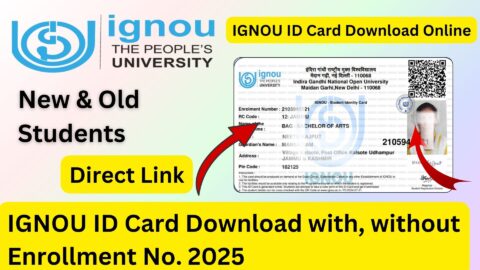
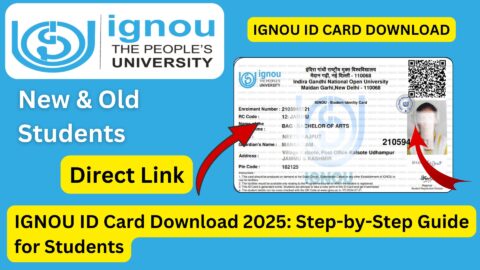
IGNOU ID Card Download with Enrollment No: The IGNOU ID Card is one of the most important documents for students enrolled in Indira Gandhi National Open University. Whether you are a new student or a continuing learner, keeping a copy of your IGNOU Student Identity Card is important because it may be required for academic activities, examinations, study centre visits, practical sessions, library-related activities, and other university-related purposes.
IGNOU provides students with an online facility to access and download their Student ID Card through the Samarth Student Portal. The university’s official information specifically identifies ignou.samarth.edu.in as the portal for downloading the Student I-Card.
If you are searching for IGNOU ID Card Download with Enrollment No, this guide explains the complete process, including registration, login, downloading the ID card, the role of the enrollment number, password requirements, common problems, and frequently asked questions.
IGNOU ID Card Download Link
Students can access the IGNOU Student Portal using the following link:
IGNOU ID Card Download Portal:
https://ignou.samarth.edu.in/index.php/site/login
You can use this portal to register or log in and access student services, including the facility to download your IGNOU ID Card.
According to IGNOU’s official information, students can download the Student Identity Card online. IGNOU has also stated that the student identity card is generated online and can be downloaded and printed by the student.
Important Links and Information
| Information | Details |
|---|---|
| University | Indira Gandhi National Open University |
| ID Card | IGNOU Student Identity Card |
| ID Card Portal | https://ignou.samarth.edu.in/index.php/site/login |
| Login Username | Enrollment Number |
| Registration | Required for students who have not registered on the Student Portal |
| Required Information | Enrollment Number, programme details, registered mobile/email |
| ID Card Format | Digital/online Student I-Card |
| Download Option | Available after logging into the student portal |
| Password for Downloaded I-Card | Enrollment Number, as specified in IGNOU regional-centre instructions |
| Official Website | IGNOU official website |
| Useful Service | Student Portal / Student I-Card |
| Students can save and print the downloaded ID card |
What Is the IGNOU Student ID Card?
The IGNOU Student ID Card is an official identity document provided to students enrolled with the university. It contains important student information that can be used to identify the learner as an IGNOU student.
The online admission system allows students to access their identity card digitally. IGNOU documentation states that the Student Identity Card is generated online and can be downloaded and printed.
The ID card generally contains information such as the student’s name, photograph, enrollment number, programme details and other relevant identification information.
Students should download the card after their admission has been confirmed and keep a copy safely on their phone, computer or cloud storage. It is also a good idea to maintain a printed copy.
Can I Download IGNOU ID Card with Enrollment Number?
Yes, the enrollment number is an important part of the IGNOU Student Portal login process.
However, students should understand that the process is not necessarily just entering the enrollment number on a public page and immediately receiving the ID card. Students generally need to access the Samarth Student Portal and, where required, complete the student registration process first.
IGNOU regional-centre instructions explain that students can register on the Samarth Student Portal, log in using the enrollment number and newly created password, and then access the ID Card option under student services.
Therefore, if you only have your enrollment number but have never created an account on the Student Portal, you may need to complete registration before downloading the ID card.
How to Register on the IGNOU Student Portal?
If you are accessing the portal for the first time, follow these steps.
Step 1: Open the IGNOU Student Portal
Visit:
https://ignou.samarth.edu.in/index.php/site/login
This is the portal you can use for accessing your IGNOU student account.
Step 2: Select New Registration
If you have not previously registered on the Student Portal, look for the New Registration option.
IGNOU’s instructions indicate that new registration is required for downloading the ID card through this student portal in the relevant process.
Step 3: Enter Your Details
You may be asked to provide information such as your programme code, name and enrollment number.
Make sure the information you enter matches your IGNOU admission records.
Your name should be entered carefully because student information is associated with your university records.
Step 4: Verify Your Account
The portal may send a one-time password to your registered email address or mobile number.
Enter the OTP when requested.
After successful verification, you can create a password for your Student Portal account.
Step 5: Create Your Password
Create and remember the new password.
Keep your login credentials private and do not share your password or OTP with other people.
How to Download IGNOU ID Card with Enrollment No?
Once your Student Portal registration is complete, you can proceed to download the ID card.
Step 1: Visit the Student Portal
Open:
https://ignou.samarth.edu.in/index.php/site/login
Step 2: Enter Enrollment Number
Your IGNOU enrollment number is used as the username for logging into the Student Portal according to the download instructions published by an IGNOU Regional Centre.
Enter your enrollment number carefully.
Avoid adding unnecessary spaces before or after the number.
Step 3: Enter Your Password
Enter the password that you created during Student Portal registration.
If you have forgotten your password, use the available password recovery option on the portal if provided.
Step 4: Login to Your Account
Click the Login button.
After successful login, you should reach your student dashboard.
Step 5: Open Services
Look for the Services section in your student dashboard.
The exact appearance of the portal may change from time to time, but the ID card facility is generally available through the student services area.
Step 6: Select ID Card
According to the IGNOU Regional Centre instructions, students should click the ID CARD option under Services.
Step 7: Click Download ID Card
Select the option to download your ID card.
The system should generate your Student Identity Card if it is available for your account.
Step 8: Save the PDF
Save the downloaded ID card on your computer or mobile phone.
It is recommended that you keep multiple copies of the document so that you can access it when required.
What Is the Password of the Downloaded IGNOU ID Card?
This is one of the most common questions among IGNOU students.
According to instructions published by an IGNOU Regional Centre, after downloading the ID card, the enrollment number is used as the password for the downloaded ID card.
For example, if your enrollment number is 123456789, you would use that enrollment number as the password when opening the downloaded ID card, if the downloaded document is password protected in this manner.
Remember that this is different from your Student Portal login password.
Your Student Portal password is the password you create for logging into the account, while the downloaded ID card may use the enrollment number as its PDF password.
Why Is the IGNOU Enrollment Number Important?
The enrollment number is one of the most important identifiers for an IGNOU student.
It is associated with your university records and is used for accessing several student services.
Depending on the service, students may need their enrollment number for checking admission information, grade card details, examination-related services and other university facilities.
IGNOU’s admission/registration status service, for example, asks students to enter their enrollment number along with their programme code.
Therefore, students should keep their enrollment number safely available.
What If My IGNOU ID Card Is Not Showing?
Sometimes students log into the portal but cannot find their ID card. There can be several possible reasons.
First, check whether your admission has been confirmed.
IGNOU explains that after confirmation of admission, relevant student information is communicated to the learner, and the online system provides access to the Student Identity Card.
If your admission is still under processing, the ID card may not yet be available.
You should also check whether you have completed the required Student Portal registration.
Another possibility is that the information in your student account has not yet been updated.
In such cases, check your admission status and verify that your enrollment number and programme details are correct.
What to Do If You Forgot Your IGNOU Student Portal Password?
If you have forgotten the password used for the IGNOU Student Portal, first check whether the portal provides a password recovery or reset option.
Follow the instructions provided on the login page.
Do not create multiple accounts unnecessarily, because this can make it more difficult to determine which account should be used.
If you are unable to access your account even after using the available recovery facility, you can contact IGNOU through the appropriate student support channel.
IGNOU’s Student Registration Division provides a centralized student registration support system, including a central helpline and email contact.
What If the Name or Photo on the ID Card Is Incorrect?
If you notice an incorrect name, photograph or other important detail on your ID card, do not simply edit the document yourself.
The ID card is generated from university records. IGNOU’s online system uses student information stored in its admission system for generating the identity card. The university has also described the online ID card as a QR-code-based identity card whose student information can be checked electronically.
If there is a genuine discrepancy, students should follow the university’s prescribed process for correcting their student records.
Can I Print the IGNOU ID Card?
Yes. Students can save the digital ID card and print it.
IGNOU’s information states that the Student Identity Card can be downloaded and printed.
After downloading the ID card, you can print it on paper and keep it with your academic documents.
It is also useful to keep the PDF version because a digital copy can be accessed quickly whenever needed.
Is IGNOU ID Card Important for Students?
Yes, students should keep their ID card safely because it serves as an important student identification document.
Depending on the activity and instructions applicable to your programme or Regional Centre, you may be asked to show your identity card when visiting a study centre, participating in certain academic activities or accessing student services.
For this reason, downloading the ID card soon after it becomes available is recommended.
IGNOU ID Card Download: Common Problems and Solutions
| Problem | Possible Solution |
|---|---|
| Cannot log in | Check enrollment number and Student Portal password |
| Forgot password | Use the portal’s password recovery option |
| ID card not visible | Check admission confirmation and account status |
| New student | Complete Student Portal registration first |
| PDF asks for password | Try your enrollment number as instructed by IGNOU Regional Centre guidance |
| Incorrect details | Contact IGNOU through the appropriate correction/support process |
| Download fails | Try another browser or check your internet connection |
| PDF does not open | Enter the correct PDF password |
| Photo is incorrect | Request correction through the appropriate university process |
| Enrollment number rejected | Verify the number against your admission records |
Tips for Downloading Your IGNOU ID Card
Students can follow a few simple precautions to avoid problems.
First, always use the official IGNOU Samarth portal instead of random third-party websites.
Second, enter your enrollment number exactly as provided by IGNOU.
Third, make sure your registered email address and mobile number are accessible when completing registration or verification.
Fourth, after downloading the ID card, check all the information carefully.
Finally, save a copy of the ID card on your mobile phone and computer and consider keeping a printed copy as well.
IGNOU ID Card Download with Enrollment No: Quick Process
For students who want a short version of the process, the steps are:
- Open the IGNOU Samarth Student Portal.
- Complete New Registration if you are a first-time user.
- Enter your programme details, name and enrollment number where required.
- Verify your registered mobile number or email using OTP.
- Create your Student Portal password.
- Login using your enrollment number and password.
- Open the Services section.
- Select the ID CARD option.
- Click Download ID Card.
- Save the ID card PDF.
- If the downloaded PDF asks for a password, use your enrollment number as specified in the relevant IGNOU instructions.
- Print the ID card if required.
Direct Link to Download IGNOU ID Card
Students looking for the direct portal can use the link below:
The IGNOU Common Prospectus identifies https://ignou.samarth.edu.in/ as the portal for downloading the Student I-Card.
FAQ about IGNOU ID Card Download
How can I download my IGNOU ID Card?
You can download your IGNOU ID Card by logging into the IGNOU Samarth Student Portal. After login, go to the Services section and select the ID CARD option. Then use the download option to save your ID card.
Can I download IGNOU ID Card using my enrollment number?
Yes, your enrollment number is used as the username for the Student Portal login. You may also need it as the password for opening the downloaded ID card, according to IGNOU Regional Centre instructions.
What is the official IGNOU ID Card download website?
The official Student Portal is:
https://ignou.samarth.edu.in/index.php/site/login
IGNOU’s own prospectus identifies the Samarth portal as the Student I-Card download portal.
Do I need to register on the IGNOU Student Portal?
If you have not previously registered on the Student Portal, you may need to complete New Registration before accessing the ID card facility. IGNOU Regional Centre instructions specifically describe New Registration as part of the ID-card download process.
What should I use as the password for my downloaded IGNOU ID card?
For the password-protected downloaded ID card, IGNOU Regional Centre instructions state that the enrollment number should be used as the password.
What if my IGNOU ID card is not available?
First check whether your admission has been confirmed and whether your Student Portal account is properly registered. If the card remains unavailable, check your admission/registration details and contact the appropriate IGNOU support channel.
Can I print my IGNOU Student ID Card?
Yes. The university states that the online Student Identity Card can be downloaded and printed.
Is the IGNOU ID Card available online?
Yes. IGNOU provides an online process for generating and downloading the Student Identity Card through its student/admission systems.
Can I use my enrollment number to check my admission details?
Yes. IGNOU’s admission/registration status service asks students to enter their enrollment number and programme code to access their registration details.
Should I keep a digital copy of my IGNOU ID Card?
Yes. Keeping the PDF on your phone, computer or cloud storage is useful. You can also keep a printed copy for situations where a physical identity card is requested.
Conclusion
The process for IGNOU ID Card Download with Enrollment No is straightforward once your admission is confirmed and your Student Portal account is ready. Students can use the official IGNOU Samarth portal to register, log in with their enrollment number, access the Services section and download the Student ID Card.
The most important thing is to use the official portal and enter your enrollment number and other details correctly. After downloading the ID card, check your name, photograph, enrollment number and programme information carefully. Save the PDF safely and keep a printed copy if required.
If you are ready to download your IGNOU ID Card, use the official portal below:
IGNOU ID Card Download:
https://ignou.samarth.edu.in/index.php/site/login
Keeping your IGNOU Student ID Card readily available can make it easier to handle various academic and administrative requirements throughout your programme.