IGNOU Grievance 2026: If you are an IGNOU student and are facing an issue related to admission, registration, assignments, study material, examination, results, grade card, marks, certificates, re-registration, or other student services, you can use the official IGNOU grievance portal to submit your complaint online. IGNOU has developed the Grievance Redressal and Management system, commonly known as iGRAM, to provide students with a dedicated platform for reporting problems and tracking their complaints.
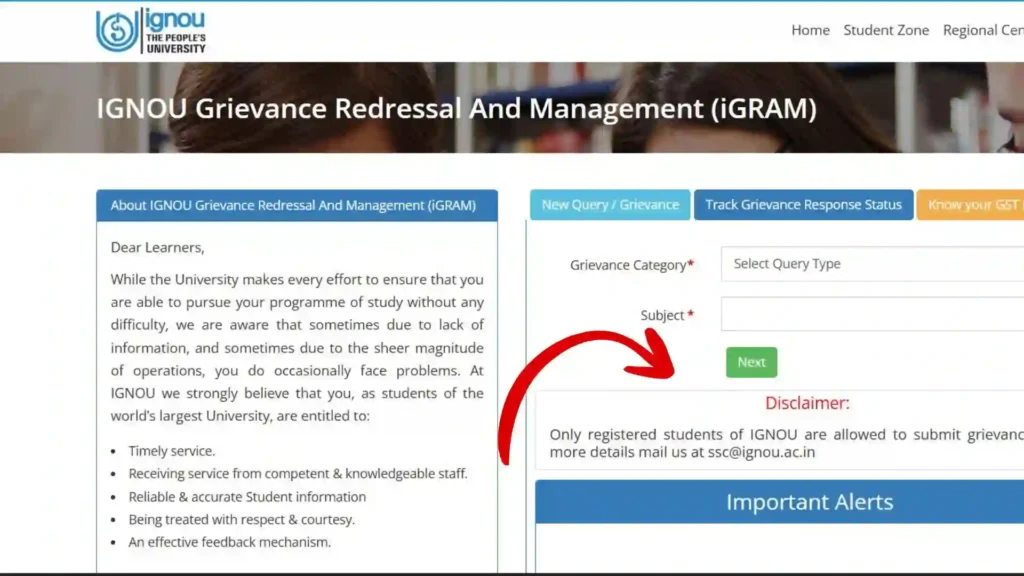
The IGNOU grievance portal is particularly useful because students do not always need to visit the university headquarters or regional centre to report an issue. A grievance can be submitted online by selecting the appropriate category and subject and then providing details about the problem. The official iGRAM portal also provides an option to track the response status of a submitted grievance. IGNOU’s official website identifies Student Grievances through iGRAM as one of its student services.
Important Links and Information for IGNOU Grievance
| Information | Details |
|---|---|
| Grievance Portal | iGRAM – IGNOU Grievance Redressal and Management |
| Official IGNOU Grievance Link | https://igram.ignou.ac.in/ |
| Main Purpose | Submit and track student grievances |
| Who Can Submit | Registered IGNOU students |
| Submission Mode | Online |
| Main Options | New Query/Grievance and Track Grievance Response Status |
| Information Usually Required | Student details and details of the issue |
| Official Student Service Centre | IGNOU Student Service Centre |
| IGNOU Headquarters | Maidan Garhi, New Delhi – 110068 |
| General Student Support Numbers | 011-29572513, 011-29572514 |
| Grievance Support Email Shown on iGRAM | ssc@ignou.ac.in |
The iGRAM portal states that only registered IGNOU students are allowed to submit grievances. It provides options for submitting a new query or grievance and checking the response status.
What Is IGNOU Grievance?
An IGNOU grievance is a complaint, problem, or service-related issue that an enrolled student wants the university to address. Since IGNOU has a very large student population and operates through different divisions, schools, regional centres and study centres, students may sometimes experience delays or difficulties with university services.
For example, a student may find that an assignment submission has not been updated, examination information is missing, marks are not correctly reflected, a registration-related request has not been processed, or study material has not been received. In such situations, the student can raise the matter through the appropriate support channel.
The iGRAM system was created specifically to help IGNOU receive and manage student queries and grievances. IGNOU describes the purpose of the platform as providing a mechanism for quicker resolution of student problems and improving the student support process.
Official IGNOU Grievance Portal
Students who want to submit an IGNOU grievance should use the official iGRAM website:
Submit IGNOU Grievance on the Official iGRAM Portal
Before submitting your complaint, it is advisable to keep the relevant information available. Depending on the nature of your issue, this could include your enrollment number, programme details, regional centre information, course details, examination information, assignment details, payment information, or other documents related to the problem.
Using the official portal is important because students should avoid submitting personal academic information on unofficial websites.
How to Submit IGNOU Grievance Online?
Submitting an IGNOU grievance through iGRAM involves several basic steps. The exact appearance of the portal may change over time, but the general process is based on selecting the grievance category and subject and then entering the details of the problem.
Step 1: Visit the Official iGRAM Website
First, open the official IGNOU grievance portal:
The iGRAM homepage provides options including “New Query / Grievance” and “Track Grievance Response Status.”
Step 2: Select New Query / Grievance
If you have not previously submitted the complaint, choose the option for creating a new query or grievance.
This takes you into the grievance submission process.
Step 3: Select the Grievance Category
The portal asks students to select a Grievance Category. Choose the category that most closely matches your problem.
Selecting the correct category is important because it can help direct the complaint to the appropriate department or authority.
Step 4: Select the Subject
After choosing the category, select the relevant subject. The subject should accurately describe the problem you are experiencing.
For example, if your issue concerns an examination-related matter, choose the appropriate examination subject rather than selecting an unrelated category.
Step 5: Enter Your Grievance Details
The next step is to provide a clear description of your problem.
When writing your IGNOU grievance, avoid writing only a few words such as “my result is not updated.” Instead, explain the issue in a concise but complete manner.
A useful grievance description can include:
- Your enrollment number
- Programme name or programme code
- Regional centre, if relevant
- Study centre, if relevant
- Course code, if the complaint concerns a particular course
- Examination session, if applicable
- Assignment submission information, if applicable
- Date of the relevant transaction or submission
- Description of the problem
- What action you expect from IGNOU
Do not unnecessarily include unrelated information. A focused complaint is easier to understand.
Step 6: Review the Information
Before submitting your complaint, carefully check the information you entered.
Make sure that your enrollment number, programme details, course code and other important information are correct. A mistake in your student information can make it more difficult for the concerned department to identify your record.
Also check the description for clarity.
Step 7: Submit the Grievance
Once the information is complete, submit your complaint through the portal.
Keep any grievance number, reference number, acknowledgment, or other tracking information provided by the system. This information can be useful when checking the status of your complaint later.
IGNOU’s FAQ documentation describes iGRAM as an online grievance platform where students can lodge their grievances and explains the process beginning with “New Query/Grievance,” followed by selecting the category and subject and entering grievance details.
How to Track IGNOU Grievance Status?
Submitting an IGNOU grievance is only the first part of the process. Students should also monitor the response to their complaint.
The iGRAM portal provides a Track Grievance Response Status option. You can use this feature to check the status of a grievance that you have already submitted.
When tracking your complaint, keep the relevant grievance or login information available. If the portal asks for specific details, enter them exactly as provided during the submission process.
Students should avoid submitting multiple identical complaints simply because a response has not appeared immediately. Instead, first check the status of the existing grievance and allow the concerned department reasonable time to process the issue.
What Issues Can Be Reported Through IGNOU Grievance?
The appropriate use of the IGNOU grievance system depends on the nature of your problem. Common student concerns can involve several areas of IGNOU’s services.
Admission-Related Issues
Students may have questions or complaints involving admission, registration information, programme-related records or other admission services.
If your issue is specifically related to admission, provide your application or enrollment information and explain exactly what has happened.
Re-Registration Issues
Students sometimes face problems with re-registration, fee payment, course selection or updating their academic records.
When raising such a complaint, provide the relevant session, programme and transaction details.
Assignment Issues
Assignment-related concerns are another important area for students.
For example, if you submitted an assignment but the status has not been updated, clearly mention the course code, submission date, submission method and other relevant information.
If you have proof of submission, retain it for your records.
Examination Issues
Students may raise complaints involving examination-related services.
When submitting an examination grievance, mention the relevant term-end examination session, programme, course code and examination details wherever applicable.
Providing precise information can make it easier for the concerned authority to investigate the matter.
Result and Grade Card Issues
If there is a discrepancy or missing information in your result or grade card, explain the issue clearly.
For example, you can mention the course code, examination session and the information that is missing or appears incorrect.
Do not simply write “result problem.” Explain exactly what you want IGNOU to check.
Study Material Issues
If you have not received expected study material or have another material-related concern, mention your programme, course details and relevant student information.
IGNOU’s official documentation includes study material and assignment-related matters among areas for which students may need support.
Certificate and Academic Record Issues
Students may also need assistance with certificates, academic records or other university services. The appropriate authority can depend on the specific issue, so it is important to select the closest available category and provide complete information.
Tips for Writing a Better IGNOU Grievance
A well-written complaint can make it easier for the concerned department to understand your situation.
1. Write a Clear Subject
Your subject should immediately explain the issue.
Instead of writing:
“Problem”
write something more specific, such as:
“Assignment submission status not updated for course ABC-101”
2. Mention Your Enrollment Number
Your enrollment number is an important identifier. Include it where the portal requests it or where appropriate in the grievance details.
3. Mention the Course Code
If the issue concerns a particular course, always mention the course code.
4. Include Relevant Dates
Dates can help explain the timeline of your problem. For example, mention the date you submitted an assignment or completed a relevant payment if it is directly related to the complaint.
5. Explain What You Need
Tell IGNOU what you want the university to check or correct.
For example:
“I request IGNOU to verify my assignment submission and update the assignment status if the submission has been successfully received.”
This is more useful than simply saying:
“Please solve my problem.”
6. Keep Proof of Important Transactions
If your complaint involves an online payment, assignment submission, application, examination form or another transaction, keep the relevant receipt or confirmation for your records.
If the portal provides a facility to submit supporting information, provide only documents that are relevant to the grievance.
What to Do If Your IGNOU Grievance Is Not Resolved
If your IGNOU grievance does not appear to be resolved, first check the grievance status through the iGRAM portal.
You should also carefully read any response provided by the university. Sometimes a grievance may be answered with instructions to contact a particular division, regional centre or another authority.
IGNOU’s Student Service Centre functions as an interface between learners and the university and works with operational divisions to address student queries and grievances. IGNOU’s current Student Service Centre information also describes coordination with platforms such as iGRAM and other grievance mechanisms.
If your issue requires a particular department, follow the instructions given in the response rather than repeatedly submitting the same complaint.
For general student support, IGNOU’s official website currently lists the Student Service Centre telephone numbers as 011-29572513 and 011-29572514.
IGNOU Grievance vs General Enquiry
Students should understand the difference between a general enquiry and a formal grievance.
A general enquiry may involve asking for information about a programme, procedure, deadline or service.
A grievance generally concerns a specific problem that you want the university to investigate or resolve.
For example, asking “How can I submit an assignment?” is generally an informational question. However, if you submitted your assignment according to the prescribed procedure and your submission has not been reflected in your record, that may be appropriate for a grievance.
When in doubt, read the categories available on iGRAM and choose the one that best describes your problem.
Important Things to Remember Before Submitting IGNOU Grievance
Before submitting an IGNOU grievance, keep the following points in mind:
- Use the official iGRAM website.
- Make sure you are an eligible registered IGNOU student.
- Select the correct grievance category.
- Select the most appropriate subject.
- Enter your enrollment and programme information correctly.
- Explain the issue clearly.
- Include relevant course codes and dates.
- Keep evidence of important submissions and payments.
- Save your grievance reference or tracking information.
- Check the grievance response status regularly.
- Avoid submitting repeated complaints for the same issue unless necessary.
- Follow any instructions provided in the response.
The official iGRAM portal specifically states that only registered IGNOU students are allowed to submit grievances.
Alternative Student Support Channels
Although iGRAM is an important platform for submitting an IGNOU grievance, it is not the only support mechanism available to IGNOU students.
IGNOU’s Student Service Centre provides student support and works with various university divisions. Official IGNOU information also lists multiple grievance mechanisms and support channels.
For certain issues, students may be directed to the relevant regional centre, operational division or other official authority. Therefore, always check the instructions associated with your specific problem.
If you are unsure where to begin, iGRAM can be a useful starting point because it is specifically designed for student grievance management.
FAQ about IGNOU Grievance 2026
What is IGNOU grievance?
IGNOU grievance refers to a complaint or student-related problem that needs attention from IGNOU. Students can submit eligible complaints through the IGNOU Grievance Redressal and Management system, known as iGRAM.
Where can I submit IGNOU grievance online?
You can submit your complaint through the official iGRAM portal:
IGNOU Grievance Portal – iGRAM
Is iGRAM the official IGNOU grievance portal?
Yes. iGRAM is the IGNOU Grievance Redressal and Management portal developed for handling student queries and grievances. IGNOU’s official documentation identifies iGRAM as a dedicated online grievance platform.
Can I track my IGNOU grievance?
Yes. The iGRAM portal provides a “Track Grievance Response Status” option for checking the response status of submitted grievances.
Who can submit an IGNOU grievance?
According to the iGRAM portal, only registered IGNOU students are allowed to submit grievances through the system.
What information should I include in my grievance?
You should provide accurate student information and explain your issue clearly. Depending on the complaint, useful information may include your enrollment number, programme, regional centre, course code, examination session, submission date and other relevant details.
Can I complain about an assignment issue through iGRAM?
Yes, assignment-related problems can be raised through appropriate student support and grievance channels. Clearly mention your course code, submission details and the exact problem.
Can I submit a grievance about my IGNOU result?
If you have a specific issue with your result or academic record, you can use the appropriate grievance category available on iGRAM and provide complete details about the examination session, course and problem.
What should I do after submitting my grievance?
Keep the grievance or tracking information provided by the portal and use the tracking option to monitor the response. If IGNOU provides further instructions, follow them carefully.
What if I accidentally enter incorrect information?
If you notice an error, check whether the portal provides an option to correct or update the submitted information. If the information cannot be changed, use the appropriate official support channel for guidance rather than submitting unnecessary duplicate complaints.
Is there a phone number for IGNOU student support?
IGNOU’s official website lists 011-29572513 and 011-29572514 for student support.
Conclusion
The IGNOU grievance system provides students with a convenient online method to report problems related to university services. Instead of repeatedly visiting an office or sending an unclear complaint, students can use the official iGRAM portal to submit a structured grievance and track its response.
The most important step is to provide accurate information and clearly explain the issue. Whether your concern involves assignments, examinations, results, registration, study material or another student service, selecting the correct category and providing relevant details can help the concerned department understand your problem.
If you need to submit an IGNOU grievance, use the official portal below:
Submit Your IGNOU Grievance Here – Official iGRAM Portal
Remember to save any grievance or tracking information after submission and check the response status through the portal. For additional student support, you can also refer to the official IGNOU Student Service Centre information and follow the instructions provided by the university.
![IGNOU Previous Year Question Paper 2025 – Download All Courses [PDF]](https://www.ignoubank.com/wp-content/uploads/2025/04/IGNOU-Previous-Year-Question-Paper-2025-–-Download-All-Courses-PDF-480x270.jpg)