The IGNOU Grade Card 2026 is an important academic record for students enrolled in Indira Gandhi National Open University (IGNOU). It helps students check their course-wise marks, assignment performance, term-end examination results, practical marks where applicable, and course completion status.
Students often search for their IGNOU grade card after submitting assignments or appearing in the June or December Term-End Examination (TEE). The grade card allows them to identify which marks have been updated, which results are still pending, and whether they have completed the assessment requirements for their courses.
Students can visit the grade card checking page provided below to access guidance and find the relevant grade card service:
Check IGNOU Grade Card 2026: https://www.ignoubank.com/ignou-grade-card/
For official academic records, students should also use the university’s official grade card portal: https://gradecard.ignou.ac.in/
This article explains how to check the IGNOU Grade Card 2026 online, understand the information displayed, check assignment and examination marks, resolve missing marks, and find answers to common questions.
IGNOU Grade Card 2026: Overview
The grade card is an online record of a student’s performance in the courses registered under their programme. The details displayed depend on the programme, course requirements, and the assessment components processed by the university.
The university’s Student Evaluation Division handles examination evaluation, assignment awards, result processing, grade cards, and other academic evaluation activities. Marks may be updated at different times, so students should check the portal regularly when results are being processed.
| Particulars | Details |
|---|---|
| University name | Indira Gandhi National Open University |
| Popular name | IGNOU |
| Academic record | IGNOU Grade Card 2026 |
| Applicable students | Students enrolled in eligible IGNOU programmes |
| Information available | Course-wise marks and assessment status |
| Assignment marks | Displayed when evaluated and uploaded |
| Term-end examination marks | Displayed when processed and published |
| Practical marks | Available for courses requiring practical assessments |
| Course completion status | Shown according to the available assessment record |
| Grade card checking guide | https://www.ignoubank.com/ignou-grade-card/ |
| Official grade card portal | https://gradecard.ignou.ac.in/ |
| Official university website | https://www.ignou.ac.in/ |
What Is an IGNOU Grade Card?
An IGNOU grade card is a record of the assessment results for the courses a student has registered for. It may display assignment marks, theory examination marks, practical or laboratory marks, and the status of individual courses.
The exact columns depend on the programme and the assessment requirements for each course. Not every programme uses the same combination of assignments, theory examinations, practical examinations, projects, or other evaluation components.
For example, a student enrolled in a programme with assignment and theory examination requirements may see separate entries for assignment marks and term-end examination marks. A student enrolled in a programme with practical components may also see practical assessment information.
The grade card is useful for several reasons:
- It allows students to review their academic performance.
- It helps them identify missing assignment or examination marks.
- It shows whether individual courses are recorded as completed.
- It helps students plan for examinations or other outstanding requirements.
- It provides an accessible record to review before applying for a provisional certificate, degree, or other university service.
Students should remember that an online grade card may be provisional or incomplete while evaluation is underway. The official portal indicates that the final grade card is issued after the programme requirements have been updated and completed.
How to Check IGNOU Grade Card 2026 Online?
Students can follow these steps to check their grade card.
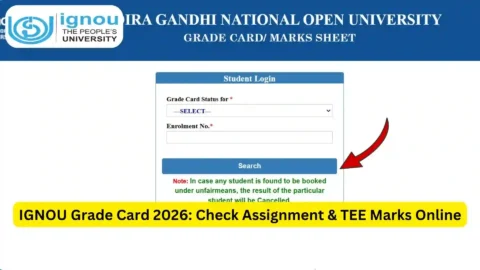
Step 1: Open the Grade Card Checking Page
Visit the grade card guide supplied in this article: https://www.ignoubank.com/ignou-grade-card/
You can also access the official IGNOU grade card portal directly: https://www.ignoubank.com/ignou-grade-card/
The official portal is the appropriate place to view the university’s available academic record.
Step 2: Select the Grade Card Status Option
On the official portal, look for the option that asks you to select the grade card status or examination-related category. Choose the relevant option from the available choices.
The options displayed may vary according to the portal’s current configuration. Read the labels carefully before proceeding.
Step 3: Select Your Programme Code
Choose the programme code that corresponds to your IGNOU course or degree.
Your programme code is generally available in your admission records or other university documents. Ensure that you select the correct code because different programmes may have different assessment records.
Step 4: Enter Your Enrolment Number
Enter your IGNOU enrolment number in the required field.
Check every digit before submitting the form. An incorrect enrolment number can prevent the portal from displaying the correct record.
Step 5: Submit the Details
After selecting the relevant options and entering your enrolment number, submit the form using the portal’s displayed button.
If the information is correct and the record is available, the portal should display the grade card details associated with your enrolment.
Step 6: Review Your Course-Wise Marks
Check the entries for each course. Depending on your programme, these may include assignment marks, theory examination marks, practical marks, and course status.
Do not assume that an empty field automatically means failure. It may indicate that the relevant assessment has not yet been processed or uploaded.
Step 7: Save or Print the Record
If the portal provides a print option, you can print the displayed grade card or save a copy as a PDF using your browser’s print function.
Keep a copy for personal reference. If you need an official transcript, final grade card, or certificate for employment or further study, check the applicable IGNOU procedure rather than assuming a browser printout replaces an official document.
How to Understand IGNOU Grade Card Marks?
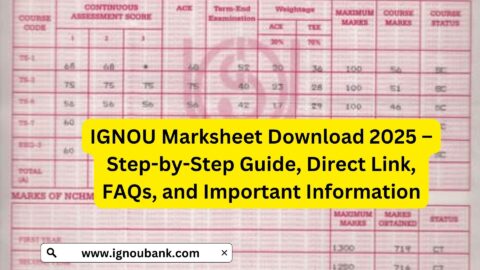
The grade card may contain different columns for each course. Understanding these entries can help students identify whether all required assessment components have been recorded.
| Grade card component | What it generally indicates |
|---|---|
| Course code | The code assigned to a subject or course |
| Assignment marks | Marks recorded for applicable assignments |
| Term-end theory marks | Marks recorded for the theory examination |
| Practical or laboratory marks | Marks for applicable practical assessments |
| Project or other assessment | Assessment information where required by the programme |
| Status | Indicates the recorded completion status of the course |
| Blank or unavailable entry | May mean that the result is pending, not applicable, or not yet updated |
The precise meaning of a column should be interpreted in the context of the selected programme. Some columns may not apply to every course.
Assignment Marks
Assignment marks reflect the evaluation of assignments submitted by students for courses that require them. These marks may appear after the relevant assignment has been evaluated and the result has been uploaded.
If your assignment marks are missing, first confirm that you submitted the correct assignment for the correct course and session. Keep your submission receipt or other available proof of submission.
Term-End Examination Marks
Term-end examination marks are associated with the theory or other examination components applicable to your course.
IGNOU generally conducts term-end examinations in June and December. However, the publication of results may take place in stages. Marks for one course may appear before marks for another course.
Practical and Project Marks
Certain programmes require practical examinations, laboratory work, projects, dissertations, fieldwork, internships, or viva examinations.
If your programme includes these components, check whether the corresponding marks or completion details have been updated. If the entry remains unavailable after the relevant assessment has been completed and results have been processed, contact the appropriate university office.
Course Completion Status
The status column helps students understand whether the course is recorded as completed in the available grade card.
A status such as COMPLETED generally indicates that the course is recorded as completed in the displayed system. A status such as NOT COMPLETED indicates that the course is not currently recorded as completed.
A course may remain incomplete because an assessment component is outstanding, marks are pending, or the student has not met the relevant requirements. Check the individual course entries before deciding what action to take.
Why Is the IGNOU Grade Card 2026 Not Updated?
Students may find that some marks are available while others are missing. This is not necessarily evidence of an error or a failed examination.
Several factors can explain an incomplete grade card.
1. Evaluation Is Still in Progress
Assignment and examination evaluation may be processed at different times. If evaluation is incomplete, the related marks may not appear immediately.
2. Results Are Being Uploaded in Stages
The university may update course results in stages. Students should check again later if a result has not appeared.
3. Assignment Marks Have Not Been Submitted for Upload
Even after an assignment is evaluated, its marks may not immediately appear on the grade card. Confirm the submission details and check the relevant assignment status service.
4. Practical or Project Results Are Pending
If your programme requires practical work, a project, a dissertation, or another assessment, its marks may be processed separately from theory results.
5. Incorrect Programme or Enrolment Details
Selecting the wrong programme code or entering an incorrect enrolment number can lead to problems accessing the correct record. Recheck the information before submitting it again.
6. Technical Issues
The portal may be temporarily unavailable or slow during periods of heavy traffic. Try again later using a current browser and a stable internet connection.
What to Do If IGNOU Assignment Marks Are Missing?
If assignment marks are not displayed, take the following steps.
- Confirm that you submitted the assignment for the correct course and applicable session.
- Check whether you have a receipt, acknowledgement, or other proof of submission.
- Visit the official IGNOU website and look for the appropriate assignment status service.
- Allow reasonable time for evaluation and uploading.
- If the marks remain missing, contact the relevant study centre or regional centre with your enrolment number, course code, submission details, and available proof.
Do not submit duplicate assignments simply because marks have not appeared online. First confirm the status of your original submission and follow the university’s instructions.
What to Do If IGNOU Term-End Examination Marks Are Missing?
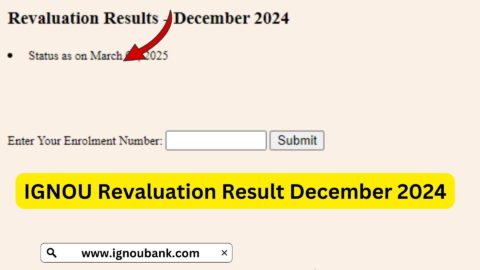
If your theory examination marks are not displayed, first check the official term-end result portal:
https://www.ignoubank.com/ignou-grade-card/
Then compare the result with the information shown on your grade card. A result may be available through the examination result service before all corresponding details are reflected in the grade card.
If the marks remain unavailable, verify that you appeared for the correct examination and that your course registration and examination details are accurate. Keep your hall ticket and any relevant examination documents.
If the discrepancy continues, contact the appropriate IGNOU examination or student support office through the official university website.
Important Links for IGNOU Grade Card 2026
The following table brings together the main links students may need when checking their grade card or resolving result-related questions.
| Purpose | Link |
|---|---|
| Grade card checking guide requested in this article | https://www.ignoubank.com/ignou-grade-card/ |
| Official IGNOU grade card portal | https://gradecard.ignou.ac.in/ |
| Official IGNOU website | https://www.ignou.ac.in/ |
| Term-end examination and re-evaluation results | https://termendresult.ignou.ac.in/ |
| Official Student Evaluation Division information | https://www.ignou.ac.in/pages/182 |
| Official IGNOU student services | https://www.ignou.ac.in/pages/60 |
| Official IGNOU announcements | https://www.ignou.ac.in/announcements/0?nav=1 |
Always verify examination, evaluation, and academic record information through official IGNOU services. The university also advises students to rely on its official website for authentic notifications and academic information.
Important Things to Remember About IGNOU Grade Card 2026
Before checking or interpreting your grade card, keep the following points in mind:
- Use your correct enrolment number and programme code.
- Check all course entries instead of looking only at the overall status.
- Assignment marks and term-end examination marks may be updated at different times.
- Practical and project marks may apply only to certain courses.
- A missing entry does not automatically mean that you have failed.
- A course marked incomplete should be checked against its applicable assessment requirements.
- Keep assignment submission proof, examination documents, and relevant communications.
- Follow official university instructions when requesting corrections or reporting missing marks.
- Do not share your enrolment number or other personal academic details publicly.
- Do not treat an unofficial grade card guide as a substitute for the university’s official academic record.
FAQ about IGNOU Grade Card 2026
How can I check IGNOU Grade Card 2026 online?
Visit https://www.ignoubank.com/ignou-grade-card/ for the guide provided in this article, or use the official portal at https://gradecard.ignou.ac.in/. Select the appropriate options, enter your programme code and enrolment number, and submit the details.
What information is available on the IGNOU grade card?
Depending on your programme, the grade card may display course codes, assignment marks, term-end examination marks, practical marks, and course completion status.
Is the IGNOU Grade Card 2026 available for all students?
The official portal serves students whose programme and academic records are supported by the system. The availability and completeness of information depend on the relevant assessment records and whether results have been processed.
Why are my IGNOU assignment marks not showing?
Assignment marks may be missing because evaluation or uploading is still pending, or because the submission needs to be verified. Check your submission proof and the relevant assignment status service before contacting your study centre or regional centre.
Why is my IGNOU term-end examination result missing from the grade card?
The result may not have been processed or uploaded yet. Check the official term-end result portal and revisit your grade card later. If the discrepancy continues, contact the appropriate university office.
What does “NOT COMPLETED” mean on the IGNOU grade card?
It generally means the course is not currently recorded as completed in the displayed system. Check which assessment components are available and whether any required marks or results are missing. Follow the applicable programme requirements before deciding your next step.
Can I download or print my IGNOU grade card?
If the portal displays a print option, you can use it to print or save the available record as a PDF. Whether that copy is accepted for a particular official purpose depends on the receiving institution or organisation and the applicable IGNOU procedure.
Does a missing mark mean that I have failed?
No. A missing mark does not automatically mean failure. It may mean that the evaluation or uploading process is incomplete. Confirm the status through the official result and grade card services.
How often should I check my IGNOU grade card?
Check it after assignment evaluations or term-end results are expected to be processed, and periodically while any marks remain outstanding. There is no need to check repeatedly within very short intervals.
Where can I find official information about IGNOU evaluation?
Visit the official Student Evaluation Division page at https://www.ignou.ac.in/pages/182 or the main IGNOU website at https://www.ignou.ac.in/.
What should I do if the marks displayed on my grade card appear incorrect?
Keep a copy of the displayed record and compare it with the relevant result information and your assessment documents. Contact the appropriate IGNOU office through official channels and provide the course code, examination session, and supporting evidence.
Is the online grade card the same as a final degree certificate?
No. A grade card is an academic performance record. A degree certificate, provisional certificate, transcript, or other official document serves a different purpose and may require a separate university process.
Conclusion
The IGNOU Grade Card 2026 is a useful resource for students who want to track assignment marks, term-end examination results, practical assessments, and course completion status. Checking the grade card regularly can help students identify missing information and take timely action when an assessment result remains outstanding.
To get started, visit the grade card checking guide at https://www.ignoubank.com/ignou-grade-card/ or access the official IGNOU grade card portal at https://gradecard.ignou.ac.in/.
Enter your correct enrolment number and programme code, review every course entry, and keep your academic documents for reference. If any marks are missing or a status appears incorrect, verify the information through official IGNOU services and contact the appropriate university office when necessary. The official university record should always be treated as the authoritative source for your academic status.