IGNOU Assignment Status 2026 is an important update for students enrolled at Indira Gandhi National Open University. After submitting their assignments, students often want to know whether their work has been received, evaluated, and updated in the university’s online records. Checking the assignment status helps students monitor their academic progress and identify whether any marks or evaluation details are still pending.
IGNOU students can check their assignment, project, and practical awards through the university’s official marks transmission status portal. To check the status, students generally need their enrolment number and programme code. Once the evaluation process is completed and the marks are transmitted by the relevant Study Centre or Regional Centre, the information can become available online.
Students should understand that assignment submission status and assignment marks are not always the same thing. The official status portal tracks the transmission of assignment, project, and practical awards, while the IGNOU Grade Card provides more detailed information about marks and academic performance.
In this article, you will learn how to check IGNOU Assignment Status 2026, view assignment marks, understand common status messages, resolve pending updates, and access important official links.
IGNOU Assignment Status 2026: Overview
The following table provides the important details students should know before checking their assignment status.
| Particulars | Details |
|---|---|
| University Name | Indira Gandhi National Open University |
| Common Name | IGNOU |
| Academic Activity | Assignment, Project and Practical Award Status |
| Status Year | 2026 |
| Information Available | Assignment, project and practical marks transmission status |
| Required Details | Enrolment Number and Programme Code |
| Checking Mode | Online |
| Official Status Portal | https://isms.ignou.ac.in/changeadmdata/StatusAssignment.asp |
| Assignment Portal | https://webservices.ignou.ac.in/assignments/ |
| Official Website | https://www.ignou.ac.in/ |
| Grade Card Portal | Access through IGNOU’s official website |
| Status Update | After evaluation and transmission of marks |
Students should use the correct programme code and enrolment number while checking their records. The status may not appear immediately after an assignment is submitted because the university updates the record after the relevant evaluation and marks transmission processes.
Check IGNOU Assignment Status 2026 Online
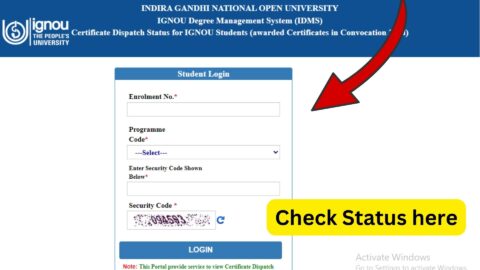
Students can use the official IGNOU assignment status portal to check whether assignment, project, or practical awards have been transmitted to the university’s system.
Direct link to check IGNOU Assignment Status 2026:
https://isms.ignou.ac.in/changeadmdata/StatusAssignment.asp
Follow these steps to check your assignment status.
Step 1: Open the Official Status Portal
Visit the official IGNOU Assignment/Project/Practical Awards/Marks Transmission Status page:
https://isms.ignou.ac.in/changeadmdata/StatusAssignment.asp
Make sure you are using the official IGNOU domain before entering your enrolment details.
Step 2: Enter Your Enrolment Number
Enter your IGNOU enrolment number in the required field. Check every digit carefully to avoid errors.
Your enrolment number is generally available on your IGNOU identity card, admission documents, or student records.
Step 3: Select Your Programme Code
Choose the correct programme code from the available options. The programme code must match the programme under which you submitted your assignment.
Selecting an incorrect programme can prevent the portal from displaying the relevant record.
Step 4: Submit the Details
After entering the required information, submit the form using the option provided on the portal.
Step 5: Check the Displayed Status
Review the information displayed on the screen. Depending on the record available, you may see information about assignment, project, or practical awards and their transmission status.
If the marks have already been transmitted, the portal may direct you to check the Grade Card for the detailed marks.
Step 6: Save the Information
Keep a screenshot or note of the displayed status for your personal records. If the information remains pending for an extended period, this record may help when contacting your Study Centre or Regional Centre.
How to Check IGNOU Assignment Marks 2026?
Checking the assignment status and checking assignment marks are two related but different activities.
The assignment status portal indicates whether the relevant awards or marks have been transmitted through the university’s system. To check the actual marks, students should consult the IGNOU Grade Card.
Follow these steps:
- Visit the official IGNOU website at https://www.ignou.ac.in/.
- Open the student services or Grade Card section.
- Select the appropriate Grade Card service for your programme.
- Enter your enrolment number and select the required programme details.
- Submit the information.
- Review the available course-wise marks and results.
The Grade Card may show assignment marks alongside theory, practical, project, or other components, depending on the programme.
If your assignment marks are visible in the Grade Card, save a copy for reference. If some courses show marks while others remain pending, it may mean the different components are still being processed.
Difference Between IGNOU Assignment Status and Grade Card
Students sometimes confuse the assignment status page with the Grade Card. Both are useful, but they serve different purposes.
| Feature | Assignment Status | IGNOU Grade Card |
|---|---|---|
| Main Purpose | Tracks transmission of assignment, project and practical awards | Displays detailed academic marks and results |
| Required Details | Enrolment number and programme code | Enrolment number and programme selection |
| Assignment Information | Indicates available award transmission information | Shows assignment marks when updated |
| Theory Examination Marks | Not the primary purpose | Available when updated |
| Practical or Project Information | Tracks award transmission where applicable | Displays relevant marks or results when available |
| Best Use | Checking whether awards have been transmitted | Checking detailed course-wise academic performance |
If the assignment status page indicates that marks have been transmitted, but you cannot see the detailed marks, check your Grade Card. If the marks are still unavailable, allow time for the relevant records to update and contact your Study Centre if necessary.
What Does “Assignment Status Not Found” Mean?
Some students may see a message indicating that their assignment status is unavailable or that no matching record was found.
This does not automatically mean that their assignment has been rejected or lost. There can be several reasons for the missing record.
1. Evaluation Is Still Pending
The Study Centre may have received the assignment, but the evaluation process may not yet be complete. The status portal reflects marks transmission, so a record may not appear until the required process has been completed.
2. Marks Have Not Been Transmitted
The assignment may have been evaluated, but the relevant Study Centre or Regional Centre may not yet have transmitted the awards to the university’s system.
3. Incorrect Enrolment Number
An incorrect digit in the enrolment number can prevent the system from finding the correct record. Check the number on your identity card or admission documents before submitting the form again.
4. Incorrect Programme Code
Students enrolled in different programmes must select the appropriate programme code. If the wrong code is selected, the status may not match the submitted assignment.
5. Assignment Record Is Being Updated
Online records may take time to reflect the latest information. Students should check again later if the submission was recent.
If the problem continues, contact your Study Centre Coordinator and ask whether the assignment has been evaluated and whether the marks have been transmitted.
How Long Does IGNOU Take to Update Assignment Status?
There is no single fixed timeline that applies to every assignment and programme. The time required depends on the evaluation process, the workload of the Study Centre, and the transmission of marks to the university’s system.
Students should allow reasonable time after submission before expecting the online status to change.
If the assignment status remains unavailable, follow these steps:
- Verify your enrolment number and programme code.
- Check the portal again after some time.
- Contact your Study Centre to confirm receipt and evaluation.
- Ask whether the marks have been transmitted.
- If necessary, contact the concerned Regional Centre with your submission proof and course details.
Avoid relying on a fixed number of days mentioned by unofficial websites. The university’s own status portal explains that records are reflected after awards or grades are transmitted by Study Centres or Regional Centres following evaluation.
What to Do If IGNOU Assignment Marks Are Not Updated?
If your assignment marks are missing even after you have submitted the work, do not immediately assume that the assignment has been rejected.
First, check the assignment status portal and Grade Card. If the marks are still unavailable, contact the Study Centre where you submitted the assignment.
Keep the following information ready:
- IGNOU enrolment number.
- Programme code.
- Course code or codes.
- Assignment submission date.
- Relevant examination session.
- Submission acknowledgement or receipt.
- A copy of the assignment, if available.
- Screenshot of the status or Grade Card page.
Explain the issue clearly and ask whether the assignment has been received, evaluated, and transmitted. If the Study Centre confirms that the awards have been transmitted but the online record is still incorrect, contact your Regional Centre for further assistance.
For assignment award or marks-related queries, the IGNOU assignment system lists the email address assignment@ignou.ac.in. Use official contact details and provide only the information necessary to identify your academic record.
IGNOU Assignment Submission Deadline for December 2026 TEE
Students preparing for the December 2026 Term-End Examination should also pay attention to the assignment submission deadline.
IGNOU announced an extension of the last date for submission of assignments for December 2026 TEE, covering ODL and online programmes, including GOAL and EVBB, up to October 31, 2026, subject to the university’s stated conditions.
Students should check the latest official announcement to confirm whether any further extension applies to their programme.
Important points to remember:
- Submit assignments using the method prescribed for your programme.
- Follow the instructions issued by your Study Centre or the university.
- Keep proof of submission.
- Confirm that every required course assignment has been submitted.
- Do not assume that submitting an assignment automatically means the marks will appear online immediately.
Assignment submission, assignment evaluation, and marks transmission are separate stages. Students should monitor their status after submission and keep the acknowledgement until the marks are reflected in their academic records.
IGNOU Assignment Status 2026: Important Links
The following table contains useful official links for checking assignment status, downloading assignments, and accessing student services.
| Purpose | Link |
|---|---|
| Check IGNOU Assignment Status | https://isms.ignou.ac.in/changeadmdata/StatusAssignment.asp |
| IGNOU Official Website | https://www.ignou.ac.in/ |
| IGNOU Assignment Portal | https://webservices.ignou.ac.in/assignments/ |
| IGNOU Student Services | https://www.ignou.ac.in/pages/54 |
| IGNOU Announcements | https://www.ignou.ac.in/announcements/0?nav=1 |
| IGNOU Student Login | https://ignou.samarth.edu.in/index.php/site/login |
| Assignment Marks Queries | assignment@ignou.ac.in |
Use the official status portal for checking assignment award transmission and the Grade Card service for detailed marks. The IGNOU announcements page is useful for checking updates related to assignment submission deadlines and examination notices.
Tips for IGNOU Students After Assignment Submission
Students can avoid confusion by following a few simple practices after submitting their assignments.
Keep a copy of every assignment. Save a digital copy or photocopy of the submitted work for future reference.
Preserve the submission receipt. If your Study Centre provides an acknowledgement, retain it until the marks appear in your Grade Card.
Check course codes carefully. Make sure the assignments you submit correspond to the courses registered for your programme.
Use official portals. Check status and marks only through official IGNOU websites to reduce the risk of misleading information.
Monitor the Grade Card. The assignment status portal and Grade Card may update at different stages, so check both when necessary.
Contact the correct office. Start with your Study Centre if the assignment has not been evaluated or transmitted. Contact your Regional Centre if further clarification is needed.
FAQ about IGNOU Assignment Status 2026
How can I check IGNOU Assignment Status 2026?
Visit the official status portal at https://isms.ignou.ac.in/changeadmdata/StatusAssignment.asp. Enter your enrolment number, select your programme code, and submit the details to view the available status.
What details are required to check IGNOU assignment status?
You generally need your IGNOU enrolment number and programme code. Keep your registration records available so you can enter the details accurately.
How can I check IGNOU assignment marks online?
Check the assignment status portal first. For detailed course-wise marks, open the IGNOU Grade Card service through the official university website and enter the required programme and enrolment details.
Why is my IGNOU assignment status not showing?
The assignment may still be awaiting evaluation or marks transmission. Incorrect enrolment details or programme selection can also prevent the record from appearing.
How long does it take for IGNOU assignment marks to appear?
The timeline varies depending on evaluation and marks transmission. Check the official portal periodically and contact your Study Centre if the status remains pending for an extended period.
What does “Check Grade Card Status for detail” mean?
It indicates that you should consult the Grade Card for more detailed marks information. Open the official Grade Card service and check the relevant course entries.
What should I do if my assignment marks are missing from the Grade Card?
Verify your programme and course details, check the assignment status portal, and contact your Study Centre to confirm whether the awards have been transmitted. Keep your submission receipt and other relevant records ready.
Can I check IGNOU assignment status without an enrolment number?
The official status portal requires an enrolment number. Check your IGNOU identity card, admission confirmation, or student records if you cannot remember it.
What is the last date for IGNOU December 2026 assignment submission?
The announced extended deadline for the covered ODL and online programmes, including GOAL and EVBB, is October 31, 2026, subject to the university’s stated conditions. Check the latest official notice for any further updates.
Does assignment submission guarantee that marks will be updated immediately?
No. The assignment must go through the relevant evaluation and marks transmission process before the record appears online.
Where should I contact IGNOU if the assignment status remains pending?
Start by contacting your Study Centre Coordinator. If the matter is not resolved, contact your Regional Centre or use the official assignment-related contact information provided by IGNOU.
Is IGNOU assignment status the same as the final result?
No. Assignment status concerns assignment, project, or practical award transmission. The Grade Card and examination result provide broader information about academic performance and course completion.
Conclusion
IGNOU Assignment Status 2026 helps students monitor whether assignment, project, and practical awards have been transmitted to the university’s online system. Students can check the status by entering their enrolment number and programme code on the official IGNOU status portal.
If the status is missing or the assignment marks have not been updated, verify your details, check the Grade Card, and contact your Study Centre to confirm the evaluation and marks transmission process. Keep your submission acknowledgement and other supporting records until the marks appear in your academic records.
For accurate information, use the official IGNOU Assignment Status portal at https://isms.ignou.ac.in/changeadmdata/StatusAssignment.asp and the university website at https://www.ignou.ac.in/. Regularly checking official announcements can help you stay informed about assignment deadlines, marks updates, and other important academic requirements.