IGNOU Assignment Status 2026: Indira Gandhi National Open University (IGNOU) is one of the largest open universities in the world, offering a wide range of undergraduate, postgraduate, diploma, and certificate programs. A crucial part of every IGNOU program is the submission of assignments, which carry significant weight in the final evaluation. After submitting assignments, students eagerly wait to check their IGNOU Assignment Status to confirm whether their submissions have been received, evaluated, and updated in the system.
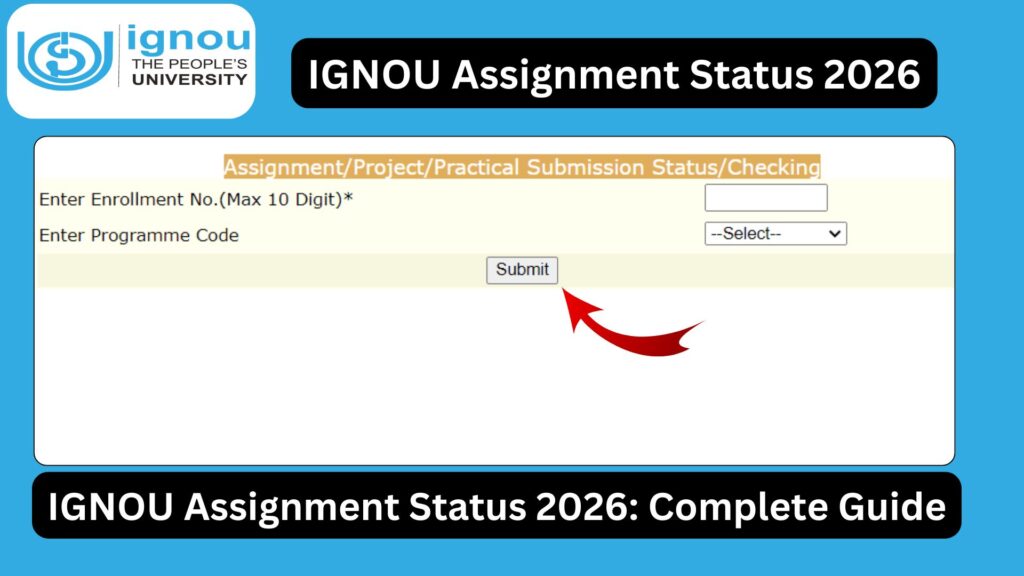
In this comprehensive guide, you will learn everything about IGNOU assignment status—how to check it, what different statuses mean, common issues faced by students, and how to resolve them. This article is designed to help you avoid confusion and ensure that your academic progress remains on track.
What is IGNOU Assignment Status?
IGNOU Assignment Status refers to the official record that shows whether your submitted assignments have been received, processed, and evaluated by the university. It also indicates the marks obtained in each assignment.
Assignments are a compulsory component in IGNOU courses and usually contribute around 30% to the final grade. Without submitting assignments and getting passing marks, you cannot complete your course or receive your degree.
Why is Checking Assignment Status Important?
Checking your assignment status regularly is essential for several reasons:
- It confirms that your assignment has been successfully submitted.
- It ensures that your marks have been updated.
- It helps you identify errors or missing records early.
- It allows you to take corrective action before exam results are declared.
Ignoring your assignment status may lead to serious consequences such as incomplete results or delay in course completion.
How to Check IGNOU Assignment Status 2026?
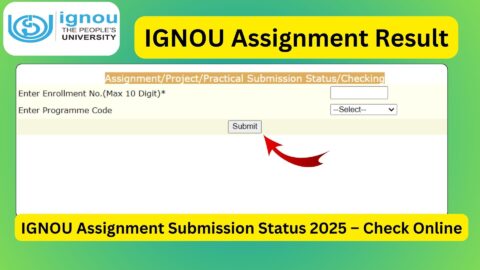
You can easily check your assignment status online through the official IGNOU portal. Follow the steps below:
- Visit the official assignment status page:
https://isms.ignou.ac.in/changeadmdata/StatusAssignment.asp - Enter your Enrollment Number.
- Select your Program Code.
- Click on the “Submit” button.
- Your assignment status will be displayed on the screen.
Details Mentioned in IGNOU Assignment Status
When you check your assignment status, you will typically see the following details:
- Enrollment Number
- Program Code
- Course Code
- Assignment Submission Status
- Marks Obtained
- Date of Update
Make sure all your submitted assignments are listed correctly.
Important Links and Information
Below is a table containing important links and details related to IGNOU assignment status:
| Purpose | Link / Information |
|---|---|
| Check Assignment Status | https://isms.ignou.ac.in/changeadmdata/StatusAssignment.asp |
| IGNOU Official Website | https://www.ignou.ac.in |
| Assignment Submission Mode | Online / Offline (Study Centre) |
| Assignment Weightage | Approximately 30% |
| Minimum Passing Marks | 40% |
| Update Time for Status | 15–45 days after submission |
| Contact Study Centre | Visit your allotted study centre |
| Re-evaluation Option | Not applicable for assignments |
Understanding Different Assignment Status Messages
When checking your assignment status, you may encounter different types of messages. Here is what they mean:
1. “Received and Under Evaluation”
This means your assignment has been successfully submitted and is currently being checked by evaluators.
2. “Marks Updated”
This indicates that your assignment has been evaluated and marks have been uploaded.
3. “Not Found”
This can happen due to:
- Delay in updating records
- Incorrect enrollment number entered
- Assignment not yet received by the study centre
4. Blank Status
If no data appears, it may mean that the assignment has not yet been processed.
How Long Does It Take to Update Assignment Status?
Typically, IGNOU takes around 15 to 45 days to update assignment status after submission. However, delays can occur due to:
- High volume of assignments
- Late submission
- Administrative processing delays
Students are advised to check their status regularly but remain patient during peak periods.
Common Problems and Solutions
Problem 1: Assignment Status Not Updated
Solution:
- Wait for at least 30 days after submission.
- Contact your study centre with proof of submission.
Problem 2: Marks Not Showing
Solution:
- Ensure that your assignment was submitted before the deadline.
- Wait for updates; marks are uploaded separately in some cases.
Problem 3: Assignment Missing from Record
Solution:
- Verify your enrollment number and course code.
- Contact the study centre immediately.
Problem 4: Low Marks in Assignment
Solution:
- You cannot request re-evaluation for assignments.
- You may need to resubmit the assignment in the next cycle.
Tips to Ensure Your Assignment Status Updates Smoothly
- Always keep a copy of your submitted assignment.
- Take a submission receipt or acknowledgment.
- Write correct enrollment number and course code.
- Submit assignments before the deadline.
- Follow IGNOU guidelines for formatting and presentation.
IGNOU Assignment Submission Guidelines
To avoid issues with assignment status, follow these guidelines:
- Use A4 size sheets.
- Write clearly and legibly.
- Mention your details on the first page.
- Follow word limits where applicable.
- Submit assignments at your designated study centre or through the official online portal.
What to Do If Assignment Status Is Not Updated Before Exams?
If your assignment status is not updated but you have already submitted your assignments:
- Do not panic; you can still appear for exams.
- Keep proof of submission safe.
- Follow up with your study centre after exams.
IGNOU Assignment and Term-End Exam Connection
Assignments and Term-End Exams (TEE) are interconnected:
- You must pass both assignments and exams separately.
- Even if you pass the exam but fail the assignment, you must resubmit the assignment.
- Final results are declared only after both components are cleared.
FAQ about IGNOU Assignment Status 2026
How can I check my IGNOU assignment status?
You can check it online using your enrollment number at the official portal:
https://isms.ignou.ac.in/changeadmdata/StatusAssignment.asp
How long does it take for assignment status to update?
It usually takes 15 to 45 days after submission.
What should I do if my assignment status is not showing?
Wait for some time and then contact your study centre if the issue persists.
Can I re-evaluate my IGNOU assignment?
No, IGNOU does not provide re-evaluation for assignments.
What are the passing marks for IGNOU assignments?
You need at least 40% marks to pass.
Can I appear for exams if my assignment status is not updated?
Yes, you can appear for exams, but ensure you have submitted your assignments.
What happens if I fail in an assignment?
You will need to resubmit the assignment in the next session.
Is assignment submission compulsory in IGNOU?
Yes, it is mandatory to submit and pass assignments to complete your course.
Conclusion
IGNOU Assignment Status is a vital aspect of your academic journey. It not only confirms your submission but also determines your eligibility for course completion. By regularly checking your status, understanding the updates, and taking timely action in case of discrepancies, you can avoid unnecessary stress and delays.
Always remember to keep proof of submission, follow guidelines carefully, and stay updated through official channels. With proper attention and planning, managing your IGNOU assignments becomes much easier.
If you have already submitted your assignments, make sure to check your status using the official link provided in this article and ensure that everything is correctly updated.