
IGNOU Admit Card Download 2026: The Indira Gandhi National Open University (IGNOU) is one of the largest open universities in the world, serving millions of students across India and abroad. Every year, IGNOU conducts Term-End Examinations (TEE) for its various undergraduate, postgraduate, diploma, and certificate programs. To appear in these exams, one of the most important documents a student must carry is the admit card.
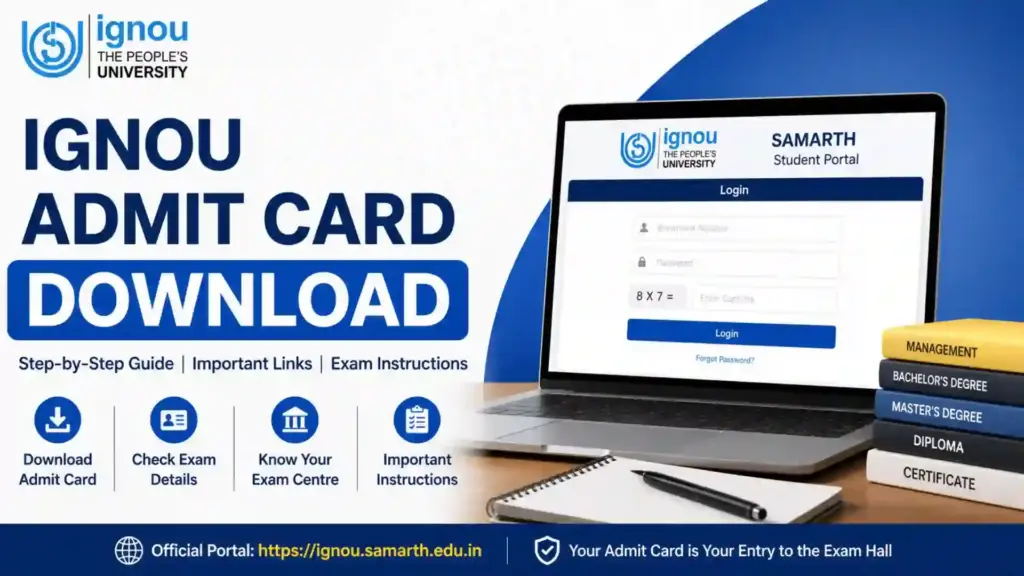
If you are preparing for your upcoming exams, this detailed guide on ignou admit card download will help you understand everything—from how to download the admit card, important instructions, common issues, and solutions, to FAQs and expert tips.
What is IGNOU Admit Card?
The IGNOU admit card, also known as the hall ticket, is an official document issued by the university that allows students to appear in their term-end examinations. It contains essential details such as:
- Student’s name and enrollment number
- Exam center details
- Course codes and exam dates
- Exam timing
- Instructions for candidates
Without this document, entry into the examination hall is strictly prohibited.
Importance of IGNOU Admit Card
The admit card is not just a formality; it plays a crucial role in the examination process. Here’s why it is important:
- Acts as proof of eligibility to appear in exams
- Helps identify the correct exam center and schedule
- Ensures smooth entry into the examination hall
- Contains instructions that must be followed during exams
Students must ensure that they download and print their admit cards well in advance.
IGNOU Admit Card Download 2026: Important Highlights
Here are some key details related to the IGNOU admit card:
- Released online only
- Available before Term-End Exams (TEE)
- No physical copy sent by post
- Mandatory for all students appearing in exams
Direct Link for IGNOU Admit Card Download
You can download your admit card using the official login portal provided below:
Admit Card Download Link:
https://ignou.samarth.edu.in/index.php/site/login
Make sure you have your login credentials ready before accessing the portal.
Step-by-Step Process for IGNOU Admit Card Download
Follow these simple steps to download your admit card without any confusion:
Step 1: Visit the Official Portal
Go to the official IGNOU Samarth portal using the link provided above.
Step 2: Login to Your Account
Enter your credentials such as:
- Enrollment Number
- Password
Step 3: Access Dashboard
After logging in, you will see your student dashboard.
Step 4: Locate Admit Card Section
Find the “Admit Card” or “Hall Ticket” option.
Step 5: Download Admit Card
Click on the link and download your admit card in PDF format.
Step 6: Print the Admit Card
Take a clear printout and keep multiple copies for safety.
Details Mentioned on IGNOU Admit Card
After completing the ignou admit card download process, you should carefully check the following details:
- Student Name
- Enrollment Number
- Program Name
- Course Codes
- Exam Dates and Timing
- Exam Centre Name and Address
- Photograph and Signature
If you find any discrepancies, contact your regional center immediately.
Important Instructions for Students
While appearing for the IGNOU exams, students must follow these guidelines:
- Carry a printed copy of the admit card
- Bring a valid ID proof (Aadhaar Card, Voter ID, etc.)
- Reach the exam center at least 30 minutes early
- Do not carry prohibited items like mobile phones or notes
- Follow all instructions mentioned on the admit card
Common Issues During IGNOU Admit Card Download
Many students face issues while downloading their admit cards. Here are some common problems and their solutions:
1. Unable to Login
- Check your enrollment number and password
- Reset password if forgotten
2. Admit Card Not Available
- Ensure you have submitted the exam form
- Wait for official release if not yet published
3. Incorrect Details
- Contact IGNOU support or regional center immediately
4. Website Not Loading
- Try accessing during non-peak hours
- Use a different browser or device
What to Do If You Cannot Download Your Admit Card?
If you are unable to complete the ignou admit card download, follow these steps:
- Verify your exam form submission
- Check payment status
- Contact IGNOU helpline
- Visit your regional center for assistance
IGNOU Admit Card vs Hall Ticket
Many students get confused between admit card and hall ticket. In IGNOU’s context:
- Both terms are used interchangeably
- They refer to the same document
- Issued before exams for entry permission
IGNOU Exam Day Checklist
Before leaving for the exam center, ensure you have:
- Printed Admit Card
- Valid ID Proof
- Required stationery (pens, pencils)
- Water bottle (if allowed)
- Watch (if permitted)
Important Links and Information
| Purpose | Link / Information |
|---|---|
| IGNOU Admit Card Download | https://ignou.samarth.edu.in/index.php/site/login |
| Login Credentials | Enrollment Number & Password |
| Admit Card Release Mode | Online Only |
| Exam Type | Term-End Examination (TEE) |
| Required Documents | Admit Card + ID Proof |
| Official Website | https://www.ignou.ac.in |
| Helpline Support | Available via regional centers |
Tips for a Smooth Exam Experience
To avoid last-minute stress, follow these tips:
- Download admit card early
- Check exam center location in advance
- Keep multiple printouts
- Revise syllabus thoroughly
- Sleep well before the exam
FAQ about IGNOU Admit Card Download 2026
When will IGNOU admit card be released?
The admit card is usually released 7–10 days before the Term-End Examination.
Can I appear for the exam without an admit card?
No, the admit card is mandatory for entry into the examination hall.
What if I forget my login credentials?
You can reset your password using the “Forgot Password” option on the portal.
Is a digital copy of the admit card allowed?
No, you must carry a printed copy.
What should I do if there is an error in my admit card?
Immediately contact your regional center or IGNOU support team.
Can I change my exam center after admit card release?
Generally, changes are not allowed after the admit card is issued.
Do I need to carry assignment submission proof?
It is not mandatory, but carrying it can be helpful in case of discrepancies.
Conclusion
The ignou admit card download process is simple but extremely important for every student appearing in the Term-End Examination. Without the admit card, you will not be allowed to enter the examination hall, regardless of your preparation level.
Make sure to download your admit card well in advance, verify all the details carefully, and follow the instructions mentioned on it. Keeping multiple copies and preparing a checklist for exam day can help you avoid unnecessary stress.
By following the steps and guidelines provided in this article, you can ensure a smooth and hassle-free experience while preparing for your IGNOU exams. Stay organized, stay focused, and give your best




Exam kab h