IGNOU Admission Status: The Indira Gandhi National Open University (IGNOU) is one of the largest open universities in the world, serving millions of students in India and abroad. Every year, lakhs of learners enroll in IGNOU’s various undergraduate, postgraduate, diploma, certificate, and doctoral programs. One of the most common concerns among newly applied students is how to check their IGNOU admission status and what the different status messages mean.
Tracking your IGNOU admission status is a crucial step because it allows you to confirm whether your application has been approved, rejected, kept pending, or requires additional documents. The process is entirely online, quick, and simple. However, due to the large number of applicants, many students often face delays or confusion while checking their admission status.
This detailed guide explains everything you need to know about the IGNOU Admission Status, including step-by-step procedures, interpretation of status terms, important links, common problems faced by students, and solutions.
Understanding IGNOU Admission Status
IGNOU admission is processed in multiple stages. When a student applies online, the details go through multiple verification steps, including:
- Document Verification
- Course Eligibility Check
- Payment Confirmation
- Regional Centre Approval
- Enrollment Number Generation
Your admission status on the IGNOU portal reflects where your application currently stands in this process.
IGNOU updates the admission status after verifying your submitted documents such as identity proof, photograph, signature, educational certificates, category certificate (if applicable), and other course-specific requirements.
Why Checking IGNOU Admission Status Is Important?
There are several reasons why tracking your admission status is essential:
1. Confirm Whether You Are Officially Admitted
Sometimes, even after submitting the application and payment, your admission may remain pending due to document issues. Checking the status keeps you aware.
2. Identify Document-Related Problems
IGNOU may keep your admission on hold if your:
- Photo or signature is unclear
- Marksheets are blurred
- Category certificate is missing or mismatched
- Course eligibility document is incomplete
Knowing the problem helps you take timely action.
3. Access Study Materials and Services
Your enrollment number is generated only after final admission approval. Without it, you cannot:
- Download study materials
- Access the eGyankosh platform
- Appear in exams
- Check assignments
- Submit TEE forms
4. Avoid Admission Cancellation
If IGNOU requests additional documents and you fail to upload them on time, your admission may be cancelled. Regularly checking the status prevents such issues.
How to Check IGNOU Admission Status?
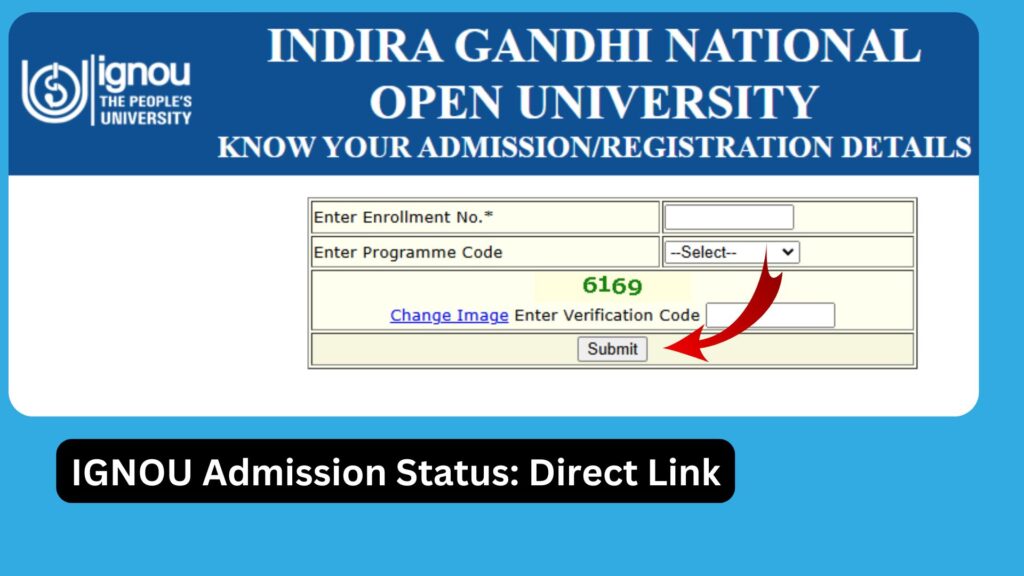
IGNOU provides a simple online portal to check the admission status for fresh applicants. You can check the status using the link below:
Official IGNOU Admission Status Link: https://isms.ignou.ac.in/changeadmdata/AdmissionStatusNew.ASP
Below is the step-by-step process:
Step 1: Visit the Official Admission Status Page
Use the above link to access the status portal.
Step 2: Enter Your Enrollment Details
If you have already received your enrollment number, enter it.
For fresh admission without an enrollment number, you may be required to enter:
- Control number
- Registered mobile number
- Registered email ID
Step 3: Submit the Form
Click on the “Submit” button to fetch your admission status.
Step 4: Check the Status Message
You will now see a message showing your admission progress such as:
- Admission Confirmed
- Documents Pending
- Rejected Due to Eligibility
- Rejected Due to Document Discrepancy
- Payment Pending Verification
- Enrollment Number Generated
Memorize the message or take a screenshot for future reference.
Different Types of IGNOU Admission Status Messages
Below are common messages displayed and what they mean:
1. ‘Admission Confirmed’
This means your documents and details have been verified. You can expect your enrollment number shortly.
2. ‘Enrollment Number Generated’
You are now officially an IGNOU student. You can log into the Student Portal and download study materials.
3. ‘Pending Document Verification’
Your application has been received but your documents are still under review.
4. ‘Pending Due to Document Issues’
You need to re-upload certain documents. Common reasons include:
- Unclear photos
- Incorrect category certificate
- Blurry marksheet
- Invalid identity proof
5. ‘Payment Verification Pending’
IGNOU has received your application, but payment is not yet verified. This usually resolves within a few days.
6. ‘Admission Rejected’
Your application is not accepted. Reasons may include:
- Not meeting eligibility criteria
- Missing mandatory documents
- Incorrect information
You may reapply with correct details.
What to Do If IGNOU Admission Status Shows Pending?
Many students see a “Pending” status for days or even weeks. Here is what you should do:
1. Wait for Processing
IGNOU takes time due to the huge number of applications.
2. Check for Email From IGNOU
IGNOU sends emails if any documents are incorrect or missing.
3. Contact Regional Centre
If status does not update within 20–25 days, contact your Regional Centre for clarification.
4. Re-upload Documents
If IGNOU asks for corrected documents, upload them immediately.
5. Keep Screenshots
These help if you need to raise a complaint later.
IGNOU Enrollment Number After Admission Status Approval
Once your status shows “Admission Confirmed,” the next step is enrollment number generation. The enrollment number is important for:
- Accessing the Student Portal
- Preparing for exams
- Downloading ID cards
- Reading study materials
- Assignment submissions
If your enrollment number does not appear even after confirmation, allow a few more days for processing.
Important Links and Information
Below is a useful table containing direct and essential IGNOU links:
| Purpose | Link | Description |
|---|---|---|
| Check IGNOU Admission Status | https://isms.ignou.ac.in/changeadmdata/AdmissionStatusNew.ASP | Check whether your admission is approved, pending, or rejected |
| IGNOU Fresh Admission Portal | https://ignouadmission.samarth.edu.in | For new student admissions |
| IGNOU Re-Registration Portal | https://onlinerr.ignou.ac.in | For re-registration for the next semester or year |
| IGNOU Student Login | https://isms.ignou.ac.in | Access study materials, assignments, and profile |
| IGNOU ID Card Download | https://admission.ignou.ac.in/changeadmdata/IDCard.asp | Download official ID card after enrollment |
| IGNOU Assignment Submission | https://webservices.ignou.ac.in/assignments | Submit assignments online if your RC allows |
| IGNOU Exam Form | https://exam.ignou.ac.in | Apply for Term End Exam forms |
| IGNOU Grade Card | https://gradecard.ignou.ac.in | Check marks and results |
| IGNOU Hall Ticket | https://hall_ticket.ignou.ac.in | Download hall ticket before exams |
Common Problems While Checking IGNOU Admission Status
Students commonly face several challenges. Here are solutions:
1. Server Not Responding
IGNOU websites sometimes face heavy traffic. Try checking late at night or early morning.
2. Wrong Details Entered
Double-check the spelling of your name or control number.
3. Payment Not Reflected
Payments made through net banking or UPI may take time to reflect.
4. Document Discrepancies
Scan and upload high-resolution, clear copies of documents.
Tips to Ensure Smooth IGNOU Admission Approval
- Upload a clear passport-size photograph.
- Ensure your signature is neat and readable.
- Submit correct and valid mark sheets.
- Provide proper category certificates if applicable.
- Make full payment and keep the receipt.
- Check your email regularly for updates from IGNOU.
- Always keep copies of submitted documents.
FAQ about IGNOU Admission Status
How much time does IGNOU take to confirm admission?
IGNOU typically takes 15–30 days after the last date of admission, depending on application volume.
What should I do if my admission status is not updating?
Give it a few more days. If it still doesn’t update, contact your Regional Centre.
Can I submit assignments without enrollment number?
No, you must have an enrollment number to submit assignments.
Why is my payment showing pending?
Payment sometimes takes 48–72 hours to reflect. If it takes longer, raise a complaint with your bank or IGNOU support.
What if my admission is rejected?
You can reapply with correct details and proper documents.
Can I change my course after admission?
Yes, IGNOU allows course change within a specific period by submitting an application to the Regional Centre.
When will I receive my study materials?
You will receive soft copies immediately on the eGyankosh platform after enrollment. Hard copies are sent depending on availability and logistics.
Can I take printout of my admission confirmation?
Yes, it is recommended to download and save your confirmation page.
Conclusion
Checking the IGNOU admission status is a vital part of the admission process for every IGNOU student. It ensures that your application is approved, documents are verified, and your enrollment number is generated on time. Since IGNOU manages a massive number of applications, delays are common, but with proper understanding of the process, students can track their admission efficiently.
The official admission status page makes it easy to stay updated on your application progress. Always ensure that your documents are clear, complete, and accurate during the admission process. Use the important links table provided in this guide to access the most essential IGNOU portals in one place.
By staying proactive and regularly checking your admission status, you can smoothly progress toward your academic journey at IGNOU. This guide is designed to eliminate confusion and help students clearly understand how IGNOU admission status works.
If you follow the steps outlined here, you will have no difficulty tracking your admission and beginning your academic year with confidence.