IGNOU Study Material Status 2026 is an important service for students waiting to receive their printed books and course materials after admission. Indira Gandhi National Open University (IGNOU) provides study materials to help learners understand their subjects, prepare assignments and get ready for Term-End Examinations.
Students can check information about their study material dispatch through the university’s official website. The status facility helps learners find out whether information about their books is available and whether their study materials have been dispatched.
IGNOU also provides digital study materials through its eGyanKosh repository. Students who are waiting for printed books can use these online resources to continue their studies.
In this article, you will learn how to check IGNOU study material status online, track dispatched books, download digital study materials, understand common status messages and contact the university if your books have not arrived.
IGNOU Study Material Status 2026: Overview
| Particulars | Details |
|---|---|
| University Name | Indira Gandhi National Open University |
| Popular Name | IGNOU |
| Service Name | IGNOU Study Material Status |
| Academic Year | 2026 |
| Responsible Division | Material Production and Distribution Division (MPDD) |
| Main Purpose | Check study material dispatch information |
| Information Required | Enrolment Number and other details, if requested |
| Study Material Type | Printed and Digital |
| Checking Mode | Online |
| Official Website | https://www.ignou.ac.in/ |
| Official Status Page | https://www.ignou.ac.in/pages/65 |
| Digital Study Material | https://egyankosh.ac.in/ |
| Study Material Status Guide | https://www.ignoubank.com/ignou-book-status/ |
What Is IGNOU Study Material Status?
IGNOU Study Material Status is an online facility that helps students check information about the processing and dispatch of their course books.
The university has a dedicated division called the Material Production and Distribution Division (MPDD), which is responsible for activities related to the production and distribution of study materials.
After admission confirmation, eligible students may receive printed books according to their programme, registered courses, language and selected study material option.
The delivery process may take time because the books need to be prepared, processed and dispatched. Students can use the status facility to check the information available for their enrolment number and admission session.
The IGNOU study material status facility is useful for:
- Newly admitted IGNOU students.
- Undergraduate programme students.
- Postgraduate programme students.
- Diploma and certificate programme learners.
- Students waiting for printed books.
- Students who have received only some of their study materials.
- Learners who want to check book dispatch information.
- Students who want to access digital study materials while waiting for printed books.
It is important to understand that admission status and study material status are two different services. Admission status relates to the processing of your admission, while study material status relates to the available information about your course books.
How to Check IGNOU Study Material Status 2026 Online?
Students can check their IGNOU book dispatch status through the university’s official website. IGNOU provides separate status options for different admission sessions.
You can first visit the study material status guide provided below:
Click Here to Check IGNOU Study Material Status
Follow these steps to check your status.
Step 1: Visit the IGNOU Study Material Status Guide
First, open: https://www.ignoubank.com/ignou-book-status/
This page provides guidance for students who want to check their IGNOU study material and book dispatch information.
Step 2: Open the Official IGNOU Website
Visit the official IGNOU website:
Open the Student Services section and look for the option called Study Material Status.
Step 3: Select the Correct Admission Session
IGNOU provides separate study material status options for different admission sessions.
For example, students admitted in January 2026 should select the January 2026 option, while students admitted in July 2026 should select the July 2026 option, if available.
Selecting the correct session is important because the status information may be maintained separately for different admission cycles.
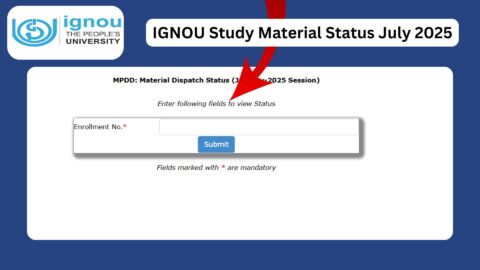
Step 4: Enter Your Enrolment Number
Open the appropriate study material status page and enter your IGNOU enrolment number in the required field.
Check every digit carefully before submitting the information. An incorrect enrolment number may prevent the portal from displaying the expected record.
Step 5: Submit the Details
Click the Submit or Search button provided on the page.
If the relevant record is available, the portal should display the study material status associated with your enrolment details.
Step 6: Check Your Book Dispatch Information
Read the information displayed on the screen. If dispatch details or a barcode are available, save them for future reference.
If the portal does not display information, do not immediately assume that your admission has been cancelled or that your books will not be delivered. Check your admission details and contact IGNOU if the issue continues.
IGNOU Study Material Status Links for January and July 2026
Students should use the status link associated with their admission session. The official IGNOU Student Services page provides session-wise study material status options.
The following direct links can help students access the available status facilities.
| Admission Session | Study Material Status Link |
|---|---|
| January 2026 | https://gradecard.ignou.ac.in/mpddstatus/Jan26/StudentMaterialStatus.aspx |
| July 2026 | https://gradecard.ignou.ac.in/mpddstatus/Jul26/StudentMaterialStatus.aspx |
| Other Admission Sessions | https://www.ignou.ac.in/pages/65 |
| General Study Material Information | https://www.ignou.ac.in/pages/179 |
Important: Select the session that matches your admission. If a particular session link is unavailable or does not display your record, use the official Student Services page for the latest options.
How to Check IGNOU Book Dispatch Status Through India Post?
After IGNOU dispatches study materials, students may receive an SMS containing a barcode or consignment number from India Post.
If you receive this information, you can use it to check the delivery progress of your study material packet.
Follow these steps:
- Check your IGNOU study material status.
- Look for the barcode or consignment number, if available.
- Visit the official India Post website.
- Open the consignment tracking facility.
- Enter the barcode or consignment number.
- Complete any required verification.
- Submit the tracking request.
- Check the latest available delivery information.
Official India Post website: https://www.indiapost.gov.in/
The tracking information can help you understand whether your study material packet has been booked, processed or delivered.
IGNOU’s published student FAQs explain that students may receive an SMS containing barcode details after the consignment is booked. If the tracking information is unavailable, contact your concerned Regional Centre or the university’s Material Production and Distribution Division.
Understanding Different IGNOU Study Material Status Messages
While checking IGNOU book status, students may find different messages depending on the information available in the portal.
The exact wording may vary between status facilities. The following table explains some common descriptions in general terms.
| Status Message | General Meaning | What Students Should Do |
|---|---|---|
| No Record Found | No matching record is available in the selected status facility | Check enrolment number and admission session |
| Processing | Study material information may still be under processing | Check again after some time |
| Awaiting Dispatch | Dispatch has not yet been confirmed | Wait for an update |
| Dispatched | The study material has been recorded as dispatched | Check barcode or consignment information |
| Partially Dispatched | Some study materials may have been sent | Check the status of remaining books |
| Delivered | Delivery has been recorded | Confirm that you have received the packet |
These are general explanations, not a guaranteed list of official status codes. Always follow the message and instructions displayed on the actual IGNOU portal.
Why Is My IGNOU Study Material Status Showing No Record Found?
Some students may see a No Record Found message when checking their book status. This can happen for several reasons.
1. Incorrect Enrolment Number
The most common issue may be an incorrect enrolment number. Check your IGNOU identity card or admission confirmation and enter the number carefully.
2. Wrong Admission Session
IGNOU maintains different status options for different admission sessions. If you select the wrong session, your record may not appear.
3. Admission Processing Is Not Complete
If your admission has not been fully processed, the study material information may not yet be available.
Check your admission status separately before making assumptions about book dispatch.
4. Study Material Record Is Not Updated
Sometimes the relevant information may not have been updated in the status system. Try again after some time.
5. Digital Study Material Option
Students who selected digital study material should check the applicable admission conditions and instructions. The availability of printed books depends on the selected material option and programme arrangements.
If the problem continues, contact your Regional Centre or MPDD for assistance.
How to Download IGNOU Study Material PDF Online?
Students do not always need to wait for printed books to begin studying. IGNOU provides digital study materials through its eGyanKosh repository.
The repository contains self-learning materials for different programmes and courses. Students can search for their programme or course code and access the available resources.
Follow these steps to download IGNOU study material online.
Step 1: Visit the eGyanKosh Website
Open the official digital repository:
Step 2: Search for Your Programme
Find the relevant programme or academic collection.
IGNOU offers study materials for different types of programmes, including:
- Bachelor of Arts (BA).
- Bachelor of Commerce (BCom).
- Bachelor of Science (BSc).
- Bachelor of Computer Applications (BCA).
- Bachelor of Business Administration (BBA).
- Master of Arts (MA).
- Master of Commerce (MCom).
- Master of Science (MSc).
- Master of Business Administration (MBA).
- Master of Social Work (MSW).
- Diploma programmes.
- Certificate programmes.
The availability of particular resources depends on the programme and course.
Step 3: Search by Course Code
If you know your course code, use it to find the relevant study material.
Searching by course code can help you locate the correct subject more easily.
Step 4: Open the Required Study Material
Select the relevant course collection and open the available blocks, units or learning resources.
Step 5: Download the PDF
If a downloadable PDF is available, save it to your mobile phone or computer.
You can then use the digital study material for assignment preparation, revision and examination studies.
Students should check their admission details and programme instructions to understand whether they selected printed or digital study material.
What to Do If IGNOU Books Have Not Arrived?
If you have confirmed your admission but have not received your printed books, first check the available study material status.
If the status does not provide sufficient information, follow these steps.
1. Verify Your Admission Details
Make sure your admission has been confirmed and your programme and enrolment information are correct.
2. Check Your Selected Study Material Option
Review your admission confirmation or other relevant records to see whether you selected printed or digital study material.
3. Verify Your Postal Address
Check whether the address provided during admission is correct and complete. Incorrect or incomplete address details may affect delivery.
4. Check the Dispatch Status
Visit the official IGNOU study material status facility and check whether dispatch information is available.
5. Track the Consignment
If you have received a barcode or consignment number, use the India Post tracking facility to check the delivery progress.
6. Contact Your Regional Centre
If your books have not arrived and the status remains unclear, contact your concerned Regional Centre for guidance.
7. Contact the MPDD
For issues related to the production and distribution of study materials, students can contact the Material Production and Distribution Division.
Keep your enrolment number, programme details and admission confirmation ready when requesting assistance.
How to Contact IGNOU for Study Material Problems?
Students who experience problems with book dispatch or non-receipt of study materials can contact IGNOU through its official channels.
The university’s published FAQs provide the following contact information for study material-related queries.
| Contact Details | Information |
|---|---|
| Division | Material Production and Distribution Division (MPDD) |
| University | IGNOU |
| Address | Maidan Garhi, New Delhi – 110068 |
| registrarmpdd@ignou.ac.in | |
| Official Website | https://www.ignou.ac.in/ |
| MPDD Information | https://www.ignou.ac.in/pages/179 |
| Student Services | https://www.ignou.ac.in/pages/65 |
When sending an email, include your enrolment number, programme name, admission session, contact details and a short explanation of the issue.
If you have already received a dispatch barcode, include that information as well. Avoid sending unnecessary personal documents unless the university requests them.
Important Links for IGNOU Study Material Status 2026
Students can use the following links to check study material status, access digital books and manage other IGNOU academic activities.
| Purpose | Important Link |
|---|---|
| Check IGNOU Study Material Status Guide | https://www.ignoubank.com/ignou-book-status/ |
| IGNOU Official Website | https://www.ignou.ac.in/ |
| IGNOU Student Services | https://www.ignou.ac.in/pages/65 |
| January 2026 Study Material Status | https://gradecard.ignou.ac.in/mpddstatus/Jan26/StudentMaterialStatus.aspx |
| July 2026 Study Material Status | https://gradecard.ignou.ac.in/mpddstatus/Jul26/StudentMaterialStatus.aspx |
| IGNOU MPDD Information | https://www.ignou.ac.in/pages/179 |
| Download Digital Study Material | https://egyankosh.ac.in/ |
| India Post Tracking | https://www.indiapost.gov.in/ |
| IGNOU Student Login | https://ignou.samarth.edu.in/index.php/site/login |
| IGNOU Admission Portal | https://ignouadmission.samarth.edu.in/ |
| IGNOU Re-Registration | https://onlinerr.ignou.ac.in/ |
| IGNOU Assignment Questions | https://webservices.ignou.ac.in/assignments |
| IGNOU Grievance Portal | https://igram.ignou.ac.in/ |
Direct link to check your study material status: https://www.ignoubank.com/ignou-book-status/
Use the official IGNOU website for university records and notifications. The IGNOU Bank page is a guide to help students understand the checking process.
Important Tips for IGNOU Students
Students should regularly check their academic information and keep important admission records safe.
Here are some useful tips:
- Keep your IGNOU enrolment number saved.
- Check your admission status after completing registration.
- Select the correct admission session when checking book status.
- Verify your registered postal address.
- Save the barcode or consignment number if you receive one.
- Use eGyanKosh to access available digital study materials.
- Keep assignment submission deadlines in mind.
- Check examination form announcements regularly.
- Save important university notifications.
- Contact your Regional Centre if your study material remains undelivered.
These simple steps can help you manage your IGNOU academic activities more effectively.
FAQ about IGNOU Study Material Status 2026
How can I check IGNOU Study Material Status 2026?
Visit the IGNOU Student Services page and select the Study Material Status option. Choose your admission session, enter your enrolment number and submit the details.
You can also use this guide: https://www.ignoubank.com/ignou-book-status/
What details are required to check IGNOU book status?
Students generally need their IGNOU enrolment number. Depending on the status facility, additional information may be requested.
How can I check IGNOU January 2026 study material status?
Open the January 2026 status facility:
https://gradecard.ignou.ac.in/mpddstatus/Jan26/StudentMaterialStatus.aspx
Enter your enrolment number and follow the instructions on the page.
How long does IGNOU take to deliver study materials?
The delivery time can vary depending on admission confirmation, printing, availability, dispatch arrangements and postal delivery. Students should check the official status facility for information about their own books.
What should I do if IGNOU study material status shows No Record Found?
Check your enrolment number and make sure you selected the correct admission session. If the information is still unavailable, verify your admission details and contact your Regional Centre or MPDD.
How can I track IGNOU books after dispatch?
If you receive a barcode or consignment number, visit https://www.indiapost.gov.in/ and use the postal tracking facility to check the available delivery information.
What is MPDD in IGNOU?
MPDD stands for Material Production and Distribution Division. It is responsible for activities related to the production and distribution of IGNOU study materials.
Conclusion
IGNOU Study Material Status 2026 helps students check information about the processing and dispatch of their printed course books. By using the official status facility, learners can find the available information associated with their enrolment number and admission session.
Students should select the correct January or July admission session, enter their enrolment number carefully and check the displayed information. If dispatch details are available, they can use the barcode or consignment number to track the packet through India Post.
Students who are waiting for printed books can also access available digital study materials through eGyanKosh and continue preparing their assignments and examinations.
If your books have not arrived or the status is not displaying correctly, verify your admission details and contact your Regional Centre or the Material Production and Distribution Division.