The IGNOU Samarth Portal is an important online platform used by students of Indira Gandhi National Open University (IGNOU) for accessing various academic and student-related services. As IGNOU has a large number of students enrolled in undergraduate, postgraduate, diploma, certificate and other programmes, online portals make it easier for students to manage several academic activities without visiting a regional centre.
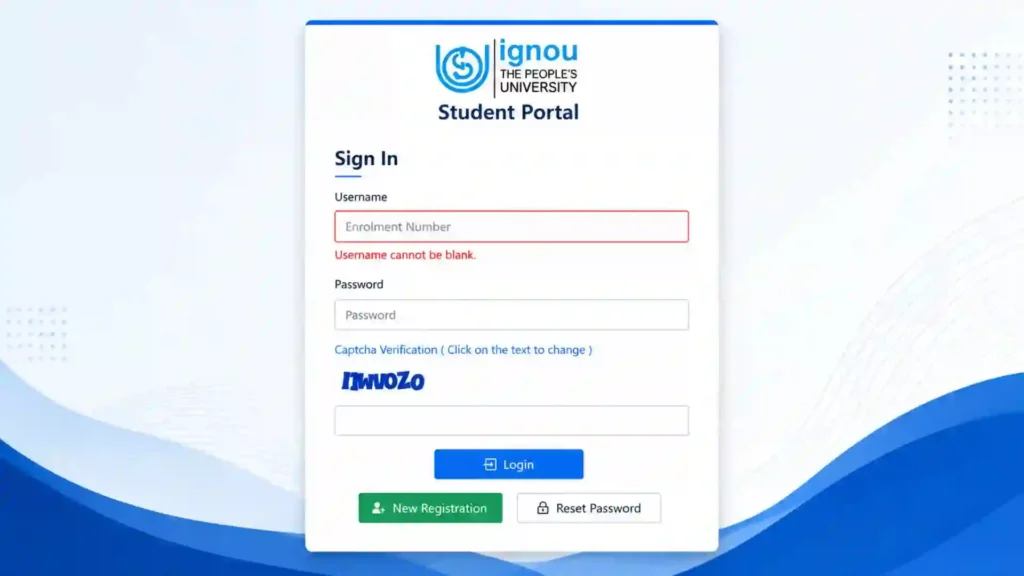
The IGNOU Samarth Portal provides students with an online login facility through which they can access services and information related to their academic journey. Depending on the student’s programme and current admission cycle, the portal may be used for activities such as accessing admission-related information, checking application details, managing student information and accessing other services provided through the Samarth platform.
Students searching for IGNOU Samarth Portal, IGNOU Samarth Login, IGNOU Student Login or IGNOU Samarth Portal Login can use the official portal provided below.
IGNOU Samarth Portal: Important Information
The following table contains important information about the IGNOU Samarth Portal.
| Information | Details |
|---|---|
| Portal Name | IGNOU Samarth Portal |
| University | Indira Gandhi National Open University |
| Portal Type | Online Student Portal |
| Login Requirement | Registered login credentials |
| Main Purpose | Access IGNOU online student services |
| Portal Access | Online |
| Official Login Page | https://ignou.samarth.edu.in/index.php/site/login |
| University Website | https://www.ignou.ac.in/ |
| Device Required | Smartphone, tablet, laptop or desktop |
| Internet Required | Yes |
| Login Details | As requested on the portal |
| Student Support | Available through official IGNOU channels |
What Is the IGNOU Samarth Portal?
The IGNOU Samarth Portal is an online platform associated with IGNOU’s digital student services. Samarth is used by many educational institutions in India to provide digital academic and administrative services.
For IGNOU students, online systems are particularly useful because the university operates through a large network of regional centres and study centres. Instead of depending entirely on physical paperwork, students can use online platforms to access important information and complete certain activities.
The exact services available to an individual student can depend on their programme, admission status, academic cycle and the particular service being offered by IGNOU.
Students should therefore use their registered credentials and follow the instructions displayed after logging into the official portal.
IGNOU Samarth Portal Login
Students who already have an account can access the IGNOU Samarth Portal Login page through the official website.
To access the portal, visit:
After opening the page, students should carefully read the information displayed on the login screen and enter the required credentials.
The login information should be entered exactly as registered with the university. Students should also avoid sharing their password or other confidential login information with other people.
How to Login to IGNOU Samarth Portal?
Students can follow the general steps below to access their account.
Step 1: Visit the Official Portal
Open the official IGNOU Samarth Portal login page using a web browser.
Open IGNOU Samarth Portal Login
It is recommended that students use the official IGNOU Samarth domain rather than third-party websites.
Step 2: Check the Login Page
Once the website opens, check the login page carefully.
The page will provide the fields and instructions required to access the account.
Step 3: Enter Your Login Details
Enter the required username, password or other information requested by the portal.
Students should make sure that the information is entered correctly.
Step 4: Submit the Login Form
After entering the required details, select the login or submit option available on the page.
If the information is correct, the portal should proceed to the student’s account or the relevant student service.
Step 5: Access Available Services
After successfully logging in, students can access the services available for their account.
The options shown can vary depending on the student’s programme, admission status and the services currently provided through the portal.
What Can Students Use the IGNOU Samarth Portal For?
The IGNOU Samarth Portal is designed to support various digital services. However, students should remember that not every service is necessarily available to every student at all times.
Depending on the student’s academic status, the portal can be used to access relevant information and services associated with the student’s IGNOU account.
Some common purposes associated with IGNOU’s digital student systems include:
- Accessing student-related information
- Managing online academic information
- Checking application-related information
- Accessing admission-related services
- Viewing available student services
- Managing certain online academic activities
- Accessing information associated with an IGNOU account
Students should always follow the instructions displayed inside their account because the available options can change according to the academic session and university requirements.
IGNOU Samarth Portal for Admission
The Samarth platform is also important in the context of IGNOU’s online admission and academic processes.
Students applying for admission should carefully distinguish between different IGNOU portals. IGNOU uses different online systems for different purposes, and an admission-related portal may not provide exactly the same services as the student login portal.
If you are already an IGNOU student and have been instructed to use the Samarth Portal for a particular activity, use the login page provided by the university.
Students should also keep their application information, registration details and other academic information safely stored for future reference.
IGNOU Samarth Portal and Student Account
The student account is an important part of managing your academic information online.
Students should ensure that the information associated with their account is accurate. If the university requests an update or verification, students should complete it according to the official instructions.
Keeping your registered email address and mobile number accessible is also useful because educational institutions may use registered contact details for important communication.
What If You Cannot Login to IGNOU Samarth Portal?
Sometimes students may have difficulty accessing their account. A login problem does not necessarily mean that the account has been deleted or that there is a problem with the student’s admission.
There can be several reasons for login difficulties.
Incorrect Login Credentials
One of the most common reasons is entering incorrect login information.
Check your username, password and other required details carefully before submitting the login form.
Forgotten Password
If you have forgotten your password, look for the password recovery or reset option provided on the official portal, if available.
Follow the instructions displayed by the website rather than using third-party password recovery services.
Browser Problem
Sometimes browser settings, cached data or extensions can interfere with a website.
You can try opening the portal in another browser or clearing the browser cache and trying again.
Internet Connection
A slow or unstable internet connection can also prevent the login page from loading correctly.
Check your internet connection and try again.
Server or Maintenance Issue
Online portals can occasionally experience technical problems or maintenance.
If the website is temporarily unavailable, wait for some time and try again.
How to Use the IGNOU Samarth Portal Safely?
Students should take basic security precautions while using the IGNOU Samarth Portal.
Always access the portal through the official IGNOU/Samarth website. Avoid clicking login links received through unknown emails, social media messages or messaging groups.
Students should never share their password with friends, agents or strangers.
It is also recommended to avoid saving passwords on shared computers.
After completing an important activity, log out of the portal, especially when using a computer in a library, cyber cafe, college or another public location.
Students should also verify the website address before entering personal or academic information.
IGNOU Samarth Portal on Mobile
The IGNOU Samarth Portal can generally be accessed through a modern web browser on a smartphone, provided the device has a stable internet connection.
Students can open the official login page from their mobile browser and enter the required information.
For a better experience, make sure the browser is updated and that the page has fully loaded before entering your login details.
If some parts of the website do not work properly on a mobile device, students can try using a laptop or desktop computer.
Documents and Information Students Should Keep Ready
Before using the IGNOU Samarth Portal, students should keep important academic information readily available.
Depending on the activity they need to complete, this may include:
- IGNOU enrolment number
- Application or registration information
- Registered mobile number
- Registered email address
- Programme details
- Course information
- Login credentials
- Relevant academic documents
Keeping these details organized can save time when completing online activities.
IGNOU Samarth Portal vs IGNOU Result Portal
Students should not confuse the Samarth Portal with the IGNOU Term-End Examination Result Portal.
The Samarth Portal is used for various student and academic services, while IGNOU has a separate portal for checking Term-End Examination results.
For example, students looking for the IGNOU June or December Term-End Examination result should use the official result portal rather than assuming that the Samarth login page is the result page.
Similarly, different academic services may have their own dedicated IGNOU websites.
This is why students should always check which portal is mentioned in the official IGNOU notification for the particular service they want to use.
Important IGNOU Links and Information
The following links can be useful for IGNOU students.
| Service | Official Link |
|---|---|
| IGNOU Samarth Portal Login | https://ignou.samarth.edu.in/index.php/site/login |
| IGNOU Official Website | https://www.ignou.ac.in/ |
| IGNOU Term-End Result Portal | https://termendresult.ignou.ac.in/ |
| IGNOU Student Services | Available through relevant official IGNOU portals |
| IGNOU Academic Information | Available through the official IGNOU website |
For the IGNOU Samarth Portal Login, students should use the official page:
Common Issues With IGNOU Samarth Portal
Students may encounter different problems while accessing the portal. Some common issues include:
Login Details Not Working
Check whether you are using the correct login credentials. Carefully check capitalization, numbers and special characters where applicable.
Website Is Not Loading
Try refreshing the page after a few minutes. If the problem continues, use another browser or device.
Password Recovery Problem
Use only the recovery process provided by the official portal. Avoid giving your login credentials to unauthorized individuals.
Service Is Not Visible
A particular service may not be available for every student. It can also depend on the academic cycle and current university requirements.
Mobile Website Problem
Try switching to a desktop or laptop if the portal does not display correctly on your smartphone.
Tips for IGNOU Students Using the Samarth Portal
Students can follow these tips for a smoother experience:
- Always use the official IGNOU Samarth website.
- Keep your login credentials secure.
- Do not share your password with anyone.
- Keep your registered mobile number and email accessible.
- Check official IGNOU notifications regularly.
- Save important application or academic information.
- Take screenshots or download documents when appropriate.
- Use a reliable internet connection.
- Keep your browser updated.
- Avoid unofficial websites asking for sensitive login information.
FAQ about IGNOU Samarth Portal 2026
What is the IGNOU Samarth Portal?
The IGNOU Samarth Portal is an online platform used to provide digital student and academic services to IGNOU students. The services available can depend on the student’s programme and current academic requirements.
What is the official IGNOU Samarth Portal login link?
Students can access the official login page here:
https://ignou.samarth.edu.in/index.php/site/login
What details are required to login to IGNOU Samarth?
Students need to enter the login information requested on the official portal. The exact fields can depend on the portal’s current login system.
Can I access the IGNOU Samarth Portal on my mobile?
Yes, students can access the portal through a compatible mobile web browser. If the website does not work correctly on a smartphone, try using a laptop or desktop computer.
What should I do if I forget my IGNOU Samarth password?
Check the official login page for an available password recovery or reset option and follow the instructions provided there.
Why is the IGNOU Samarth Portal not opening?
The issue could be related to your internet connection, browser, device or temporary server problems. Try refreshing the page, using another browser or accessing the portal later.
Is IGNOU Samarth the same as the IGNOU result portal?
No. IGNOU uses different online systems for different services. The Samarth Portal is not the same as the dedicated Term-End Examination result portal.
Can I use the IGNOU Samarth Portal for all IGNOU services?
Not necessarily. IGNOU has multiple online platforms for different services. The services available through Samarth depend on the student’s account and the university’s current systems.
Conclusion
The IGNOU Samarth Portal is an important online platform for IGNOU students and can provide access to various academic and student-related services. Instead of visiting a regional centre for every online activity, students can use the university’s digital platforms to manage relevant information and services.
Students who need to access their account should use the official IGNOU Samarth Portal Login page:
Before logging in, make sure that you have the required credentials and a stable internet connection. Students should also keep their login information confidential and avoid using unofficial websites that request personal or academic details.
It is important to remember that IGNOU operates multiple online portals for different purposes. Therefore, students should always check the official instructions to determine whether they need the Samarth Portal, result portal, admission portal, grade card portal or another dedicated IGNOU service.