IGNOU Registration Status 2026: If you have recently taken admission in Indira Gandhi National Open University (IGNOU) and want to know whether your registration has been successfully processed, you can check your IGNOU registration status online. The registration status helps students verify important details related to their admission and programme.
IGNOU provides an online facility through which students can check their admission and registration details using their Enrollment Number and Programme Code. This is particularly useful for students who have completed the admission process but have not yet received confirmation or want to verify their registration details.
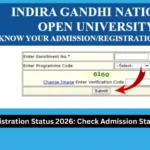
The official IGNOU page is titled “Know Your Admission/Registration Details” and provides fields for entering the Enrollment Number, Programme Code and Verification Code.
IGNOU Registration Status
IGNOU registration status refers to the information available in the university’s admission and registration system about a student’s programme registration.
After completing the IGNOU admission process, students may want to confirm whether their details have been successfully recorded in the university database. Checking the registration status can help students identify whether their admission information is available and whether further action may be required.
The online status page is useful for both new and existing students who need to verify their admission or registration-related details.
Students should keep their Enrollment Number and Programme Code ready before visiting the status-check page.
Important Links and Information
| Information | Details |
|---|---|
| University | Indira Gandhi National Open University |
| Status | IGNOU Registration / Admission Status |
| Status Page | https://isms.ignou.ac.in/changeadmdata/AdmissionStatusNew.ASP |
| Information Available | Admission/Registration Details |
| Required Details | Enrollment Number |
| Programme Information | Programme Code |
| Verification | Verification Code |
| Website Type | Official IGNOU status page |
| Purpose | Check admission and registration details |
How to Check IGNOU Registration Status?
Checking your IGNOU registration status is a straightforward process. Students can follow the steps below to access their details.
Step 1: Visit the IGNOU Registration Status Website
First, open the official IGNOU admission and registration status page:
https://isms.ignou.ac.in/changeadmdata/AdmissionStatusNew.ASP
The page is provided for checking admission/registration details.
Step 2: Enter Your Enrollment Number
After opening the page, you will see an option to enter your Enrollment No.
Enter your Enrollment Number carefully in the required field.
Your Enrollment Number is an important identification number associated with your IGNOU registration. Make sure that you enter the correct number to avoid receiving incorrect or unavailable information.
Step 3: Select Your Programme Code
The page also provides an option to enter or select the Programme Code.
Select the programme associated with your IGNOU admission.
For example, students enrolled in different undergraduate, postgraduate, diploma, certificate or other programmes should select the appropriate programme code corresponding to their admission.
Step 4: Enter the Verification Code
The status page also requires students to enter the displayed Verification Code.
Enter the verification code exactly as displayed on the page.
If the code is difficult to read, use the available option to change or refresh the image and then enter the new verification code.
Step 5: Check Your Registration Details
After entering the required information, submit the details to check your IGNOU admission or registration information.
The result will depend on the information available in the IGNOU database.
If your registration details are available, carefully check the information displayed on the page.
What Information Can You Check?
The IGNOU status page is designed to provide students with admission and registration-related information.
The exact information displayed can depend on the student’s programme and records available in the university system.
Students can use the page to verify whether their admission-related information has been recorded and to check the details associated with their registration.
It is important to remember that registration status is different from other IGNOU services such as examination form status, assignment status, grade card status and result status.
Therefore, students should use the appropriate IGNOU portal depending on the information they want to check.
Why Should Students Check IGNOU Registration Status?
There are several reasons why students may want to check their IGNOU registration status.
1. To Confirm Registration
Students who have recently completed the admission process can use the status page to verify whether their registration details are available in the university system.
2. To Verify Admission Details
The status page can also help students check admission-related information associated with their programme.
3. To Avoid Registration Confusion
Sometimes students may complete the admission process but remain unsure about whether their registration has been successfully processed. Checking the online status can provide useful confirmation.
4. To Keep a Record
Students can save or take a screenshot of their registration information for future reference if required.
5. To Prepare for Further Academic Activities
After registration, students may need to complete other academic activities such as downloading study material, submitting assignments, filling examination forms and checking examination-related information.
Having the correct registration information can make these processes easier.
What to Do If IGNOU Registration Status Is Not Showing?
Sometimes students may enter their details but not see the expected registration information.
There can be several reasons for this.
The admission or registration information may still be under processing, the student may have entered an incorrect Enrollment Number or Programme Code, or the information may not yet be available in the online system.
If your status is not displayed, first verify that you have entered your details correctly.
Check the following:
- Enrollment Number
- Programme Code
- Verification Code
- Admission information
- Spelling and numbers entered in the required fields
You can also try checking the status again later if your admission was completed recently.
Students should avoid repeatedly submitting incorrect information and should carefully verify their Enrollment Number before checking the status.
IGNOU Registration Status vs Admission Status
Students often use the terms admission status and registration status interchangeably.
Although they are closely related, students should understand that different IGNOU services may provide different types of information.
The page provided for this article is specifically titled “Know Your Admission/Registration Details.”
Therefore, students can use this page to check the admission or registration details available through the system.
If you want to check a specific service such as an examination form, assignment submission, grade card or result, you should use the corresponding IGNOU service.
Things to Keep Ready Before Checking IGNOU Registration Status
To make the process easier, keep the following information available:
- Your IGNOU Enrollment Number
- Your Programme Code
- A working internet connection
- The verification code shown on the status page
The official status page specifically provides fields for the Enrollment Number, Programme Code and Verification Code.
Entering the correct information is important because incorrect details may prevent the system from displaying your registration information.
Common Problems While Checking IGNOU Registration Status
Incorrect Enrollment Number
One of the most common problems is entering an incorrect Enrollment Number.
Double-check every digit before submitting the form.
Incorrect Programme Code
Make sure that the Programme Code selected corresponds to your actual programme.
Verification Code Error
The verification code must be entered correctly. If the displayed code is difficult to understand, use the available option to change the image.
Registration Information Not Updated
If you have recently completed your admission process, your information may take some time to become available in the relevant system.
In such cases, students can check again later.
Website or Internet Problem
Sometimes temporary technical or connectivity issues can prevent the page from loading properly.
Try refreshing the page or checking again after some time.
Tips for IGNOU Students After Registration
Once your registration is confirmed, it is important to keep track of other academic activities.
Students should regularly check their IGNOU-related information and make sure they do not miss important deadlines.
Depending on your programme and admission session, you may need to complete activities such as:
- Downloading study material
- Preparing and submitting assignments
- Checking assignment status
- Filling the Term-End Examination form
- Checking examination dates
- Downloading the examination date sheet
- Checking results
- Checking the grade card
- Checking admission or registration details
Students should also keep copies of important documents such as their admission confirmation, fee payment information, Enrollment Number and programme details.
FAQ about IGNOU Registration Status 2026
What details are required to check IGNOU registration status?
The official status page asks for your Enrollment Number, Programme Code and Verification Code.
Is the IGNOU registration status available online?
Yes. IGNOU provides an online page for students to check their admission and registration details.
What should I do if my registration details are not showing?
First, check whether your Enrollment Number and Programme Code have been entered correctly. If the information is still unavailable, try checking again later, particularly if you recently completed the admission process.
Can I check my IGNOU registration status without an Enrollment Number?
The status page requires an Enrollment Number, so students should keep their Enrollment Number available when checking their registration details.
What is the IGNOU admission status page?
The IGNOU admission status page is an online facility for checking admission and registration details. The page is titled “Know Your Admission/Registration Details.”
Can I check my programme details through the registration status page?
The page includes an option for entering or selecting the Programme Code, allowing students to check their admission/registration information associated with their programme.
What should I do after checking my IGNOU registration status?
After confirming your registration, continue monitoring the relevant IGNOU services for assignments, examinations, study material, results and grade card updates according to your programme and admission session.
Conclusion
Checking your IGNOU registration status is an important step after completing the admission process. It allows students to verify their admission and registration details through the online IGNOU system.
To check your status, visit the official IGNOU page and enter your Enrollment Number, Programme Code and Verification Code. The official page is specifically designed to help students know their admission and registration details.
IGNOU Registration Status:
https://isms.ignou.ac.in/changeadmdata/AdmissionStatusNew.ASP
If your information is not immediately available, carefully verify the details you entered and try checking again later. Students should also regularly monitor other IGNOU services so that they can stay updated about assignments, examinations, results and other academic requirements.
Keeping your Enrollment Number and programme details safely stored can also make it easier to access IGNOU services throughout your academic journey.