The IGNOU grade card is an important document for students enrolled in Indira Gandhi National Open University (IGNOU). It provides details about a student’s academic performance, including marks or grades obtained in assignments, theory examinations, practical examinations, projects, and other applicable components of the programme.
After submitting assignments and appearing in the Term-End Examination (TEE), students usually want to know whether their marks have been updated in the grade card. Checking the IGNOU grade card status online is therefore an important step for students who want to monitor their academic progress.
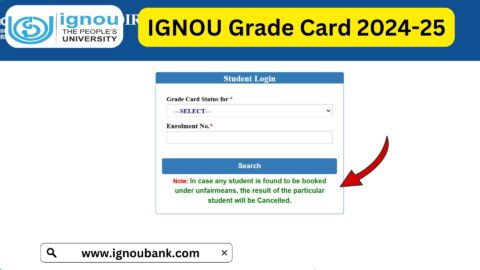
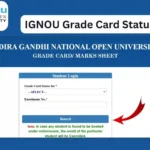
If you are looking for the IGNOU grade card status, you can check it online using the following page:
Check IGNOU Grade Card Status:
https://www.ignoubank.com/ignou-grade-card/
The grade card may not be updated immediately after an examination or assignment submission. Different components can be updated at different times, so students should check their grade card periodically.
What Is IGNOU Grade Card?
The IGNOU grade card is an online record of a student’s academic performance. It generally contains information about the marks or grades received for different components of the programme.
Depending on the programme and course requirements, the grade card can include details such as assignment marks, theory examination marks, practical marks, project marks, and other academic components.
Students can use the grade card to understand which components have been updated and which marks are still pending.
For example, a student may have submitted an assignment and appeared for the December TEE, but the assignment marks and examination marks may not appear at the same time. In such a situation, the student should not immediately assume that the marks are missing permanently.
The grade card can be checked again after the university or concerned regional centre has processed and uploaded the relevant marks.
How to Check IGNOU Grade Card Status Online
Students can check their IGNOU grade card status online by following a few simple steps.
Step 1: Open the IGNOU Grade Card Page
Visit:
This page provides information and access related to checking the IGNOU grade card status.
Step 2: Enter the Required Details
Depending on the grade card page and the information requested, enter the required student details carefully.
Make sure that your enrolment number is entered correctly. An incorrect enrolment number can result in difficulty finding the correct academic record.
Step 3: Select the Programme
If the page asks you to select your programme, choose the appropriate programme from the available options.
Students should make sure that the selected programme corresponds to their current IGNOU enrolment.
Step 4: Submit the Information
After entering the required information, submit the form.
The available grade card information should then be displayed.
Step 5: Check Your Marks and Grades
Once the grade card is displayed, carefully check the information provided for your courses.
You may find information related to assignments, theory examinations, practicals, projects, or other components depending on your programme.
Important Links and Information for IGNOU Students
| Information | Link / Details |
|---|---|
| IGNOU Grade Card Status | https://www.ignoubank.com/ignou-grade-card/ |
| IGNOU Term-End Result | https://termendresult.ignou.ac.in/ |
| IGNOU Student Portal | http://ignou.samarth.edu.in/ |
| IGNOU Student Login | https://ignou.samarth.edu.in/index.php/site/login |
| IGNOU Assignment Status | https://isms.ignou.ac.in/changeadmdata/StatusAssignment.asp |
| IGNOU Admission Status | https://isms.ignou.ac.in/changeadmdata/AdmissionStatusNew.ASP |
| IGNOU Assignment Downloads | https://www.ignou.ac.in/studentService/download/assignments |
| IGNOU Exam Form | https://exam.ignou.ac.in/ |
| Grade Card Check Page | https://www.ignoubank.com/ignou-grade-card/ |
What Information Is Available on the IGNOU Grade Card?
The exact information displayed can vary depending on the programme and the academic components applicable to a student.
Generally, the grade card is used to record the performance of a student in different academic activities.
Assignment Marks
Assignments are an important component of many IGNOU programmes. After students submit their assignments and the concerned authorities evaluate them, assignment marks can be uploaded to the student’s academic record.
Students should check whether their assignment marks have been updated in the grade card.
Term-End Examination Marks
The grade card can also contain marks or grades obtained in the Term-End Examination.
Students who have appeared for the June or December TEE can check the grade card to determine whether their examination marks have been updated.
Practical Marks
For programmes that include practical courses, practical marks may also be reflected in the academic record.
The availability of practical marks depends on the programme and the completion of the relevant practical requirements.
Project Marks
Some IGNOU programmes include projects or similar academic components. Where applicable, the corresponding marks may be included in the grade card after evaluation and processing.
Why Is My IGNOU Grade Card Not Updated?
One of the most common questions students have is why their grade card does not show all their marks.
There can be several reasons for this.
First, different academic components may be processed separately. Assignment marks, TEE marks, practical marks, and project marks do not necessarily appear at exactly the same time.
Second, the evaluation process may still be underway. If a particular component has not yet been evaluated or processed, it may not appear in the grade card.
Third, there may be a delay between the completion of evaluation and the uploading of marks to the online system.
Therefore, if some marks are missing from the grade card, students should check again after some time rather than assuming that the marks have been permanently lost.
IGNOU Grade Card Not Showing Assignment Marks
If your assignment marks are not visible in the grade card, first confirm that you submitted the assignment according to the applicable submission process.
Students should also keep proof of assignment submission, such as a submission receipt, acknowledgement, or other available record.
If the assignment has been submitted and the marks are still not reflected, the student can wait for the evaluation and updating process to be completed.
Students can also check their assignment status separately using the IGNOU assignment status page:
https://isms.ignou.ac.in/changeadmdata/StatusAssignment.asp
The assignment status and grade card serve different purposes, so students may find it useful to check both when monitoring their academic record.
IGNOU Grade Card Not Showing TEE Marks
TEE marks may also take time to appear in the grade card.
Students who have recently appeared for the June or December Term-End Examination should understand that the examination result and grade card updating process can involve multiple stages.
If the result has been published but the grade card has not yet been updated, students can check the grade card again later.
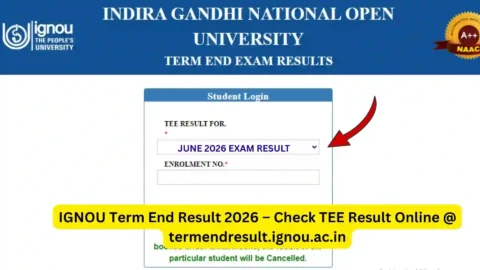
Students can also check the IGNOU Term-End Result separately:
Difference Between IGNOU Result and Grade Card
The IGNOU result and grade card are related but are not exactly the same thing.
The result generally provides information about the outcome of an examination or course, whereas the grade card provides a broader record of different academic components.
For example, the grade card can help students monitor assignment marks along with examination and other applicable marks.
This makes the grade card particularly useful when students want to review their overall academic progress.
How Often Should Students Check the IGNOU Grade Card?
There is no need to check the grade card repeatedly every day.
Students can check it periodically, especially after:
- Assignment evaluation
- Term-End Examination results
- Practical examinations
- Project evaluation
- Other academic evaluation activities
If some marks are missing, checking again after a reasonable period can help determine whether the university has subsequently updated the record.
What Should You Do If Marks Are Missing?
If a particular mark is missing from your grade card, follow these steps:
- Check whether you completed the relevant academic requirement.
- Confirm your enrolment number and programme details.
- Check the assignment status if assignment marks are missing.
- Check the Term-End Examination result if examination marks are missing.
- Keep your assignment submission or examination-related records safely.
- Wait for the applicable evaluation and updating process.
- If the issue continues, contact IGNOU through the appropriate official student support or grievance mechanism.
Students should avoid submitting duplicate assignments simply because marks are temporarily absent from the grade card unless IGNOU specifically instructs them to do so.
IGNOU Grade Card and Final Completion
The grade card is particularly important when students are approaching completion of their programme.
Before considering the programme requirements complete, students should review their academic record and make sure that the required courses and components have been completed.
Students should carefully check for pending courses, missing marks, unsuccessful courses, or other requirements applicable to their programme.
The grade card can therefore be used as a useful academic record throughout the programme rather than only after the final examination.
Things to Check While Viewing Your Grade Card
When you open your IGNOU grade card, carefully check:
- Enrolment number
- Programme details
- Course codes
- Assignment marks
- TEE marks
- Practical marks, if applicable
- Project marks, if applicable
- Grades or status shown against courses
- Any missing academic component
- Overall completion status where applicable
If you find an apparent discrepancy, keep the relevant documents and records before contacting the university.
Can IGNOU Grade Card Marks Change?
The online academic record can be updated as pending evaluation and other academic processes are completed.
For this reason, students should not necessarily treat an incomplete grade card as the final academic record if some components are still pending.
A student’s record may become more complete as additional marks are evaluated and uploaded.
Students should therefore check the updated grade card when new results or evaluation updates are expected.
IGNOU Grade Card Status for June and December TEE
IGNOU generally conducts Term-End Examinations in June and December.
Students appearing in these examinations can use the grade card to monitor the status of their examination performance along with other academic components.
The exact time at which marks become visible can vary. Assignment evaluation and examination result processing can also occur separately.
If you have recently appeared in a TEE, it is therefore useful to check both the examination result and grade card periodically.
Tips for IGNOU Students
Students can follow a few simple practices to avoid problems related to their academic records.
Always keep a copy of submitted assignments and relevant submission proof. Keep examination-related information safely as well.
Enter your enrolment number carefully whenever checking an online academic record.
Do not assume that missing marks immediately indicate a failed course or an unaccepted submission. First check whether the relevant evaluation or updating process has been completed.
Students should also use the appropriate IGNOU portals for different services instead of relying on a single page for every type of information.
For example, assignment status, admission status, examination forms, examination results, and grade card information may be available through different systems.
FAQ
What is IGNOU grade card status?
IGNOU grade card status shows the academic marks or grades recorded for different components of a student’s programme, such as assignments, examinations, practicals, and projects where applicable.
Where can I check my IGNOU grade card status?
You can check the IGNOU grade card status using:
https://www.ignoubank.com/ignou-grade-card/
Why is my IGNOU grade card not updated?
Your grade card may not be updated because evaluation, result processing, or mark uploading is still in progress. Different components can also be updated at different times.
Why are my assignment marks missing from the grade card?
Assignment marks may not yet have been evaluated or uploaded. You can also check your assignment status separately at:
https://isms.ignou.ac.in/changeadmdata/StatusAssignment.asp
Why are my TEE marks not showing in the grade card?
TEE marks may take time to appear after the examination and evaluation process. You can also check the Term-End Examination result separately.
Can I check my IGNOU grade card online?
Yes. Students can check their grade card online using the relevant grade card checking page.
Does the IGNOU grade card contain assignment marks?
Assignment marks can be included in the grade card for programmes where assignments are part of the academic requirements.
Does the grade card show practical marks?
For programmes that include practical components, practical marks may be reflected in the academic record.
What should I do if my marks are incorrect?
If you believe that marks have been incorrectly recorded, keep the relevant supporting documents and contact IGNOU through the appropriate official support or grievance channel for assistance.
Should I worry if some marks are temporarily missing?
Not necessarily. Marks can be updated at different stages. If an evaluation or result has recently taken place, it may be appropriate to check the grade card again after the relevant processing period.
Is the IGNOU grade card important?
Yes. The grade card is an important academic record because it helps students monitor their performance across different courses and academic components.
Can I check my IGNOU result and grade card from the same page?
The result and grade card are separate academic records and may be available through different online services. Students should use the relevant page for each service.
Conclusion
The IGNOU grade card status is an important resource for students who want to monitor their academic progress. It can provide information about assignment marks, Term-End Examination marks, practicals, projects, and other applicable academic components.
Students should remember that all marks may not appear at the same time. Evaluation, result processing, and online updating can take place at different stages. Therefore, if a particular component is temporarily missing, students should check the relevant status page and review the grade card again after the updating process.
To check your IGNOU grade card status, visit:
Keeping track of the grade card throughout your IGNOU programme can help you identify missing academic components, monitor your progress, and verify your course-wise academic record.