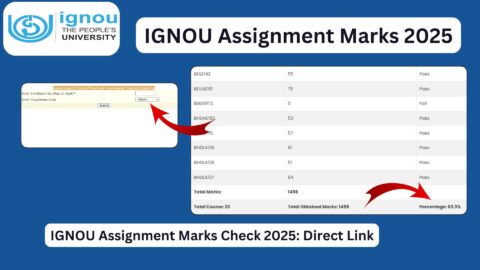
The IGNOU Assignment Status 2026 facility helps students of Indira Gandhi National Open University (IGNOU) check the status of their submitted assignments and find out whether their assignment marks have been updated. Assignments are an important part of the academic evaluation process for many IGNOU programmes, including undergraduate, postgraduate, diploma and certificate courses.
Students must complete and submit the assignments prescribed for their courses within the university’s specified deadlines. After submission, the assignments are evaluated by the relevant study centre or designated evaluator, and the marks are transmitted to the university for updating the student’s academic record.
IGNOU students can check assignment-related information online through the university’s official assessment status facility. However, assignment submission status and assignment marks are not always updated at the same time. Students may need to wait until the assignment has been evaluated and the marks have been transmitted by the study centre or regional centre.
For students preparing for the December 2026 Term-End Examination (TEE), IGNOU has announced an extension of the assignment submission deadline to 31 October 2026, subject to the approval of the competent authority. Students should read the official notification carefully and confirm the instructions applicable to their programme.
This article explains how to check IGNOU assignment status, understand the displayed information, check assignment marks, resolve missing records and access important official links.
IGNOU Assignment Status 2026: Overview
The following table provides essential information about the IGNOU assignment status facility.
| Particulars | Details |
|---|---|
| University name | Indira Gandhi National Open University |
| Common name | IGNOU |
| Service name | IGNOU Assignment Status |
| Academic year | 2026 |
| Relevant examination session | June and December TEE, as applicable |
| Eligible students | Students enrolled in eligible IGNOU programmes |
| Assignment submission mode | As prescribed by IGNOU for the programme |
| Assignment status checking mode | Online |
| Official assignment status link | https://isms.ignou.ac.in/changeadmdata/StatusAssignment.asp |
| Official IGNOU website | https://www.ignou.ac.in/ |
| Assignment portal | https://webservices.ignou.ac.in/assignments/ |
| Grade card status | https://gradecard.ignou.ac.in/view_gradecard.aspx |
| Assignment deadline for December 2026 TEE | 31 October 2026, as announced |
| Separate fee for checking assignment status | No separate fee for checking the online status |
| Marks update | After evaluation and transmission of marks |
The online status facility provides information based on the records transmitted by the relevant university authorities. If your assignment has been submitted but its status or marks are not visible, it does not automatically mean that the assignment has been rejected.
Important Links for IGNOU Assignment Status 2026
Students should use official IGNOU websites for checking assignment information, downloading assignment questions and reviewing academic results.
| Purpose | Direct link |
|---|---|
| Check assignment, project and practical marks transmission status | https://isms.ignou.ac.in/changeadmdata/StatusAssignment.asp |
| IGNOU official website | https://www.ignou.ac.in/ |
| IGNOU assignment portal | https://webservices.ignou.ac.in/assignments/ |
| IGNOU announcements and notifications | https://www.ignou.ac.in/announcements/0?nav=1 |
| IGNOU grade card status | https://gradecard.ignou.ac.in/view_gradecard.aspx |
| IGNOU Term-End Examination results | https://termendresult.ignou.ac.in/login.aspx |
| IGNOU Samarth Student Portal | https://ignou.samarth.edu.in/index.php/site/login |
| IGNOU Student Evaluation Division | https://www.ignou.ac.in/pages/182 |
| IGNOU student grievance portal | https://igram.ignou.ac.in/ |
The assignment and marks transmission status facility is especially useful when you want to check whether assignment-related records have been transmitted. The assignment portal is useful for locating assignment questions, while the grade card portal helps students review available academic marks.
What Is IGNOU Assignment Status?
IGNOU assignment status refers to the available information about the submission, processing or marks transmission of assignments associated with a student’s programme.
Assignments form part of the continuous assessment system for many IGNOU courses. Students are required to complete the prescribed questions and submit their work according to the instructions issued for their programme and examination session.
After submission, the assignment is processed through the relevant academic system. The assignment may be evaluated by the designated evaluator, and the marks are then transmitted to the university’s records.
Students often check their assignment status to confirm whether their work has been received and whether the corresponding marks have appeared in the grade card.
It is important to understand that assignment submission status and assignment marks status are different. A submission record may be available before the marks are updated. Similarly, assignment marks may take additional time to appear in the grade card after evaluation.
How to Check IGNOU Assignment Status 2026 Online?
Students can follow these steps to check the available assignment-related status information.
Step 1: Visit the official IGNOU website
Open the official IGNOU website at https://www.ignou.ac.in/.
Check the announcements and student services sections for relevant assignment notifications and links.
Step 2: Open the assignment status facility
Visit the official assignment and marks transmission status page:
https://isms.ignou.ac.in/changeadmdata/StatusAssignment.asp
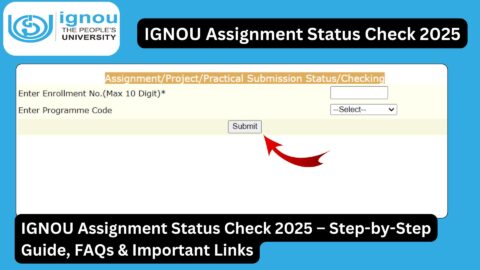
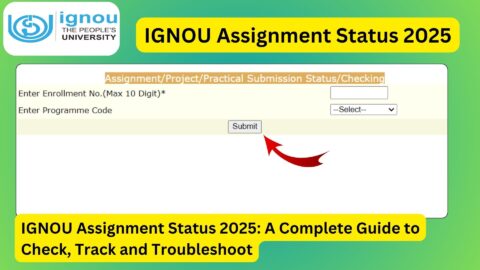
This facility displays assignment, project and practical awards or marks transmission information. The university states that the status is reflected when marks or grades have been transmitted by study centres or regional centres after evaluation.
Step 3: Enter the required details, if requested
Follow the instructions displayed on the official page. If the page asks for student information, enter the details exactly as recorded in your IGNOU admission records.
Some university assessment systems are designed for authorised study centre and regional centre staff. If the status page does not provide a student-facing form for your query, use the official grade card portal or contact your study centre for assistance.
Step 4: Check the available information
Review any assignment-related information displayed on the portal. Depending on the facility, the available details may concern assignment submission records, evaluation or marks transmission.
Do not assume that every status page will display the same fields for every programme.
Step 5: Check the grade card if marks are your concern
If your main objective is to find out whether assignment marks have been updated, visit:
https://gradecard.ignou.ac.in/view_gradecard.aspx
Enter the required enrolment and programme details and review the available course-wise marks.
Step 6: Save the available record
If the portal provides a print or download option, save the relevant information for future reference. Keep your assignment submission receipt, acknowledgement or email confirmation as supporting evidence.
If the online information is incomplete, contact the relevant study centre or regional centre.
IGNOU Assignment Status for December 2026 TEE
Students planning to appear in the December 2026 Term-End Examination should pay particular attention to assignment submission requirements.
IGNOU announced that the last date for submitting assignments, including hard and soft copies for eligible ODL and online programmes, had been extended to 31 October 2026, subject to approval by the competent authority.
Students should check the official announcement to confirm how the deadline applies to their programme and submission method. They should not assume that every course requires the same submission format.
Before submitting an assignment, students should:
- Confirm that the assignment questions belong to the correct programme and course.
- Check the applicable examination session and assignment validity.
- Follow the instructions for handwritten, printed or digital submissions, as applicable.
- Submit the assignment through the authorised method.
- Keep the submission receipt or acknowledgement.
- Check the available status and grade card information after submission and evaluation.
Students should avoid waiting until the final day. If a study centre requires a particular format or submission procedure, completing the process early provides time to resolve any technical or administrative problem.
For the latest instructions, visit the official IGNOU announcements page at https://www.ignou.ac.in/announcements/0?nav=1.
How to Check IGNOU Assignment Marks?
Students who have already submitted their assignments may want to check whether the marks have been uploaded.
The grade card portal is generally the most useful place to review available assignment marks.
Follow these steps:
- Visit https://gradecard.ignou.ac.in/view_gradecard.aspx.
- Enter your enrolment number.
- Select the correct programme code.
- Submit the required information.
- Review the marks shown against your courses.
- Check whether any assignment-related marks remain missing.
The grade card is an indicative online record. IGNOU states that it should not be used as a substitute for the final grade card, which is issued after completion of the programme and updating of all prescribed components.
If assignment marks are missing, check whether the assignment has been evaluated and whether the marks have been transmitted. You may also need to contact your study centre.
Why Is My IGNOU Assignment Status Not Updated?
There are several reasons why assignment status or marks may not appear immediately.
1. The assignment has not been evaluated
After submission, assignments must be evaluated through the relevant academic process. Until evaluation is completed, marks may not be available.
2. Marks have not been transmitted
The assignment may have been evaluated, but the marks may not yet have been transmitted by the study centre or regional centre. The university’s status facility specifically indicates that marks are reflected after transmission following evaluation.
3. The assignment submission record is incomplete
The study centre may need to record or verify the submission details. If the assignment was submitted recently, allow time for the relevant information to be processed.
4. The wrong course or session was selected
If the assignment belongs to a different course code or examination session, the records may not match your expectations. Check the course code and applicable assignment instructions.
5. The grade card has not been updated
Assignment status and grade card marks are related but separate records. A delay in updating one system does not necessarily mean that the assignment has been rejected.
6. The portal is temporarily unavailable
The website may occasionally experience technical issues or heavy traffic. Try accessing it later and check the official university website for relevant notices.
What to Do If IGNOU Assignment Marks Are Missing?
If you submitted an assignment but the marks have not appeared, take the following steps.
First, verify your submission. Locate your receipt, acknowledgement, email or other evidence showing when and how you submitted the assignment.
Second, confirm the course details. Check that the assignment was for the correct course and session and that it was submitted through the required method.
Third, check your grade card. Visit the official grade card portal and review the available marks for the relevant course.
Fourth, contact your study centre. Ask whether the assignment has been evaluated and whether the marks have been transmitted to the university.
Fifth, contact your regional centre if needed. If the study centre confirms that the marks were transmitted but the records remain incomplete, ask the regional centre for guidance.
Finally, contact the Student Evaluation Division where appropriate. IGNOU provides separate contact channels for assignment-related queries and grade card discrepancies.
According to IGNOU’s January 2026 Common Prospectus, assignment-related queries can be directed to the relevant university office using the published contact information, including the email address assignment@ignou.ac.in. Students should verify the current contact details on the official website before sending a query.
When contacting the university, include your enrolment number, programme code, course code, examination session and submission date. Avoid sending unnecessary personal documents or sharing your login credentials.
IGNOU Assignment Passing Marks
The minimum passing requirements for assignments depend on the applicable programme and course rules. Students should consult their programme guide or official academic regulations rather than assuming that the same passing percentage applies to every programme.
Some programmes have separate assessment requirements for assignments, theory examinations, practical examinations and project work. Meeting the requirement for one component does not necessarily mean that the entire course has been completed successfully.
To understand your academic position:
- Check the minimum passing requirements in your programme guide.
- Review assignment marks in your grade card.
- Check the relevant Term-End Examination result.
- Confirm whether practical, project or other assessments are compulsory.
- Contact your study centre if you need clarification about course-specific requirements.
Students should also remember that an assignment mark may be recorded separately from the theory examination mark. Review all required components before concluding that a course has been completed.
Difference Between IGNOU Assignment Status and Grade Card Status
Assignment status and grade card status serve related but different purposes.
| Feature | Assignment status | Grade card status |
|---|---|---|
| Main purpose | Check assignment-related submission or marks transmission information | Review available academic marks and course results |
| Information available | Depends on the status facility being used | Course-wise marks, grades and assessment details, where available |
| Assignment submission confirmation | May be available through the relevant centre or facility | Not necessarily shown as a complete submission history |
| Assignment marks | May concern the transmission of marks | Shows available marks after they are recorded |
| Theory examination marks | Not the primary purpose | May be displayed when results are updated |
| Best next step for missing assignment marks | Contact the study centre and verify transmission | Check the relevant course entry and contact the university if necessary |
Students should use the appropriate portal for their particular question. If you want to check whether assignment marks have appeared, reviewing the grade card is usually helpful. If you need to verify the submission or transmission record, contact your study centre or use the applicable status facility.
FAQ about IGNOU Assignment Status 2026
How can I check IGNOU Assignment Status 2026?
Visit the official IGNOU website and use the relevant assignment or marks transmission facility. You can also check available assignment marks through the official grade card portal at https://gradecard.ignou.ac.in/view_gradecard.aspx.
What is the official IGNOU assignment status link?
The official assignment, project and practical marks transmission status page is:
https://isms.ignou.ac.in/changeadmdata/StatusAssignment.asp
The page reflects information when marks or grades have been transmitted after evaluation. If it does not provide the student-facing information you need, contact your study centre.
What is the last date for IGNOU assignments for December 2026 TEE?
IGNOU announced an extension of the assignment submission deadline to 31 October 2026 for the relevant ODL and online programmes, subject to approval by the competent authority. Check the official notification for programme-specific instructions.
Why are my IGNOU assignment marks not showing?
Marks may be missing because evaluation is incomplete, the study centre has not transmitted the marks, or the university’s records have not yet been updated. Verify your submission and contact the relevant study centre if the issue continues.
How long does IGNOU take to update assignment marks?
There is no single guaranteed processing time for every course and study centre. The time required depends on evaluation, transmission and administrative processing. Check the official portals periodically.
Can I check IGNOU assignment marks through the grade card?
Yes. Students can review available assignment marks through the official grade card portal by entering the required enrolment and programme details.
Does missing assignment status mean my assignment was rejected?
No. Missing status does not automatically mean rejection. The submission may not have been recorded, evaluated or transmitted yet. Keep your submission evidence and ask the relevant study centre to verify the record.
What should I do if my study centre has not updated my assignment marks?
Contact your study centre and ask whether the assignment has been evaluated and the marks transmitted. If the issue remains unresolved, contact your regional centre or the relevant university office.
Is there any fee to check IGNOU assignment status?
There is generally no separate fee for checking assignment-related information online. Assignment submission requirements and any other programme-specific charges should be verified through official university instructions.
Where can I download IGNOU assignments?
Students can access the official assignment portal at https://webservices.ignou.ac.in/assignments/. Select the appropriate programme and locate the assignment questions applicable to your course and examination session.
Can I check assignment status without an enrolment number?
Some public information pages can be viewed without logging in, but student-specific academic records may require identifying details. If you cannot find your enrolment number, check your admission records or contact IGNOU through its official support channels.
What is the difference between assignment status and assignment marks?
Assignment status concerns the available submission or processing information, while assignment marks indicate the result of the evaluation after it has been recorded. A submitted assignment may not have marks available immediately.
Conclusion
The IGNOU Assignment Status 2026 facility helps students follow the progress of their assignments and identify whether marks have been transmitted to the university. Students should use official IGNOU resources, keep their assignment submission receipts and review their grade cards regularly.
For the December 2026 Term-End Examination, IGNOU announced an assignment submission deadline of 31 October 2026, subject to approval by the competent authority. Students should check the official notification to confirm the applicable requirements for their programme and submission method.
If assignment marks are missing, do not immediately assume that your submission has been rejected. Verify the submission details, check the grade card and contact your study centre to confirm evaluation and transmission. For unresolved issues, seek guidance from the regional centre or the appropriate university office.
Using official links and keeping accurate submission records can help students resolve assignment-related queries and stay informed about their academic progress.