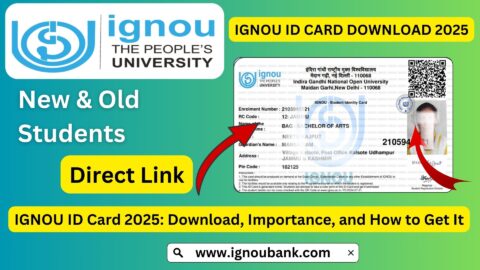
IGNOU ID Card Download 2026: The IGNOU Identity Card is an important document for every student enrolled at Indira Gandhi National Open University. It serves as proof of student identity and may be required when visiting a regional centre, study centre or library, attending academic activities, and appearing for Term-End Examinations (TEE).
IGNOU provides an online facility that allows students to download their identity cards through the Samarth Student Portal. After admission is confirmed and the student account is ready, learners can log in, open the services section and download their ID card in PDF format.
If you are searching for the IGNOU ID card download link, this article explains the complete process, including new student registration, login instructions, the PDF password, printing guidance and solutions to common problems. It also explains what to do if your ID card is not visible after admission.
IGNOU ID Card Download 2026: Overview
Before downloading your identity card, check the important details in the table below.
| Particulars | Details |
|---|---|
| University | Indira Gandhi National Open University |
| Document | IGNOU Student Identity Card |
| Academic session | 2026 |
| Download method | Online |
| Official student portal | IGNOU Samarth |
| Official portal link | https://ignou.samarth.edu.in/ |
| Login details | Student portal username and password |
| PDF password | Enrolment number, as instructed by the university portal |
| File format | |
| Availability | After admission confirmation and portal processing |
| Official website | https://www.ignou.ac.in/ |
Important: Students should use the official Samarth portal to download their identity cards. The availability of the ID card depends on admission confirmation and the status of the student account.
IGNOU ID Card Download Official Link
Students can use the official IGNOU Samarth Student Portal to access their identity card.
Official link: https://ignou.samarth.edu.in/
Direct student login: https://ignou.samarth.edu.in/index.php/site/login
After opening the portal, log in using your registered student account. Navigate to the Services section and look for the ID Card or Download I-Card option.
The university’s online programme FAQ explains that students can register on the Samarth portal, access the Services section and download the student identity card as a PDF. It also states that the enrolment number is used to open the downloaded file.
Students should avoid unofficial websites that ask for their enrolment number, password or other personal information in exchange for an ID card download.
How to Download IGNOU ID Card Online?
The process of downloading an IGNOU ID card is straightforward once your admission has been confirmed and your Samarth account is active.
Follow these steps carefully.
Step 1: Visit the Official IGNOU Student Portal
Open the official IGNOU Samarth website:
You can access the portal using a computer, laptop or smartphone. Make sure that the website address is correct before entering your login details.
Step 2: Log In to Your Student Account
Enter your registered username and password on the login page.
Your enrolment number may be used as your username, depending on your account registration details and the instructions shown on the portal.
If you are a new student who has not created a Samarth account, complete the registration process first.
Step 3: Open the Services Section
After logging in successfully, you will reach your student dashboard.
Look for the Services option in the menu. The available services may include different student facilities, depending on your account and programme.
Step 4: Select the ID Card Option
Find the option named ID Card or Download I-Card.
Click on it to access the identity card download facility.
Step 5: Download the IGNOU ID Card PDF
Select the download option. Your identity card should be downloaded as a PDF file if it is available in your account.
Save the PDF on your computer or mobile phone so that you can access it whenever required.
Step 6: Open the PDF Using Your Enrolment Number
If the downloaded PDF is password-protected, use your enrolment number as the password, following the university’s portal instructions.
Enter the enrolment number carefully. If the PDF does not open, check that you have entered the correct number and that there are no additional spaces.
Step 7: Save or Print Your Identity Card
Once the file opens, check your personal information and save a backup copy.
You can also print the identity card for physical use. Keep both the digital and printed versions safely.
How to Register on the IGNOU Samarth Portal for ID Card Download?
Newly admitted students may need to create their student accounts before accessing the ID card facility.
If you have received your enrolment number but have not registered on the Samarth Student Portal, follow these general steps.
- Visit https://ignou.samarth.edu.in/.
- Select the New Registration option.
- Enter the required details, including your programme, name and enrolment number.
- Submit the registration information.
- Check your registered email for the one-time password (OTP).
- Enter the OTP and follow the instructions displayed on the portal.
- Create your student portal password.
- Return to the login page.
- Log in using your registered credentials.
- Open Services and check the ID Card download option.
Make sure that the name and programme details entered during registration match your admission information.
If the portal does not recognise your enrolment number or registration details, check your admission confirmation first. You may also contact the relevant IGNOU support office for assistance.
What Is the Password to Open the IGNOU ID Card PDF?
One common question among students is about the password required to open the downloaded identity card.
According to the IGNOU online programme FAQ, students should use their enrolment number to open the downloaded ID card PDF.
For example, if your enrolment number is 123456789, enter that number as the PDF password when prompted.
This is an illustrative example only. Use your own enrolment number.
If the PDF does not open, try the following:
- Check that you have entered the correct enrolment number.
- Make sure there are no spaces before or after the number.
- Confirm that the PDF has downloaded completely.
- Open the file using an updated PDF reader.
- Download the file again if it appears damaged.
Do not share your enrolment number or other personal login information with unknown websites or individuals.
How to Download IGNOU ID Card on Mobile?
Students who do not have access to a computer can also try downloading their identity cards using a smartphone.
The general process is similar to downloading the document on a laptop.
- Open Chrome or another updated mobile browser.
- Visit https://ignou.samarth.edu.in/.
- Log in using your student account.
- Open the Services section.
- Select the ID Card or Download I-Card option.
- Download the PDF file.
- Open the file using a PDF reader.
- Enter your enrolment number if a password is requested.
- Save the document to your phone.
If the download option is not visible, try switching your browser to desktop mode. You can also use a laptop or desktop computer if the mobile interface does not display all available options.
What to Do If the IGNOU ID Card Is Not Showing?
Sometimes students log in to the Samarth portal but cannot find their identity card. This can happen for several reasons.
1. Admission Is Not Yet Confirmed
The ID card may not be available until the university has processed and confirmed your admission.
Check your admission status before trying to download the document repeatedly.
2. Student Portal Registration Is Incomplete
Some students receive their enrolment numbers but do not complete the separate student portal registration.
If you have not registered on Samarth, use the New Registration option and follow the instructions.
3. Incorrect Student Details
An incorrect programme code, name or enrolment number can cause registration problems.
Check your admission confirmation and enter the details exactly as required.
4. Temporary Portal Problems
The student portal may occasionally experience technical issues or slow loading.
Try again after some time, refresh the page or use another updated browser.
5. ID Card Has Not Been Generated Yet
There may be a delay between admission confirmation and the availability of the identity card.
If your admission is confirmed but the ID card is still missing, check the official portal again later. If the problem continues, contact your regional centre or the university’s student support service.
How to Download IGNOU ID Card for Old Students?
Students admitted in earlier academic sessions may have different portal or record requirements.
IGNOU’s current student identity card facility is available through the Samarth Student Portal. However, students with older admission records should check whether their information is available in the current portal.
If you cannot access your identity card through Samarth:
- Check your original admission confirmation.
- Keep your enrolment number and programme code ready.
- Try the official student portal.
- Contact your regional centre if your old admission record is not available.
- Follow the instructions provided by IGNOU for your admission category.
Do not assume that an old ID card download link will work for every student. The correct process can depend on the admission period and the availability of records.
Why Is the IGNOU Identity Card Important?
The IGNOU ID card is more than a document containing your name and enrolment number. It is an important proof of your association with the university.
Students should retain their identity cards throughout their academic journey.
1. Proof of Student Identity
The identity card helps establish that you are an enrolled IGNOU student. It contains important details that help identify your student record.
2. Term-End Examinations
Students may be required to present their IGNOU identity card when appearing for university examinations. Always check the latest examination instructions and carry the other documents required by the university.
3. Study Centre Visits
The ID card may be required when visiting your study centre or regional centre for academic services, counselling or other student-related activities.
4. Library Access
Students may need to show their identity cards when accessing library facilities provided through the university or its centres.
5. Practical Examinations and Viva-Voce
Depending on the programme, students may be asked to present their identity cards during practical examinations, project presentations or viva-voce activities.
6. University-Related Activities
The identity card can also be useful during admission-related verification, academic support activities and other official interactions with IGNOU.
Keep in mind that the ID card does not replace other documents that may be required for a particular service or examination.
IGNOU ID Card: Details to Check After Downloading
After downloading your identity card, review all the information carefully.
| Information | What to Check |
|---|---|
| Student name | Spelling should match your admission records |
| Enrolment number | Number should be correct |
| Programme name/code | Should match your enrolled programme |
| Photograph | Should be visible and identifiable |
| Admission details | Should correspond to your student record |
| University details | IGNOU information should be displayed |
| Other printed details | Check for missing or incorrect information |
If you find a mistake, do not edit the official PDF yourself and treat the edited copy as an official document. Contact IGNOU or your regional centre and follow the correction process.
Difference Between IGNOU ID Card and Hall Ticket
Students sometimes confuse the IGNOU identity card with the examination hall ticket. Both documents are important, but they serve different purposes.
| Particulars | IGNOU ID Card | IGNOU Hall Ticket |
|---|---|---|
| Purpose | Identifies the student | Provides examination-related details |
| Availability | After admission processing | Before the relevant examination session |
| Validity | Retained during the programme, subject to university rules | Applicable to a particular examination session |
| Main information | Student identity and programme details | Exam centre, dates and course details |
| Download facility | Samarth Student Portal | Official examination or hall ticket facility |
| Usage | Student verification and university activities | Entry and participation in examinations |
Students appearing for the December 2026 TEE should check the separate hall ticket announcement and download their admit card when it becomes available.
Important Links for IGNOU ID Card Download 2026
The following table contains useful links for downloading your identity card and accessing other IGNOU student services.
| Purpose | Important Link |
|---|---|
| IGNOU official website | https://www.ignou.ac.in/ |
| IGNOU Samarth Student Portal | https://ignou.samarth.edu.in/ |
| Direct Samarth login | https://ignou.samarth.edu.in/index.php/site/login |
| IGNOU ODL admission portal | https://ignouadmission.samarth.edu.in/ |
| IGNOU online programmes | https://iop.ignouonline.ac.in/ |
| IGNOU grade card | https://gradecard.ignou.ac.in/ |
| IGNOU examination portal | https://exam.ignou.ac.in/ |
| IGNOU assignment question papers | https://webservices.ignou.ac.in/assignments |
| IGNOU digital study materials | https://egyankosh.ac.in/ |
| IGNOU announcements | https://www.ignou.ac.in/announcements/0?nav=1 |
| IGNOU grievance portal | https://igram.ignou.ac.in/ |
Always check the official IGNOU website for the latest information about student services, admission and examination requirements.
Important Tips for IGNOU Students
Keep the following suggestions in mind after downloading your identity card:
- Save a digital copy on your phone and computer.
- Keep a backup in a secure location.
- Print a copy if you need a physical identity card.
- Check your name, enrolment number and programme details.
- Do not share your student portal password with anyone.
- Use only official IGNOU websites for student services.
- Keep your identity card available when visiting university centres.
- Check the latest examination instructions before attending a TEE.
- Contact your regional centre if your ID card contains incorrect information.
- Keep your identity card safely until you complete your programme.
FAQ about IGNOU ID Card Download 2026
How can I download my IGNOU ID card in 2026?
Visit the official IGNOU Samarth Student Portal, log in to your student account, open the Services section and select the ID Card or Download I-Card option. Download the available PDF and save it.
What is the official IGNOU ID card download link?
The official student portal is https://ignou.samarth.edu.in/. Students can use this portal to access their identity card after completing the required registration and login process.
Can I download my IGNOU ID card using my enrolment number?
Your enrolment number is an important part of the student registration and identification process. Log in using the credentials associated with your Samarth account. The university’s online programme FAQ also instructs students to use their enrolment number to open the downloaded ID card PDF.
What is the password for the IGNOU ID card PDF?
The enrolment number is used as the PDF password according to the university’s online programme FAQ. Enter your own enrolment number carefully when prompted.
Is IGNOU ID card download available online?
Yes. IGNOU provides an online student identity card download facility through its Samarth Student Portal.
Can I download my IGNOU ID card on my mobile phone?
Yes. You can open the official Samarth portal using a mobile browser, log in, navigate to Services and download the ID card PDF if it is available.
What should I do if my IGNOU ID card is not showing?
First, check whether your admission is confirmed and your Samarth registration is complete. If the ID card is still unavailable, try again later or contact your regional centre for assistance.
Is the IGNOU ID card compulsory for examinations?
Students should carry their identity card when appearing for examinations and follow the latest examination instructions. The hall ticket and any other documents required by the university may also need to be presented.
Can I use a digital IGNOU ID card?
You can keep the downloaded digital copy available on your phone or another device. Whether a digital copy is sufficient for a particular activity depends on the university’s applicable instructions. Carry a printed copy when required.
How can newly admitted students download their IGNOU ID cards?
New students should first check that their admission has been confirmed. They may then need to complete New Registration on the Samarth Student Portal, log in and download the ID card from the Services section.
What if I forget my IGNOU Samarth password?
Use the password recovery facility available on the official student portal. Follow the instructions to reset your password using the registered details.
Can I download my IGNOU ID card again if I lose it?
If your identity card is available in your student account, you can log in again and download another copy. Keep a backup to avoid inconvenience.
What should I do if my name is incorrect on the ID card?
Contact your regional centre or the appropriate IGNOU support office and ask about the official correction procedure. Do not rely on manually editing the PDF.
Is the IGNOU ID card the same as the hall ticket?
No. The ID card establishes your student identity, whereas the hall ticket contains information related to a particular examination session. Students may need both documents.
How long should I keep my IGNOU ID card?
Keep your identity card throughout your programme and retain it as long as it may be needed for university-related verification or records. Follow any specific university instructions about its validity.
Conclusion
The IGNOU ID card is an essential document for students enrolled at Indira Gandhi National Open University. It helps establish student identity and may be required for examinations, study centre visits, library access, practical activities and other university-related services.
Students can download their identity cards online through the official Samarth Student Portal. The general process involves completing student registration, logging in, opening the Services section and selecting the ID Card download option. If the downloaded PDF is password-protected, use your enrolment number as instructed by IGNOU.
Make sure your admission is confirmed, your student details are correct and your portal account is active before attempting to download the document. Save a digital copy and keep a printed version if needed. For any problem related to missing or incorrect details, contact your regional centre or use the official IGNOU support channels.