The IGNOU Samarth Portal is an important online platform for students of Indira Gandhi National Open University (IGNOU). It helps learners access various academic and administrative services, including student login, admission-related information, programme details and other online facilities.
IGNOU offers undergraduate, postgraduate, diploma and certificate programmes through its open and distance learning system. Since students are located in different parts of India and other countries, online services play an important role in making university processes easier and more accessible.
Through the Samarth portal, students can access services according to their registration status and the facilities enabled for their programme. These may include admission-related activities, student profile information, academic records and other university services.
Students often search for the IGNOU Samarth Portal to check their admission status, access their student account, find assignment-related information and manage their academic activities. However, it is important to understand that not every IGNOU service is available through one login page. Some services, such as grade cards, hall tickets and examination updates, may be provided through separate official university pages.
In this article, you will learn how to access the IGNOU Samarth Portal, complete student login, check admission information, understand its services and find important links for IGNOU students.
IGNOU Samarth Portal 2026 Overview
| Particulars | Details |
|---|---|
| University Name | Indira Gandhi National Open University |
| Popular Name | IGNOU |
| Portal Name | IGNOU Samarth Portal |
| Portal Type | Online Student and Academic Services |
| Main Purpose | Student login and access to available university services |
| Available For | Eligible IGNOU applicants and students |
| Login Requirement | Registered login credentials, as applicable |
| Admission Services | Available through the relevant admission system |
| Academic Services | Depend on programme and portal access |
| Official University Website | https://www.ignou.ac.in/ |
| Samarth Portal | https://ignou.samarth.edu.in/ |
| Student Login | https://ignou.samarth.edu.in/index.php/site/login |
What Is the IGNOU Samarth Portal?
The IGNOU Samarth Portal is an online platform associated with the university’s digital student services. It is designed to help students and applicants access relevant information and complete certain academic or administrative activities online.
The platform is part of the broader Samarth e-Governance initiative used by educational institutions to manage digital academic processes.
For IGNOU students, the portal provides an online access point for services that may depend on their programme, admission status and account permissions.
Instead of relying entirely on physical visits or paper-based communication, students can use available online facilities to access information and manage certain university-related activities.
The portal is particularly useful for students pursuing distance education because they may not need to visit a regional centre for every routine online activity.
However, students should remember that IGNOU uses different online platforms for different purposes. The Samarth portal should not be confused with every other IGNOU website or student service.
IGNOU Samarth Portal Login 2026
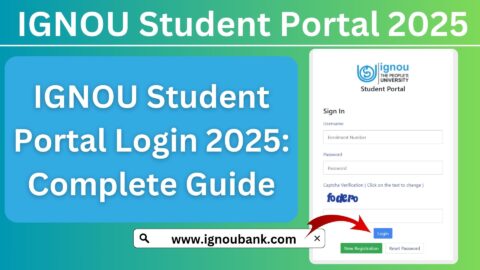
Students who already have an account can use the student login page to access the services available to them.
The official student login link is:
Follow these steps to access your account.
Step 1: Visit the Official Login Page
Open the IGNOU Samarth student login page using the link provided above.
Step 2: Enter Your Login Credentials
Enter the username or other login details requested by the portal.
Step 3: Enter Your Password
Type your registered password carefully. Make sure that the Caps Lock key and other keyboard settings are correct.
Step 4: Complete Verification
If the portal displays a verification code or another security check, complete it as instructed.
Step 5: Click the Login Option
Submit your details using the login button.
Step 6: Access Available Services
After successful login, you can access the services displayed in your account.
The available options may depend on your student status, programme and the facilities enabled by the university.
How to Register on the IGNOU Samarth Portal?
New students or applicants may need to create an account before accessing certain online services.
The registration process depends on the specific portal and the admission or student service being used.
Generally, applicants may need to follow these steps:
- Visit the relevant official IGNOU Samarth page.
- Find the registration or new-user option, if available.
- Enter the required personal information.
- Provide a valid email address and mobile number, where requested.
- Complete the verification process.
- Create login credentials according to the portal instructions.
- Submit the registration details.
- Save the confirmation or account information securely.
Students should use their own contact details and provide accurate information. If an account has already been created, they should use the existing login rather than creating multiple accounts unnecessarily.
IGNOU Samarth Portal Admission 2026
One of the important reasons applicants visit IGNOU’s online platforms is to access admission-related services.
IGNOU offers admission to various programmes through its online admission system. Applicants should use the official admission portal and follow the instructions provided for their selected academic session.
The general admission process includes the following steps:
Step 1: Visit the IGNOU Admission Portal
Open the official admission website:
Step 2: Select the Relevant Admission Session
Check the available admission cycle and choose the appropriate session.
Step 3: Create an Account
New applicants may need to register by providing their personal information and contact details.
Step 4: Select Your Programme
Choose the programme you want to study. Read the eligibility requirements and programme details before proceeding.
Step 5: Complete the Application Form
Enter your personal information, educational qualifications and other requested details.
Step 6: Upload Documents
Upload the required photograph, signature, educational certificates and other documents in the prescribed format.
Step 7: Pay the Admission Fee
Pay the applicable fee through the authorised payment facility.
Step 8: Submit the Application
Review the details carefully before submitting the form. Save the confirmation page and application details for future reference.
Applicants should check the official admission notification for programme availability, eligibility, fee details and application deadlines.
How to Check IGNOU Admission Status?
After submitting an admission application, students may want to know whether their application has been processed.
The admission status facility helps applicants check available information about their admission application.
Follow these general steps:
- Visit the official IGNOU website.
- Open the relevant admission or student service section.
- Find the admission status option.
- Enter the requested details, such as your enrollment number or control number, if required.
- Submit the information.
- Check the displayed admission information.
Students should keep their application confirmation and payment receipt safe.
If the admission status is not updated, allow time for processing and follow the instructions provided by IGNOU. If the issue continues, contact the relevant admission support channel or regional centre.
IGNOU Samarth Portal Assignment Information
Assignments are an important component of many IGNOU academic programmes. Students are generally required to complete and submit assignments according to the university’s prescribed instructions.
The Samarth portal should not be assumed to be the universal assignment submission or evaluation platform for every programme. Assignment-related information and services may be provided through different university or regional-centre channels.
Students should check the official assignment instructions for their programme and session.
Before submitting an assignment, remember to:
- Download the correct assignment question paper.
- Check the relevant course codes.
- Follow the prescribed assignment format.
- Complete all required questions.
- Write your enrollment number and other requested details.
- Submit the assignment using the prescribed method.
- Keep the submission receipt or acknowledgement.
Students can use the following resources for additional assignment-related information:
IGNOU Assignment Front Page:
Students should also check their study centre or regional centre for submission instructions and deadlines.
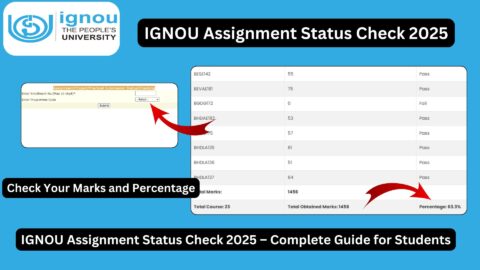
How to Check IGNOU Assignment Result and Grade Card?
After submitting assignments, students often want to check whether their marks have been updated.
The IGNOU grade card provides academic assessment information, which may include assignment marks, term-end examination marks and other applicable components.
Students can check their grade card by following these steps:
- Open the IGNOU grade card service.
- Enter your enrollment number.
- Select your programme, if required.
- Submit the details.
- Check the available course-wise marks.
- Save or print the displayed information.
You can also access this grade card resource:
Assignment marks may take time to appear after submission because evaluation and mark-entry processes are completed separately. Missing marks do not automatically mean that an assignment has been rejected.
If the marks remain unavailable, students should contact their study centre with their submission proof.
IGNOU Samarth Portal and Hall Ticket
Students preparing for IGNOU Term-End Examinations need to download their hall tickets when the university releases them.
The hall ticket is an important examination document containing candidate-specific information.
It may include:
- Student name.
- Enrollment number.
- Programme details.
- Course or paper information.
- Examination centre.
- Examination instructions.
The Samarth student portal should not be confused with the separate examination and hall ticket services.
Students should visit the official IGNOU website and follow the relevant examination notification to access their hall ticket.
Official website:
The hall ticket portal or examination link may change according to the examination session. Always use the latest official university announcement.
Important Services Available to IGNOU Students
IGNOU students may need to access several online services during their academic journey.
The following table explains some common services and their purposes.
| Service | Purpose |
|---|---|
| Samarth Student Login | Access available student account services |
| Online Admission | Apply for available IGNOU programmes |
| Admission Status | Check available admission application information |
| Grade Card | View assignment and examination marks |
| Hall Ticket | Download examination entry document |
| Assignment Information | Access assignment instructions and resources |
| Examination Date Sheet | Check the Term-End Examination timetable |
| Study Material | Access learning resources |
| Student Support | Find official assistance and contact information |
Not all these services are necessarily available inside the Samarth login. Students should use the appropriate official page for each activity.
IGNOU Samarth Portal Password Recovery
Students may sometimes forget their login password or face difficulty accessing their accounts.
If you cannot log in, follow these general steps:
- Open the official Samarth login page.
- Look for the Forgot Password or password recovery option, if available.
- Enter the requested account information.
- Complete the verification process.
- Follow the instructions sent through the registered recovery channel.
- Create a new password if the portal permits it.
- Try logging in again.
If the recovery option is unavailable or does not work, use the official portal’s help or contact facility.
Do not share your password, OTP or other security information with anyone claiming to provide account recovery assistance.
Common Problems on the IGNOU Samarth Portal and Their Solutions
Students may occasionally face technical problems while using the portal. Some common issues and possible solutions are explained below.
1. Unable to Login
If your login attempt fails, check whether your username and password are correct.
Make sure that you are using the correct student login page and that there are no typing errors.
2. Forgot Password
Use the password recovery facility available on the login page. Follow the official instructions to reset your password.
3. Portal Not Opening
If the website does not open, check your internet connection and try again after some time.
You can also try opening the portal in another browser or clearing the browser cache.
4. Admission Information Not Showing
Admission records may take time to update. Check your application confirmation and payment receipt before contacting the relevant support channel.
5. Assignment Marks Not Updated
Assignment evaluation and grade card updates may take time. Contact your study centre if the marks remain missing after the expected processing period.
6. Incorrect Student Details
If your name, programme or other important details appear incorrect, contact the appropriate IGNOU authority and follow the prescribed correction procedure.
7. Technical Error During Registration
Check whether all required fields have been completed correctly. Avoid submitting multiple applications without first checking the status of an earlier attempt.
Important Links for IGNOU Samarth Portal 2026
The following links are useful for IGNOU students and applicants.
| Description | Important Link |
|---|---|
| IGNOU Official Website | https://www.ignou.ac.in/ |
| IGNOU Samarth Portal | https://ignou.samarth.edu.in/ |
| IGNOU Student Login | https://ignou.samarth.edu.in/index.php/site/login |
| IGNOU Admission Portal | https://ignouadmission.samarth.edu.in/ |
| Check IGNOU Grade Card | https://www.ignoubank.com/ignou-grade-card/ |
| IGNOU Assignment Front Page | https://www.ignoubank.com/ignou-assignment-front-page/ |
| IGNOU Book Status | https://www.ignoubank.com/ignou-book-status/ |
| IGNOU Hall Ticket Information | https://www.ignou.ac.in/ |
| IGNOU Examination Date Sheet | https://www.ignou.ac.in/ |
Important: The IGNOU official website and relevant Samarth portals should be treated as the primary sources for university information. Additional resources listed above are informational services and do not replace official university records.
Important Instructions for IGNOU Students
Students should follow these precautions while using the IGNOU Samarth Portal:
- Always use the correct official website.
- Enter accurate personal and academic details.
- Keep login credentials confidential.
- Do not share OTPs or passwords.
- Save important application confirmations and payment receipts.
- Check admission and academic updates regularly.
- Use the correct portal for each university service.
- Contact the relevant regional centre when necessary.
- Avoid relying on unofficial messages about admission or examination results.
- Follow the latest instructions published by IGNOU.
FAQ
What is the IGNOU Samarth Portal?
The IGNOU Samarth Portal is an online platform that provides access to selected student and academic services. The facilities available depend on the student’s account and the services enabled by the university.
How can I log in to the IGNOU Samarth Portal?
Visit the official student login page, enter your registered login credentials and complete any required verification. After successful login, access the services available in your account.
How can new students register on the IGNOU Samarth Portal?
Visit the relevant official portal and look for the registration or new-user option, if available. Enter the required details and follow the instructions to create an account.
Can I check IGNOU assignment marks through the Samarth Portal?
Assignment marks are generally checked through the IGNOU grade card service. Not every assignment-related service is available through the Samarth login.
How can I check my IGNOU admission status?
Use the relevant official admission status facility and enter the information requested by the university. Keep your application and payment details available.
What should I do if I forget my Samarth portal password?
Use the password recovery option on the official login page, if available. Follow the verification instructions and reset your password through the authorised process.
Can I download my IGNOU hall ticket through the Samarth Portal?
Hall ticket availability is managed through the relevant examination services. Check the official IGNOU website for the current examination session’s hall ticket notification.
Why is the IGNOU Samarth Portal not opening?
The portal may be temporarily unavailable because of maintenance, high traffic or an internet connection issue. Try again later, check your connection or use another browser.
Is the IGNOU Samarth Portal available for all programmes?
The services available may depend on the programme, student status and university arrangements. Students should follow the instructions applicable to their particular programme.
Is the IGNOU Samarth Portal the same as the IGNOU official website?
No. The official IGNOU website provides general university information and links to different services. The Samarth portal is a separate online platform used for selected student and administrative services.
Where can I check my IGNOU grade card?
Students can use the relevant grade card service to check assignment and examination marks. The university’s official website should be used to find the current authorised grade card link.
Conclusion
The IGNOU Samarth Portal is a useful online platform for students who need to access university-related digital services. It provides a convenient way to reach available student account facilities and supports various academic and administrative processes.
Students should understand that the Samarth portal is not the only website used by IGNOU. Admission applications, grade cards, hall tickets, examination date sheets and assignment-related information may be available through separate university services.
For a smooth experience, always use the correct official portal, keep your login credentials secure and follow the latest instructions published by IGNOU. If you face problems with admission, login or academic records, contact the appropriate university support channel or regional centre.
By using the correct online services, students can manage important academic activities more conveniently throughout their IGNOU journey.