IGNOU ID Card Download With Enrollment No.: IGNOU ID card is an important document for students enrolled in Indira Gandhi National Open University. It is used as a student identification document and may be required for various academic and administrative purposes. Students can keep a digital copy of their IGNOU ID card on their mobile phone or computer and use it whenever required.
If you are searching for IGNOU ID card download with enrollment no, this guide explains the process in a simple and detailed manner. You can use your enrollment number and other required details to access your IGNOU student ID card, depending on the method available for your admission session and student account.
What Is an IGNOU ID Card?
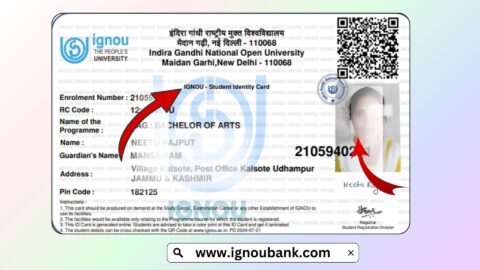
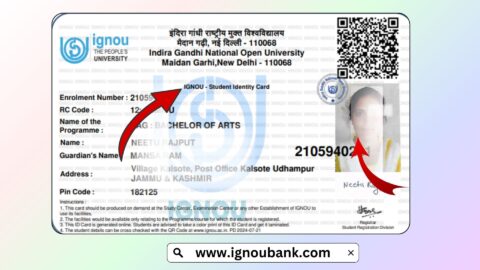
An IGNOU ID card is an official student identification document provided to students enrolled with Indira Gandhi National Open University. It contains important details related to the student’s admission and identity.
The ID card may include information such as the student’s name, enrollment number, programme, photograph, regional centre and other admission-related details.
Students are generally advised to keep their ID card safe throughout their programme because it can be useful when dealing with IGNOU regional centres, study centres, examinations and other academic activities.
A digital copy of the ID card can also be useful because students can save it on their smartphone, computer or cloud storage and access it whenever necessary.
IGNOU ID Card Download With Enrollment No
Students searching for IGNOU ID card download with enrollment no should first understand that the enrollment number is one of the most important details associated with their IGNOU student record.
Your enrollment number is provided after successful admission and is used for several IGNOU-related services. Depending on the student portal and admission session, you may need your enrollment number along with other login or verification details to access your ID card.
If you already have your enrollment number, you should keep it ready before starting the ID card download process.
You can use the following page for guidance and access to the IGNOU ID card download facility:
Download IGNOU ID Card:
https://www.ignoubank.com/ignou-id-card-download/
Important IGNOU ID Card Links and Information
| Information | Details |
|---|---|
| University | Indira Gandhi National Open University |
| Document | IGNOU Student ID Card |
| Main Requirement | IGNOU Enrollment Number |
| Download Guide | https://www.ignoubank.com/ignou-id-card-download/ |
| Useful For | Student identification and academic purposes |
| Students | IGNOU enrolled students |
| Format | Digital ID card, depending on the available portal |
| Important Detail | Keep your enrollment number and admission details ready |
| Recommended Action | Save a digital copy after downloading |
How to Download IGNOU ID Card With Enrollment Number?
The process for downloading an IGNOU ID card may depend on your admission session and the portal through which your admission was completed. However, students can follow a general process to locate and download their student ID card.
Step 1: Keep Your Enrollment Number Ready
Before trying to download your IGNOU ID card, keep your enrollment number available.
Your enrollment number is associated with your IGNOU admission record. You may find it in your admission confirmation, student account or other IGNOU admission-related documents.
Make sure that you enter the enrollment number correctly. A single incorrect digit can prevent the system from identifying your student record.
Step 2: Open the IGNOU ID Card Download Page
To make the process easier, you can visit: https://www.ignoubank.com/ignou-id-card-download/
This page provides information about the IGNOU ID card download process and can help students understand how to access their ID card.
Step 3: Check the Required Details
Depending on the process applicable to your admission, you may need to provide your enrollment number and other information.
Keep details such as your enrollment number, programme information, date of birth or login credentials available if they are required.
It is important to enter the details exactly as they appear in your IGNOU admission records.
Step 4: Access Your Student ID Card
After entering the required information, follow the instructions provided on the relevant IGNOU student portal or ID card page.
If your student record is available and the information has been entered correctly, you should be able to access your ID card.
Step 5: Download the ID Card
Once the ID card is displayed, look for the available download or print option.
You can save the document as a PDF if the option is available. It is recommended to keep the downloaded copy in a safe location on your computer or smartphone.
Step 6: Take a Printout
Although a digital copy can be useful, students may also choose to take a printout of their IGNOU ID card.
Keep the printed ID card safely with your other academic documents. You can also laminate the printed copy to protect it from damage.
Can I Download IGNOU ID Card Using Enrollment Number?
Yes, the enrollment number is an important student identifier and may be required when accessing IGNOU student services. However, the exact information required to access an ID card can vary depending on the admission process, student portal and applicable instructions.
Therefore, students should keep their enrollment number available and follow the instructions provided for their particular admission record.
If you are specifically looking for an easy guide to the process, you can visit: https://www.ignoubank.com/ignou-id-card-download/
Where Can I Find My IGNOU Enrollment Number?
Your IGNOU enrollment number is generally provided as part of your admission-related information after successful registration.
Students should carefully save their enrollment number because it may be required for many IGNOU services.
For example, the enrollment number can be useful when checking admission information, examination-related services, results, assignments, grade card details and other student services.
If you cannot remember your enrollment number, check your admission confirmation or other IGNOU documents where the enrollment number may be mentioned.
What Information Is Available on the IGNOU ID Card?
The exact information printed on an IGNOU ID card can depend on the student’s admission details and the version of the ID card issued.
An IGNOU ID card can generally be associated with important student information such as:
- Student name
- Enrollment number
- Programme
- Photograph
- Regional centre information
- Admission-related information
- Student identification details
Students should carefully check the information shown on the ID card after downloading it.
If you notice an error in important student details, do not ignore it. Contact the appropriate IGNOU authority or regional centre for guidance regarding correction.
Why Is the IGNOU ID Card Important?
The IGNOU ID card is an important document because it identifies you as an enrolled student.
Depending on the academic activity and applicable rules, students may be asked to provide identification when visiting an IGNOU regional centre or study centre.
The ID card can also be useful for examination-related activities and other university-related requirements.
For this reason, students should not wait until they urgently need the ID card before trying to access it. Download and save a copy in advance.
Keep a Digital Copy of Your IGNOU ID Card
Students should consider keeping a digital copy of their IGNOU ID card on their smartphone and computer.
You can create a dedicated folder for IGNOU documents and store your ID card along with other important documents.
For additional protection, you can keep a backup copy in cloud storage or another secure location.
Having a digital copy can be particularly convenient when you are away from home and need to access your student information quickly.
What to Do If IGNOU ID Card Is Not Downloading?
Sometimes students may experience difficulty while trying to access or download their ID card.
The problem could be related to incorrect information, login issues, browser problems, portal availability or student record-related issues.
If the ID card is not downloading, try the following steps:
- Check your enrollment number carefully.
- Make sure you are using the correct student information.
- Check your internet connection.
- Try opening the portal in another browser.
- Clear the browser cache if the page is not loading properly.
- Try again after some time if the portal is temporarily unavailable.
- Check whether your admission information has been updated.
- Contact the appropriate IGNOU support or regional centre if the problem continues.
Students should avoid repeatedly entering incorrect information because it can make the process more difficult.
What If My IGNOU ID Card Has Incorrect Information?
After downloading your ID card, carefully check your name, enrollment number, programme and other available details.
If you find incorrect information, you should contact the appropriate IGNOU authority for assistance.
Keep supporting documents related to your admission ready because they may be required when requesting a correction.
Do not edit the official ID card yourself. Changes made manually to an official document may make it unsuitable for official use.
Can I Use a Digital IGNOU ID Card?
A digital ID card can be useful for keeping your student identification information accessible. However, whether a digital copy is accepted for a particular purpose can depend on the specific requirement of the concerned IGNOU authority, regional centre, study centre or examination-related activity.
Therefore, students should follow the instructions given for the particular purpose for which identification is required.
Keeping both a digital copy and a printed copy can help students stay prepared.
Tips for Keeping Your IGNOU ID Card Safe
Your IGNOU ID card contains important student information, so it should be handled carefully.
Here are some useful tips:
- Save a PDF copy on your phone.
- Keep a backup copy on your computer.
- Store a printed copy safely.
- Avoid sharing your student information unnecessarily.
- Do not share passwords or login credentials with others.
- Check your ID card details after downloading.
- Keep your enrollment number available for future IGNOU services.
IGNOU ID Card Download With Enrollment No: Common Problems
Students sometimes search for the ID card using only their enrollment number and expect the document to appear immediately. However, accessing the ID card may require additional information or authentication depending on the applicable IGNOU system.
Some common issues include an incorrect enrollment number, incomplete admission information, incorrect login details, technical problems or temporary portal issues.
If your details are correct but the ID card is still unavailable, check your admission information and follow the relevant instructions provided by IGNOU.
FAQ about IGNOU ID Card Download With Enrollment No
How can I download my IGNOU ID card?
You can follow the applicable IGNOU ID card access process using your student information. For a detailed guide, visit https://www.ignoubank.com/ignou-id-card-download/.
Can I download the IGNOU ID card with my enrollment number?
Your enrollment number is an important identifier for accessing IGNOU student services. Depending on the applicable portal and admission process, additional information may also be required.
Where can I download my IGNOU ID card?
You can visit the following page for information about the IGNOU ID card download process:
https://www.ignoubank.com/ignou-id-card-download/
What is required to download an IGNOU ID card?
Students should keep their enrollment number and other admission or login details available. The exact requirements may depend on the applicable IGNOU student portal.
What should I do if I forgot my enrollment number?
Check your IGNOU admission confirmation, student documents and other admission-related records. Your enrollment number may be mentioned in these documents.
Is the IGNOU ID card important?
Yes. The ID card is an important student identification document and can be useful for various university-related activities.
Can I keep the IGNOU ID card on my mobile?
Yes, students can keep a digital copy on their mobile for convenient access. It is also recommended to keep a backup copy and, where appropriate, a printed copy.
What should I do if my ID card contains incorrect information?
Check the information carefully and contact the appropriate IGNOU authority or regional centre if a correction is required. Do not manually alter the official ID card.
Can I print my IGNOU ID card?
If you have downloaded the ID card in a printable format, you can take a printout and keep it safely for future use.
What if my IGNOU ID card is not available?
Check whether your admission information has been updated and verify that you are using the correct student details. If the problem continues, contact the appropriate IGNOU support channel or regional centre.
Conclusion
The IGNOU ID card download with enrollment no process is important for students who want to keep their student identification document readily available. Your enrollment number is an important part of your IGNOU student record, so students should keep it safely for future academic and administrative requirements.
After accessing your ID card, carefully check the information displayed on it and save a digital copy. It is also useful to keep a printed copy if you may need physical identification for university-related activities.
For a detailed guide and convenient access to the IGNOU ID card download information, visit:
IGNOU ID Card Download: https://www.ignoubank.com/ignou-id-card-download/
Keeping your IGNOU ID card, enrollment number and other admission documents safely stored can make it easier to manage examination, admission and other student-related activities throughout your IGNOU programme.