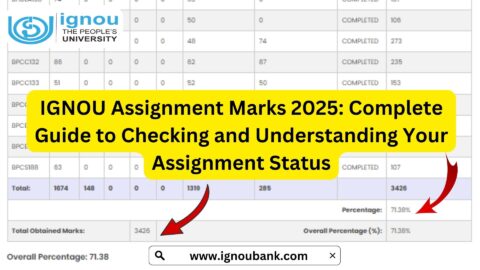
The IGNOU assignment status is an important service for students of Indira Gandhi National Open University who have submitted assignments for their respective courses. After submitting assignments, students often want to know whether their assignment has been evaluated and whether the marks or grades have been updated in the university system.
IGNOU provides an online portal through which students can check the Assignment/Project/Practical Awards/Marks Transmission Status. The official portal requires students to enter their enrolment number and programme code to check the available information.
It is important to understand that the online status may not appear immediately after an assignment has been submitted. According to the official IGNOU assignment-status portal, the status is reflected only after the marks or grades are transmitted by the concerned Study Centre or Regional Centre following the evaluation process.
Important IGNOU Assignment Status Links and Information
| Information | Details |
|---|---|
| IGNOU Assignment Status | https://isms.ignou.ac.in/changeadmdata/StatusAssignment.asp |
| Status Service | Assignment/Project/Practical Awards/Marks Transmission Status |
| Required Information | Enrolment Number and Programme Code |
| Enrolment Number | Maximum 10 digits |
| Status Update | After evaluation and transmission of marks/grades |
| Assignment Download | https://www.ignou.ac.in/studentService/download/assignments |
| IGNOU Official Website | https://www.ignou.ac.in/ |
| IGNOU Term-End Result | https://termendresult.ignou.ac.in/ |
| IGNOU Grade Card | https://www.ignoubank.com/ignou-grade-card/ |
What Is IGNOU Assignment Status?
IGNOU assignment status is the online information available to students regarding the transmission of marks or grades for their assignments. The same official portal also covers project and practical awards or marks transmission status.
Assignments are an important part of the academic process for many IGNOU programmes. Students are required to complete and submit assignments for their respective courses according to the applicable university instructions.
After submission, the assignment goes through the relevant evaluation process. Once the marks or grades are transmitted by the concerned Study Centre or Regional Centre, the information can be reflected in the university’s online system.
Therefore, students should understand that assignment submission and assignment-status updating are two different stages.
Submitting an assignment does not necessarily mean that its marks will appear online immediately.
Where Can You Check IGNOU Assignment Status?
Students can check their assignment status using the official IGNOU portal:
https://isms.ignou.ac.in/changeadmdata/StatusAssignment.asp
The page is specifically titled Assignment/Project/Practical Awards/Marks Transmission Status. It provides fields for entering the student’s enrolment number and selecting the programme code.
Students should use this official portal when checking their assignment-related information.
How to Check IGNOU Assignment Status Online?
Checking the IGNOU assignment status is a simple online process. Students should keep their enrolment number and programme information ready before accessing the portal.
Step 1: Visit the Official Website
Open the official assignment-status portal:
https://isms.ignou.ac.in/changeadmdata/StatusAssignment.asp
The page provides the facility to check the transmission status of assignment, project and practical awards or marks.
Step 2: Enter Your Enrolment Number
The portal asks students to enter their Enrolment No.
According to the official page, the enrolment number can be a maximum of 10 digits.
Enter your enrolment number carefully.
Make sure that the number belongs to your current IGNOU student record and that you have not accidentally entered an incorrect digit.
Step 3: Select Your Programme Code
The next step is to select your Programme Code.
Your programme code should correspond to the IGNOU programme in which you are enrolled.
Students should select the correct programme because entering incorrect programme information may affect the information displayed by the system.
Step 4: Submit the Details
After entering your enrolment number and selecting the programme code, proceed with the option available on the page.
The system will process the information and display the available assignment, project or practical marks/status information associated with your record.
Step 5: Check the Displayed Status
Review the information carefully.
If your marks or grades have already been transmitted after evaluation, the relevant information may be displayed.
If the information is not available, it does not automatically mean that your assignment was not submitted.
IGNOU specifically states that the status is reflected only after marks or grades are transmitted by Study Centres or Regional Centres after the evaluation process.
Why Is IGNOU Assignment Status Important?
The assignment status is important because it allows students to monitor whether their assignment-related marks or grades have been transmitted into the university system.
Students often submit assignments well before examinations and may want to verify that their academic records have been updated.
Checking the status can help students:
- Monitor assignment-related marks
- Check whether information has been updated
- Keep track of academic records
- Identify possible delays
- Compare assignment information with other academic records
- Follow up appropriately if an issue continues
Students should also keep proof of assignment submission until the marks have been reflected in their academic records.
Does IGNOU Assignment Status Update Immediately?
No, students should not assume that the assignment status will update immediately after submission.
The official IGNOU assignment-status portal explains that the status will be reflected only when the marks or grades are transmitted by the Study Centre or Regional Centre after the evaluation process.
This means there can be several stages between submitting an assignment and seeing its information online.
The process may broadly involve:
- Preparing the assignment
- Submitting the assignment
- Receiving or recording the submission
- Evaluation of the assignment
- Transmission of marks or grades
- Updating the online system
- Checking the assignment status
Because of these stages, students should allow reasonable time for processing.
What Does It Mean If IGNOU Assignment Status Is Not Updated?
One of the most common concerns among students is that they submitted an assignment but cannot see its status online.
There are several possible explanations.
The Assignment May Not Have Been Evaluated Yet
If the assignment is still awaiting evaluation, its marks may not yet be available in the online system.
Marks May Not Have Been Transmitted
Even after evaluation, the marks or grades need to be transmitted into the university system. The official portal specifically states that the status is reflected after marks or grades are transmitted by the Study Centre or Regional Centre following evaluation.
Data Updating May Still Be Pending
There may be a gap between evaluation and online reflection of the information.
Incorrect Information May Have Been Entered
Students should check whether they entered the correct enrolment number and programme code.
If you enter incorrect details, you may not receive the expected information.
How Long Does IGNOU Assignment Status Take to Update?
Students frequently ask how many days it takes for their assignment status to appear.
The exact time can vary because the process involves assignment submission, evaluation and transmission of marks or grades.
The official assignment-status page does not provide a single fixed number of days for every student’s assignment status. Instead, it explains that the status will be reflected after marks or grades are transmitted by the Study Centre or Regional Centre following evaluation.
Therefore, students should avoid assuming that a specific number of days applies to every assignment.
If the status is not available immediately, students can check again later.
IGNOU Assignment Status and Assignment Submission
Students should understand the difference between assignment submission status and assignment marks/status.
When you submit an assignment, you should retain evidence that you submitted it.
Depending on how your assignment was submitted, this could include:
- Submission receipt
- Online acknowledgement
- Screenshot
- Email confirmation
- Study Centre acknowledgement
- Submission date
- Course code
- Copy of the submitted assignment
The assignment-status portal is related to the transmission of assignment, project and practical awards or marks. The portal itself explains that marks or grades become reflected after the relevant evaluation and transmission process.
Therefore, a student should not rely solely on the online status page as proof of submission. Keep your original submission evidence safely.
What Should You Do If Your Assignment Status Is Missing?
If your assignment status is not showing, first check that you entered the correct information.
Check Your Enrolment Number
Make sure your enrolment number is correct.
The official portal specifies that the enrolment number field supports a maximum of 10 digits.
Check Your Programme Code
Select the programme code corresponding to your actual programme.
Check Again Later
If your assignment was submitted recently, the evaluation and transmission process may not yet be complete.
Keep Your Submission Proof
Keep your receipt or acknowledgement until the assignment-related information is properly updated.
Contact the Appropriate IGNOU Centre if Necessary
If the status remains unavailable after a reasonable processing period, students should follow the applicable IGNOU instructions and contact the relevant Study Centre or Regional Centre for assistance.
IGNOU Assignment Status for Different Programmes
IGNOU offers a large number of programmes, including undergraduate, postgraduate, diploma, postgraduate diploma and certificate programmes.
Assignment requirements can differ according to the programme and course.
Students should therefore check the assignment instructions applicable to their own programme rather than assuming that every IGNOU programme follows exactly the same process.
The assignment-status portal uses the programme code as one of the required fields, which makes selecting the correct programme important.
IGNOU Assignment Status and Grade Card
The assignment-status page and the grade card are related to a student’s academic record, but they serve different purposes.
The assignment-status portal specifically provides information concerning assignment, project and practical awards or marks transmission status.
The grade card provides a broader view of the student’s academic performance.
Students who are checking their overall academic progress should therefore consider reviewing their grade card in addition to the assignment-status information.
IGNOU Assignment Status and Term-End Result
The IGNOU assignment status should also not be confused with the Term-End Examination result.
Assignments and Term-End Examinations are different components of the academic evaluation process.
A student may need to check:
- Assignment status
- Assignment marks
- Term-End Examination result
- Grade card
- Other programme-related academic information
For the IGNOU Term-End Examination result, students can use:
https://termendresult.ignou.ac.in
For assignment-related marks or transmission status, use:
https://isms.ignou.ac.in/changeadmdata/StatusAssignment.asp
How to Download IGNOU Assignments
Students who are preparing assignments can access the assignment section on the IGNOU website:
https://www.ignou.ac.in/studentService/download/assignments
Before downloading or preparing an assignment, students should verify the correct programme and course code.
Using the correct assignment for the applicable course is important.
Students should also follow the submission instructions provided by IGNOU and the relevant Study Centre or Regional Centre.
Important Things to Remember About IGNOU Assignment Status
Students should keep several points in mind when checking their assignment status.
First, always use the official assignment-status portal.
Second, enter the correct enrolment number and programme code.
Third, do not assume that the status will appear immediately after submitting the assignment.
Fourth, keep your assignment submission receipt or acknowledgement.
Fifth, understand that the official portal says the status is reflected after marks or grades are transmitted following the evaluation process.
Finally, if there is a prolonged issue, follow the appropriate IGNOU support or Regional Centre process instead of relying on unofficial information.
Common Problems While Checking IGNOU Assignment Status
Website Is Not Loading
Sometimes a website may temporarily be slow or unavailable. Students can try again later and ensure that their internet connection and browser are working correctly.
Wrong Enrolment Number
A single incorrect digit can prevent the system from identifying the correct student record.
Always check the enrolment number before submitting the search.
Wrong Programme Code
Make sure that the selected programme code corresponds to your programme.
Assignment Marks Not Available
If marks are not displayed, the evaluation or transmission process may not yet be complete.
Assignment Was Submitted but Status Is Missing
Keep your submission proof and allow time for the evaluation and transmission process. The official portal confirms that online status depends on marks or grades being transmitted after evaluation.
Tips for Students Checking IGNOU Assignment Status
Check the Official Portal
Use:
https://isms.ignou.ac.in/changeadmdata/StatusAssignment.asp
Keep Your Enrolment Number Safe
You will need your enrolment number to access the status service.
Know Your Programme Code
Having the correct programme code makes the checking process easier.
Save Submission Evidence
Do not delete your assignment receipt, acknowledgement or other submission proof.
Check Your Academic Records Regularly
Students should monitor their assignment information, grade card and examination results as appropriate.
Be Careful With Unofficial Information
IGNOU-related dates, procedures and academic processes can change. Students should verify important information through official university sources.
Important IGNOU Links
| Service | Official/Useful Link |
|---|---|
| IGNOU Assignment Status | https://isms.ignou.ac.in/changeadmdata/StatusAssignment.asp |
| IGNOU Assignment Downloads | https://www.ignou.ac.in/studentService/download/assignments |
| IGNOU Official Website | https://www.ignou.ac.in/ |
| IGNOU Term-End Result | https://termendresult.ignou.ac.in/ |
| IGNOU Grade Card | https://www.ignoubank.com/ignou-grade-card/ |
FAQ about IGNOU Assignment Status 2026
What is IGNOU assignment status?
IGNOU assignment status is the online information related to the transmission of assignment, project and practical awards or marks. The official portal allows students to check the available status using their enrolment number and programme code.
Where can I check my IGNOU assignment status?
You can check it through the official IGNOU assignment-status portal:
https://isms.ignou.ac.in/changeadmdata/StatusAssignment.asp
What details are required to check IGNOU assignment status?
The portal asks students to enter their enrolment number and select their programme code. The official page states that the enrolment number can be a maximum of 10 digits.
Why is my IGNOU assignment status not showing?
The assignment may still be under evaluation, or the marks or grades may not yet have been transmitted by the Study Centre or Regional Centre. IGNOU states that the status is reflected after the evaluation process and transmission of marks or grades.
Does assignment status update immediately after submission?
Not necessarily. Assignment submission, evaluation, transmission of marks and online updating are separate stages. The official portal states that the status is reflected after marks or grades are transmitted following evaluation.
Can I check IGNOU assignment status online?
Yes. IGNOU provides an online assignment-status portal where students can enter their enrolment number and programme code to check available information.
What should I do if my assignment marks are not updated?
First, verify your enrolment number and programme code. If the assignment was recently submitted, allow time for evaluation and transmission. Keep your submission proof, and if the issue continues, follow the applicable IGNOU support or Regional Centre process.
Should I keep my assignment submission receipt?
Yes. Students should keep their assignment submission receipt or acknowledgement until the assignment-related marks have been properly reflected in their academic record.
Conclusion
The IGNOU assignment status is an important online service for students who want to monitor the transmission of their assignment, project and practical marks or grades. IGNOU provides a dedicated portal where students can enter their enrolment number and programme code to check the available information.
To check your IGNOU assignment status, visit: https://isms.ignou.ac.in/changeadmdata/StatusAssignment.asp
Students should remember that assignment status does not necessarily appear immediately after submission. According to the official IGNOU portal, the status is reflected only after the marks or grades are transmitted by the Study Centre or Regional Centre following the evaluation process.
Therefore, students should keep their assignment submission proof, enter their enrolment number and programme code correctly, and check the official portal periodically. If the status remains unavailable, students should follow the appropriate IGNOU instructions and contact the relevant academic centre when necessary.