IGNOU Degree Download: The Indira Gandhi National Open University (IGNOU) is one of the largest open universities in the world, offering quality education to millions of learners across India and abroad. With a wide range of undergraduate, postgraduate, diploma, and certificate programs, IGNOU maintains a robust system for issuing degrees, provisional certificates, and migration certificates to students who successfully complete their programmes.
In recent years, IGNOU has upgraded its system and introduced online degree download through its Samarth portal. Students no longer need to wait for convocations or visit regional centers to collect their degrees. Instead, IGNOU has simplified the process by enabling digital degree downloads from the comfort of one’s home.
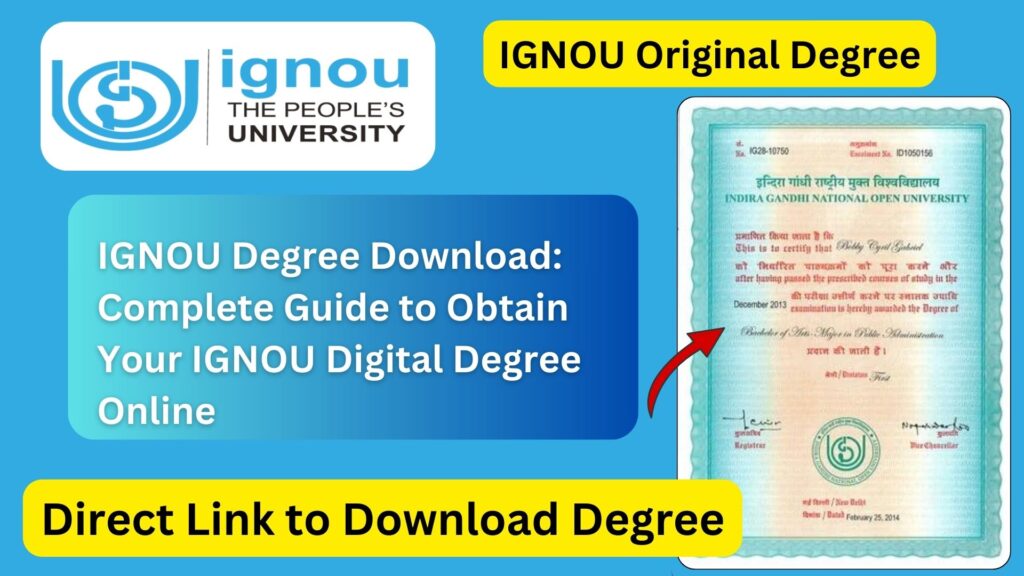
This article provides a comprehensive guide on how to download IGNOU degree, the eligibility criteria, step-by-step instructions, types of certificates available online, important dates, and a dedicated table of useful links. Detailed FAQs and a concluding summary make this blog post a complete resource for students who wish to access their IGNOU degree online.
What Is an IGNOU Degree?
An IGNOU degree is an official certificate awarded to students who successfully complete their program as per the university’s requirements. Once a student completes all required credits, including theory, practicals, assignments, and projects, IGNOU declares the result and eventually issues the final degree.
This degree is recognized by:
- University Grants Commission (UGC)
- Distance Education Bureau (DEB)
- Government of India and State Governments
- Public and private sector organizations
- Overseas institutions for further studies (in many cases)
The IGNOU degree is considered equivalent to degrees awarded by other recognized universities and is widely accepted.
IGNOU Degree Download Link
Students who have completed their program and whose degrees are approved can download their digital degree via the official IGNOU Samarth portal.
Official Link to Download IGNOU Degree: https://ignou.samarth.edu.in/
This is the only official website where IGNOU provides digital degrees and other academic certificates.
Why IGNOU Introduced Digital Degree Download?
Earlier, IGNOU students had to attend annual convocation ceremonies or visit their regional centers to collect their degree certificates. Some students waited months or even years due to administrative delays or personal circumstances.
To solve this issue, IGNOU adopted the National Academic Depository (NAD) and DigiLocker system. Later, it introduced Samarth portal-based digital degree downloads, offering:
- Instant access
- Secure digital verification
- Hassle-free retrieval
- Validity across government and private sectors
This move has significantly benefited students, especially those living in remote areas or those who need urgent proof of qualification for job applications, higher studies, or migration abroad.
Eligibility for IGNOU Degree Download
Students can download their IGNOU degree online if they meet the following conditions:
- Successful completion of the program
The student must pass all required subjects, including theory, practicals, assignments, and projects. - Result must be updated on the system
The grade card must show complete results with “Completed” status. - Eligible for convocation
IGNOU releases degrees year-wise. Students must be part of the convocation batch for their program. - Convocation fee payment (if required)
At times, students need to pay the convocation fee depending on university policies. - Digital certificate uploaded
IGNOU must have uploaded the certificate to the Samarth portal.
If all conditions are met, students can access and download their degree immediately.
Types of Degrees and Certificates Available for Download
IGNOU provides multiple academic documents through the Samarth portal:
1. Final Degree Certificate
This is the official degree confirming successful completion of the program. It includes:
- Student name
- Program name
- Enrollment number
- Passing year
- IGNOU seal and signatures
2. Provisional Certificate
This is issued shortly after completion of the program and is valid until the final degree is issued.
3. Migration Certificate
Required when students apply for admission to another university.
4. Digital Degree for Overseas Verification
Students applying for jobs abroad can use the digital certificate as a verified academic credential.
5. Convocation-Eligible Certificates
IGNOU releases degrees year-wise during convocation sessions. These can be downloaded after the official release.
How to Download IGNOU Degree Online?
Follow these steps to download your IGNOU digital degree:
Step 1: Visit the Official IGNOU Samarth Portal
Open the link: https://ignou.samarth.edu.in/
Step 2: Click on the Degree Download Section
Look for a section like:
- Download Degree Certificate
- Digital Certificates
- Convocation Certificates
Step 3: Enter Your Credentials
You will need:
- Enrollment Number
- Programme Code
- Date of Birth (if asked)
Make sure your details exactly match IGNOU’s records.
Step 4: Verify the Captcha and Submit
After entering the details, click on Submit.
Step 5: Download Your Degree
Once your credentials are verified, the degree PDF will be displayed.
Students can:
- Download
- Save
- Share (when needed)
The PDF is digitally signed and widely accepted.
What to Do If Your Degree Is Not Available for Download?
Many students face issues while trying to download their IGNOU degree. Here are common reasons and solutions.
1. Degree Not Yet Released
IGNOU releases degrees based on convocation cycles. If yours is not released yet, you must wait for the next update.
2. Incomplete Grade Card
If any assignment or practical is not updated, IGNOU will not issue the degree.
Solution: Contact your regional center or study center.
3. Incorrect Programme Code Entry
Entering the wrong programme code may cause errors.
Solution: Double-check your program code (e.g., BA, BCOM, BAG, MEG, etc.)
4. Name Mismatch
If your name is misspelled in records, the degree may not be issued.
Solution: Apply for correction via the regional center.
5. Technical Server Issues
The Samarth portal may be temporarily down.
Solution: Try again later or use another browser.
Benefits of IGNOU Digital Degree
Students can enjoy several advantages with online degree download:
1. Instant Availability
No need to wait for physical dispatch or convocation.
2. Long-Term Storage
Digital degrees can be saved permanently online.
3. Global Acceptability
Digital certificates are widely accepted by:
- Foreign universities
- Immigration authorities
- Multinational companies
4. Easy Verification
Digital signatures make verification quick and secure.
5. Useful in Emergencies
If urgently required for job applications, students can download it anytime.
How to Check Whether Your Degree Is Ready?
Students can check their degree status through:
- IGNOU Samarth portal
- IGNOU regional center announcements
- Convocation notice board
- DigiLocker account
- Grade card completion status
If your grade card shows Completed, your degree should be available soon.
How IGNOU Sends Degrees Through Convocation?
IGNOU organizes annual convocation ceremonies. Students who apply for convocation receive their degrees either:
- At the convocation venue
- By post
- Through digital download
Students not attending convocation can later collect the degree from the regional center or download it online.
Important Links and Information
Below is a table of essential links related to IGNOU degree download:
| Purpose | Link / Information | Notes |
|---|---|---|
| Download IGNOU Degree | https://ignou.samarth.edu.in/ | Official portal for digital degrees |
| IGNOU Official Website | ignou.ac.in | Latest notifications |
| Grade Card Check | ignou.ac.in/gradecard | Must be completed before degree issue |
| Convocation Registration | ignou.ac.in/convocation | For degree issuance |
| Provisional Certificate Request | Via Regional Centre | Temporary certificate |
| Migration Certificate Request | ignou.ac.in/services | Required for higher studies |
| DigiLocker IGNOU Records | digilocker.gov.in | Central academic repository |
| Regional Centre Contact List | Available on ignou.ac.in | For corrections and support |
FAQ about IGNOU Degree Download
How can I download my IGNOU degree online?
You can download your IGNOU degree from: https://ignou.samarth.edu.in/
Is a digitally downloaded degree valid?
Yes. IGNOU’s digital degree is legally valid and accepted across institutions and businesses.
My degree is not showing online. What should I do?
Check whether your grade card is complete and if your program is included in the latest convocation list.
Do I need to pay a fee to download the degree?
Usually, convocation fees are required once. After that, downloading is free.
Can I download the provisional certificate from the Samarth portal?
In some cases, yes. Otherwise, regional centers issue it.
What if I lost my printed degree?
You can use the digital degree as a valid replacement or apply for a duplicate through the regional center.
Is the IGNOU digital degree accepted abroad?
Yes. Many international institutions accept digitally-signed IGNOU certificates.
How do I know if I am eligible for the degree?
Check your grade card. If the status shows Completed, you are eligible.
Can I download my degree anytime?
Yes, once uploaded by IGNOU, it can be downloaded anytime.
Does IGNOU upload all degrees online?
Yes, IGNOU uploads degrees batch-wise based on convocation cycles.
Conclusion
Downloading an IGNOU degree online has made academic record access significantly easier for students across India and abroad. With the introduction of the Samarth portal, IGNOU has simplified the entire process by offering a secure, fast, and efficient digital degree download system.
Students no longer need to wait for postal delays or visit regional centers physically. By entering the enrollment number and program details, learners can instantly obtain their verified digital degree certificate. This feature is especially useful for students who require immediate documents for job applications, further education, visa processing, or professional verification.
This article provides a comprehensive guide to understanding how to download your IGNOU degree, eligibility requirements, troubleshooting methods, and other important information. With the provided link and guidelines, students can easily access and manage their academic records.