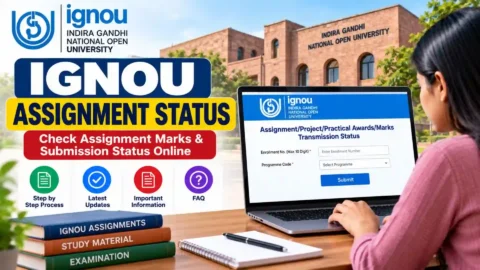
IGNOU Assignment Status 2026: Indira Gandhi National Open University (IGNOU) provides an online facility that allows students to check their assignment submission status, evaluation progress and assignment marks. Students enrolled in undergraduate, postgraduate, diploma and certificate programmes can use the official IGNOU portals to find out whether their submitted assignments have been received and whether their marks have been updated.
IGNOU Assignment Status 2026 is particularly important for students preparing for the June and December Term-End Examinations (TEE). Assignments are an essential part of the evaluation process, and students must complete and submit the required assignments according to their programme and academic session.
After submitting an assignment to the allotted study centre, students often want to know whether it has been received, evaluated and forwarded to the university. IGNOU provides an online assignment status facility for checking the available records. Students can also use the IGNOU Grade Card portal to check their assignment marks.
In this article, you will learn how to check IGNOU Assignment Status 2026 using your enrolment number and programme code, how to check assignment marks, what different status messages mean, how long updates may take and what to do if your assignment status is not showing.
IGNOU Assignment Status 2026: Overview
Students can check the important information about the IGNOU assignment status facility in the following table.
| Particulars | Details |
|---|---|
| University | Indira Gandhi National Open University |
| Short Name | IGNOU |
| Service Name | IGNOU Assignment Status 2026 |
| Academic Year | 2026 |
| Applicable Sessions | June TEE and December TEE |
| Programmes | UG, PG, Diploma and Certificate |
| Information Available | Assignment submission and evaluation records |
| Required Details | Enrolment Number and Programme Code |
| Assignment Marks | Available through the Grade Card portal |
| Checking Mode | Online |
| Official Website | https://www.ignou.ac.in/ |
| Assignment Status Link | https://isms.ignou.ac.in/changeadmdata/StatusAssignment.asp |
| Grade Card Link | https://gradecard.ignou.ac.in/ |
IGNOU provides separate online facilities for assignment submission records and assignment marks. Students should use the correct portal depending on the information they want to check.
What Is IGNOU Assignment Status?
IGNOU Assignment Status is an online facility that helps students check the available records relating to their submitted assignments.
When students submit their assignments, the concerned study centre or regional centre processes the submission. After evaluation, the assignment marks or grades are transmitted through the university’s administrative system.
The assignment status portal displays information once the relevant records have been processed and transmitted by the concerned Study Centre or Regional Centre.
Students can use this facility to check whether their assignment records are available in the university system.
The assignment status facility is useful for:
- Checking whether assignment records are available online.
- Monitoring the processing of submitted assignments.
- Checking course-wise assignment information.
- Identifying whether marks have been transmitted.
- Following up with the study centre if records are missing.
Students should remember that assignment submission status and assignment marks are not exactly the same. A submission record does not necessarily mean that evaluation is complete.
How to Check IGNOU Assignment Status 2026 Online?
Students can check their assignment status through the official IGNOU assignment status portal.
Follow these steps:
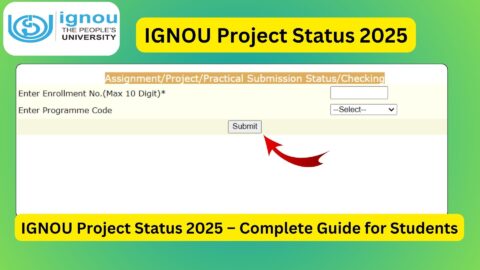
- Visit the official IGNOU Assignment Status portal at https://isms.ignou.ac.in/changeadmdata/StatusAssignment.asp.
- The assignment submission status page will open.
- Enter your IGNOU enrolment number in the required field.
- Select your programme code from the available options.
- Check that the entered details are correct.
- Click on the Submit button.
- Your available assignment status information will appear on the screen.
- Check the course-wise details and available status information.
- Save or print the displayed information for future reference.
<escape>Students should enter the correct enrolment number and programme code. If the information is entered incorrectly, the portal may not display the expected records.</escape>
Details Required to Check IGNOU Assignment Status
Before opening the portal, students should keep the following details ready.
| Required Information | Purpose |
|---|---|
| Enrolment Number | Identifies the student |
| Programme Code | Identifies the enrolled programme |
| Internet Connection | Accessing the online portal |
| Device | Mobile, laptop or desktop |
Students should use the enrolment number printed on their IGNOU identity card or admission-related documents.
IGNOU Assignment Status 2026: Direct Link
Students can use the following direct link to check their assignment submission records.
Official IGNOU Assignment Status Link:
https://isms.ignou.ac.in/changeadmdata/StatusAssignment.asp
After opening the page, enter your enrolment number, select your programme code and submit the details.
The university also provides a separate Grade Card portal where students can check their assignment marks and other academic results.
IGNOU Grade Card Link:
Students should use the official university portals instead of relying on unofficial websites that may display incomplete or outdated information.
Difference Between IGNOU Assignment Status and Assignment Marks
Many IGNOU students get confused between assignment submission status and assignment marks. Both are related to the assignment evaluation process, but they provide different information.
| Assignment Status | Assignment Marks |
|---|---|
| Shows available submission or processing information | Shows marks or grades awarded |
| Helps track assignment records | Helps check evaluation performance |
| Available through the Assignment Status portal | Available through the Grade Card portal |
| May appear before marks are updated | Usually appears after evaluation and transmission |
| Useful for checking processing progress | Useful for checking academic results |
For example, a student may have submitted an assignment successfully, but the marks may not yet appear on the grade card. This does not automatically mean that the assignment has been rejected.
The study centre must evaluate the assignment and transmit the marks through the prescribed process before the marks become visible in the university system.
How to Check IGNOU Assignment Marks 2026?
Students who want to check their assignment marks should visit the official IGNOU Grade Card portal.
Follow these steps:
- Visit https://gradecard.ignou.ac.in/.
- Open the Grade Card section.
- Select your programme from the available list.
- Enter your enrolment number.
- Select the appropriate grade card or examination status.
- Click on the Submit button.
- Your grade card will appear on the screen.
- Find the assignment section for your respective courses.
- Check the marks or grades displayed against each course.
- Download or print the grade card for future reference.
Information Available on the IGNOU Grade Card
The grade card provides important academic information, including:
- Enrolment number.
- Programme code.
- Course codes.
- Assignment marks or grades.
- Term-End Examination marks.
- Practical examination marks, where applicable.
- Project or dissertation marks, where applicable.
- Overall course status.
Students should check every course carefully. If assignment marks are missing for a particular subject, they should contact the concerned study centre or regional centre.
When Will IGNOU Assignment Status 2026 Be Updated?
One of the most common questions among IGNOU students is how long it takes for assignment status to appear after submission.
The university does not guarantee one fixed update date for every assignment. The time depends on several factors, including:
- Assignment submission date.
- Study centre processing time.
- Number of assignments received.
- Evaluation workload.
- Transmission of marks by the Study Centre or Regional Centre.
- University-level processing.
Students should understand that the assignment status portal displays records only after the relevant marks or grades have been transmitted by the concerned Study Centre or Regional Centre following the evaluation process.
Expected Assignment Update Period
The following table provides a general guide to when students may expect assignment-related updates.
| Assignment Session | General Update Period |
|---|---|
| June TEE assignments | August to September onwards |
| December TEE assignments | February to March onwards |
These are general expectations, not guaranteed dates. Actual updates may take longer depending on the evaluation and data transmission process.
Students should continue checking the official portals for their latest course-wise information.
Meaning of Different IGNOU Assignment Status Messages
Students may see different messages when checking their assignment submission records. Understanding these messages can help them identify the stage of processing.
The exact wording displayed may vary depending on the available records and portal updates.
1. Received to Be Processed
This indicates that the assignment-related information has been forwarded by the Regional Centre to IGNOU headquarters for further processing.
It is an intermediate stage. Students may need to wait until the university completes the next stage of processing.
2. Received and In-Process
This message indicates that the assignment information has been received by the university and is being processed for updating.
Students should check the portal again after some time.
3. Check Grade Card Status for Details
This message indicates that the relevant data has been processed at the university level. Students should visit the Grade Card portal to check the updated assignment marks or grades.
4. Assignment Status Not Found
If the portal does not display an assignment record, it may mean that the data has not yet been transmitted or updated.
Students should not immediately assume that their assignment has been rejected. They should first confirm the submission details with their study centre.
What to Do If IGNOU Assignment Status Is Not Showing?
Sometimes students submit their assignments successfully but cannot find the relevant information on the IGNOU portal.
There can be several reasons for this problem.
1. Assignment Evaluation Is Pending
The study centre may have received the assignment but not completed the evaluation. Until the marks are processed and transmitted, the online status may remain unavailable.
2. Marks Have Not Been Transmitted
The study centre or regional centre may not have forwarded the assignment marks to the university system.
Students should contact the concerned study centre and ask whether the marks have been transmitted.
3. Incorrect Enrolment Number
Entering an incorrect enrolment number can prevent students from accessing the expected information.
Always verify the number printed on the IGNOU identity card.
4. Incorrect Programme Code
Students must select the correct programme code. A wrong programme selection may result in incomplete or missing records.
5. Portal Updating Delay
The university processes a large number of assignments from different programmes and study centres. Therefore, online records may take time to appear.
6. Assignment Submission Record Is Missing
If the study centre has not recorded the assignment submission, the student should provide proof of submission and request assistance.
How to Resolve Missing IGNOU Assignment Marks?
If your assignment marks are not updated even after a reasonable period, follow these steps.
- Check the assignment status portal again.
- Open the IGNOU Grade Card portal.
- Verify the course code for which marks are missing.
- Contact your allotted study centre.
- Provide your enrolment number and programme details.
- Share the assignment submission receipt or acknowledgement.
- Ask the study centre to verify whether the assignment was evaluated and marks were transmitted.
- If the issue remains unresolved, contact your Regional Centre.
- For assignment-mark queries, contact the university’s Student Evaluation Division through the official contact details.
Official IGNOU Assignment Support
The university’s published contact information lists the following details for assignment-related queries.
| Particulars | Details |
|---|---|
| Department | Student Evaluation Division |
| Email for Assignment Queries | assignment@ignou.ac.in |
| Contact Number | 011-29571325 |
| Additional Contact | 011-29571319 |
Students should include their enrolment number, programme code, course code, submission date and study centre details when sending an email.
Do not share passwords, OTPs or other confidential login information.
Importance of IGNOU Assignments for Students
Assignments are an important part of the IGNOU academic evaluation system. Students enrolled in different programmes must complete the prescribed assignments according to the applicable academic session.
The assignments help students understand their subjects, apply theoretical knowledge and develop independent learning skills.
Some important reasons for completing assignments include:
- Assignments contribute to the final evaluation of courses.
- They help students understand the study material.
- They provide opportunities for self-assessment.
- They are required for academic progression according to programme rules.
- They help students prepare for the Term-End Examination.
The assignment weightage and minimum passing requirements can differ by programme and course. Students should check their programme guide and the relevant assignment booklet.
How to Download IGNOU Assignment Question Papers 2026?
Students who have not yet downloaded their assignment question papers can use the official IGNOU Assignment Portal.
Follow these steps:
- Visit https://webservices.ignou.ac.in/assignments/.
- Select your programme category.
- Find your programme name.
- Open the relevant academic session.
- Locate the required course code.
- Download the assignment question paper.
- Check the submission instructions and last date.
- Prepare your answers according to the assignment guidelines.
Students should always download the latest applicable assignment question paper for their admission cycle and academic session.
Important Instructions Before Submitting IGNOU Assignments
Students should follow the instructions provided by IGNOU and their allotted study centre.
- Download the correct assignment for your programme and academic session.
- Write your enrolment number clearly.
- Mention your programme code and course code.
- Include your name and contact details.
- Follow the prescribed assignment format.
- Submit the assignment before the applicable deadline.
- Keep a copy of the completed assignment.
- Obtain an acknowledgement or submission receipt.
- Preserve the acknowledgement until the marks appear on the grade card.
- Follow the instructions of your study centre regarding physical or online submission.
Students should not assume that every programme or study centre follows an identical submission procedure. Always confirm the applicable method with your study centre.
Important Links for IGNOU Assignment Status 2026
Students can use the following official links to check assignment status, marks, question papers and other academic information.
| Particulars | Important Link |
|---|---|
| IGNOU Official Website | Click Here |
| IGNOU Assignment Status 2026 | Check Status |
| IGNOU Grade Card 2026 | Check Grade Card |
| IGNOU Assignment Question Papers | Download Assignments |
| IGNOU Student Portal | Student Login |
| IGNOU Admission Portal | Click Here |
| IGNOU Hall Ticket | Check Hall Ticket |
| IGNOU Regional Centres | Find Regional Centre |
| IGNOU Assignment Front Page | Download Front Page |
| IGNOU Book Status | Check Study Material Status |
Students should use the official IGNOU portals for checking academic records and assignment marks. The additional IGNOU Bank links are provided as student resources.
FAQ about IGNOU Assignment Status 2026
How can I check IGNOU Assignment Status 2026?
Visit the official assignment status portal at https://isms.ignou.ac.in/changeadmdata/StatusAssignment.asp. Enter your enrolment number, select your programme code and submit the details to check the available status.
What details are required to check IGNOU assignment status?
Students generally need their IGNOU enrolment number and programme code.
Why is my IGNOU assignment status not showing?
The status may not appear because the assignment has not yet been evaluated, the marks have not been transmitted by the study centre or the university has not completed the online processing.
How long does IGNOU take to update assignment marks?
There is no guaranteed fixed timeline for every course. Updates depend on evaluation, study centre processing and transmission of marks to the university.
What does Received to Be Processed mean in IGNOU assignment status?
It indicates that the assignment information has been forwarded by the Regional Centre to IGNOU headquarters for further processing.
What does Received and In-Process mean?
It indicates that the university has received the relevant information and the records are undergoing processing.
What does Check Grade Card Status for Details mean?
It indicates that the relevant assignment data has been processed. Students should visit the Grade Card portal to check their marks or grades.
Can I check IGNOU assignment status without an enrolment number?
The official status portal requires the enrolment number to identify the student. Students who have forgotten their enrolment number should check their identity card, admission confirmation or student portal.
What should I do if my assignment marks are missing from the grade card?
First contact your study centre and confirm whether the assignment has been evaluated and the marks transmitted. If the issue remains unresolved, contact your Regional Centre or the university’s assignment section.
Is assignment submission compulsory for IGNOU students?
Students must complete and submit the assignments prescribed for their programme and courses according to the applicable academic rules. Assignment requirements and weightage should be checked in the programme guide.
Can I submit an IGNOU assignment after the last date?
Late submission is subject to the university’s official extensions or special instructions. Students should not assume that a study centre will accept assignments after the deadline without an authorised extension.
Where can I download IGNOU assignment question papers?
Students can download assignment question papers from the official portal at https://webservices.ignou.ac.in/assignments/.
Conclusion
IGNOU Assignment Status 2026 is an important online facility for students who want to monitor their assignment submission records and evaluation progress. By using the official status portal, students can check the available assignment information through their enrolment number and programme code.
Students who want to check their assignment marks should use the IGNOU Grade Card portal. If the marks are not visible, they should first contact their study centre and confirm whether the evaluation and transmission process has been completed.
Always keep your assignment submission receipt, follow the official instructions and check the university portals regularly. By monitoring your assignment status and grade card, you can stay informed about your academic progress and avoid unnecessary confusion before the Term-End Examination.