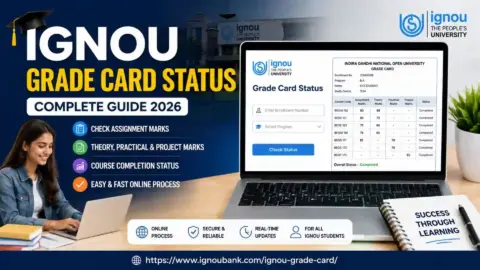
IGNOU Grade Card Status 2026 is an important topic for students enrolled at Indira Gandhi National Open University. The grade card allows students to review their available academic marks, including assignment marks, Term-End Examination (TEE) marks, practical marks, and other assessment components applicable to their programme.
Students can use the grade card to monitor their academic progress, identify missing marks, and check whether the required assessment components have been recorded. However, all marks may not appear at the same time because assignments and examination results can be processed and updated separately.
If you want to check your IGNOU grade card status, you can start with the following information page:
IGNOU Grade Card Status Check Link: https://www.ignoubank.com/ignou-grade-card/
Students can also access the university’s official grade card portal directly at https://gradecard.ignou.ac.in/.
This article explains how to check IGNOU Grade Card Status 2026, what information the grade card contains, how to understand different status messages, what to do when marks are missing, and where to find important IGNOU links.
IGNOU Grade Card Status 2026: Overview
The following table provides the important information students should know before checking their grade card.
| Particulars | Details |
|---|---|
| University name | Indira Gandhi National Open University |
| Popular name | IGNOU |
| Academic record | IGNOU Grade Card |
| Academic year | 2026 |
| Applicable students | Students enrolled in eligible IGNOU programmes |
| Information available | Course-wise marks and assessment status |
| Assessment components | Assignments, theory examinations, practicals and other applicable components |
| Information guide | https://www.ignoubank.com/ignou-grade-card/ |
| Official grade card portal | https://gradecard.ignou.ac.in/ |
| Official university website | https://www.ignou.ac.in/ |
| Term-End Examination results | https://termendresult.ignou.ac.in/ |
| Information generally required | Enrolment number and programme details |
| Final grade card | Issued according to university procedures after the prescribed requirements are completed and updated |
The information displayed on the grade card depends on the student’s programme and the assessment components applicable to individual courses. Students should always verify their academic records through official IGNOU services.
What Is an IGNOU Grade Card?
An IGNOU grade card is an academic record that displays the available assessment information for the courses included in a student’s programme. It helps students review their marks and understand whether the required academic components have been completed.
Depending on the programme, the grade card may include assignment marks, Term-End Examination theory marks, practical examination marks, laboratory assessments, project components, or other applicable assessments.
For example, a student enrolled in an undergraduate programme may need to complete assignments and appear for term-end examinations. A student in a programme that includes practical work or a project may have additional requirements.
The grade card helps students check these components in one place. It can also help identify a course for which marks are missing or the completion status has not yet been updated.
It is important to remember that an online grade card may show provisional or indicative information. IGNOU states that the displayed status is not a substitute for the final grade card, which is issued after the programme is completed and all prescribed components have been updated.
How to Check IGNOU Grade Card Status 2026 Online?
Students can follow the steps below to check their grade card status online.
Step 1: Open the Grade Card Information Page
First, visit the following page: https://www.ignoubank.com/ignou-grade-card/
This is the requested information link for students looking for IGNOU grade card status. Follow the available instructions to proceed to the relevant checking facility.
Step 2: Visit the Official IGNOU Grade Card Portal
For direct access to the university’s grade card service, open:
Check that the website address belongs to IGNOU before entering your academic information.
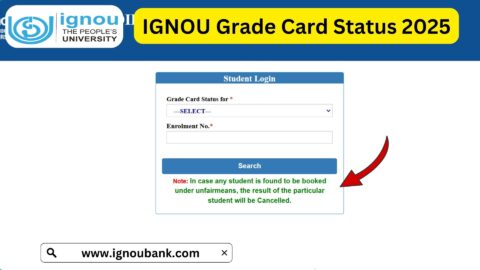
Step 3: Select the Relevant Grade Card Option
The official portal may ask you to select the applicable grade card status or category. Choose the option relevant to your programme and academic record.
Read the available choices carefully. If you are unsure which option applies, consult the instructions provided on the portal or contact IGNOU through its official student support channels.
Step 4: Select Your Programme Code
Choose the correct programme code from the available options.
Your programme code identifies the programme in which you are enrolled. Different undergraduate, postgraduate, diploma, and certificate programmes may have different codes.
Selecting the correct programme helps ensure that you access the appropriate academic record.
Step 5: Enter Your Enrolment Number
Enter your IGNOU enrolment number in the field provided.
Check the number carefully before submitting the form. An incorrect enrolment number or programme selection may prevent the portal from displaying the expected information.
If you cannot remember your enrolment number, refer to your admission confirmation or other official IGNOU documents.
Step 6: Submit the Information
After selecting the required options and entering your enrolment number, submit the details.
Wait for the portal to process the request. If the website is slow, allow some time for the page to load rather than repeatedly submitting the form.
Step 7: Check Your Marks and Course Status
Once your grade card is displayed, review the information available for each course.
Check assignment marks, theory examination marks, practical marks, and other components where applicable. Look for missing entries or a course status that indicates the requirements are not yet complete.
If the portal provides a print option, you may print the displayed information or save a copy for your personal academic records.
Details Available on the IGNOU Grade Card
The exact format of an IGNOU grade card depends on the programme and its assessment structure. The following table explains some common components students may encounter.
| Grade Card Component | What It Means |
|---|---|
| Course code | Identifies an individual course within the programme |
| Assignment marks | Marks recorded for applicable assignments |
| Term-End Examination marks | Marks recorded for the relevant theory examination |
| Practical marks | Marks for practical assessments where required |
| Laboratory or additional assessments | Other components applicable to certain programmes |
| Project or dissertation details | Assessment information for programmes that include these requirements |
| Course status | Indicates whether the available record shows the course as completed or not completed |
| Overall academic progress | Helps students review the assessment information available for their programme |
Not every course includes all these components. Students should compare their grade card with their programme’s official assessment requirements instead of assuming that every course follows the same structure.
What Does IGNOU Grade Card Status Mean?
The course status displayed on the grade card helps students understand the progress recorded for a particular course.
Completed
A status such as “Completed” generally indicates that the university’s record shows the applicable course requirements as fulfilled.
Students should still verify that the displayed information is consistent with their programme requirements and keep the official records provided by the university.
Not Completed
A status such as “Not Completed” generally indicates that the available record does not show all applicable requirements as fulfilled.
This does not automatically mean that the student has failed. The status may relate to a missing assessment component, an outstanding requirement, or information that has not yet been updated.
Review the marks displayed for that course and check the programme requirements to understand what remains outstanding.
Marks Missing or Not Updated
If assignment or examination marks are blank, the relevant result may still be under processing or may not yet have been reflected in the grade card.
Students should check the relevant result service and retain their assignment submission proof or examination details. If the marks remain missing beyond a reasonable period, contact the appropriate IGNOU office.
Why Are IGNOU Grade Card Marks Not Showing?
Students sometimes find that their grade card contains only some of their marks. This can happen for several reasons.
1. Assignment Marks Have Not Been Updated
After an assignment is submitted, the marks may take time to be evaluated, processed, and entered into the university’s records.
Students should retain their submission receipt and check the grade card periodically.
2. Term-End Examination Results Are Pending
The grade card may not show theory examination marks if the relevant result has not yet been declared or transferred to the grade card system.
You can check the examination result service at:
https://termendresult.ignou.ac.in
3. Practical or Project Assessments Are Outstanding
Some programmes require practical examinations, project reports, dissertations, or other assessments. If an applicable component is incomplete or its marks have not been recorded, the course status may remain incomplete.
Review the specific requirements for your programme.
4. Incorrect Programme Selection
Selecting an incorrect programme code may cause confusion when checking the grade card. Confirm your programme details from your admission documents and try again.
5. University Records Are Still Being Updated
IGNOU processes assessment information in stages. Assignment marks, theory results, practical marks, and other components may become available at different times.
A missing entry should not automatically be interpreted as a failed examination. Verify the information through official sources before reaching a conclusion.
What to Do If Your IGNOU Grade Card Is Incorrect?
If you notice missing marks, incorrect marks, or an unexpected course status, take the following steps.
- Check your details: Confirm your enrolment number and programme code.
- Review the relevant course: Identify the exact course code and assessment component affected.
- Check other official services: Review the assignment status or Term-End Examination result where relevant.
- Keep supporting records: Save assignment submission receipts, examination details, and any relevant communication.
- Contact IGNOU: Use the official contact details for grade card discrepancies or assignment-related queries.
- Submit a grievance if needed: If the issue remains unresolved, use the official IGNOU grievance portal.
The official university prospectus lists contact information for assignment-mark queries and grade card discrepancies. Students should consult the current prospectus or IGNOU website for the appropriate office and contact details.
Official grievance portal: https://igram.ignou.ac.in/
When contacting the university, explain the issue clearly and include the course code, relevant examination session, and supporting information requested through official channels. Avoid posting your enrolment number or other personal academic details publicly.
Important Links for IGNOU Grade Card Status 2026
The table below provides useful links for checking grade card status and related academic information.
| Purpose | Important Link |
|---|---|
| Check IGNOU Grade Card Status information | https://www.ignoubank.com/ignou-grade-card/ |
| Official IGNOU Grade Card Portal | https://gradecard.ignou.ac.in/ |
| Check Term-End Examination Results | https://termendresult.ignou.ac.in/ |
| Official IGNOU Website | https://www.ignou.ac.in/ |
| IGNOU Student Portal | https://ignou.samarth.edu.in/ |
| IGNOU Assignment Information | https://www.ignou.ac.in/studentService/download/assignments |
| IGNOU Grievance Portal | https://igram.ignou.ac.in/ |
| IGNOU eGyanKosh Study Materials | https://egyankosh.ac.in/ |
Students should use the service that matches their requirement. The grade card portal is intended for reviewing available academic assessment information, while the Term-End Examination result portal is useful for checking the relevant examination result.
Difference Between IGNOU Grade Card and Term-End Examination Result
The grade card and the Term-End Examination result are related, but they do not serve exactly the same purpose.
| Feature | IGNOU Grade Card | Term-End Examination Result |
|---|---|---|
| Main purpose | Review available academic assessment information | Check examination results |
| Assignment marks | May be displayed where applicable | Usually focuses on examination results |
| Theory examination marks | Displayed when available and updated | Displays the relevant examination outcome |
| Practical and project components | May be included where applicable | Availability depends on the result service |
| Course completion | Helps review recorded course status | Does not necessarily show every programme component |
| Official link | https://gradecard.ignou.ac.in/ | https://termendresult.ignou.ac.in/ |
If you have checked your examination result but cannot find the same information on your grade card, allow time for the relevant records to be updated. If the discrepancy continues, contact IGNOU through its official support channels.
Tips for Checking IGNOU Grade Card Status Successfully
Keep these points in mind when checking your academic record:
- Use the official IGNOU grade card portal to verify marks.
- Keep your enrolment number and programme code ready.
- Select the appropriate programme and grade card option.
- Check assignment and theory marks separately.
- Review practical or project requirements if your programme includes them.
- Remember that updates may occur at different times.
- Save submission receipts and other supporting academic records.
- Contact the relevant university office if marks remain missing or incorrect.
- Avoid sharing your enrolment number on public websites or social media.
These steps can help you monitor your academic progress and follow up appropriately if your grade card requires attention.
FAQ about IGNOU Grade Card Status 2026
How can I check IGNOU Grade Card Status 2026?
Visit https://www.ignoubank.com/ignou-grade-card/ for the requested information page, or open the official portal at https://gradecard.ignou.ac.in/. Select the relevant options, enter your enrolment number, and submit the information.
What details are required to check the IGNOU grade card?
You generally need your enrolment number and programme code, along with the relevant grade card selection requested by the portal.
Why are my IGNOU assignment marks not showing?
Your assignment marks may still be under evaluation or awaiting entry into the university’s records. Keep your submission proof and contact the appropriate study centre or university office if the marks remain missing.
Why are my IGNOU theory marks missing?
The relevant examination result may not yet have been declared or reflected in the grade card. Check the official Term-End Examination result portal for available information.
Does “Not Completed” mean I have failed?
Not necessarily. It generally means that the available record does not show all applicable requirements as completed. Review the marks and requirements for the course and contact IGNOU if you need clarification.
Is the IGNOU grade card updated immediately after results are declared?
Not always. Examination results and grade card records may be updated at different times. Check the official portal periodically for changes.
Can I check my IGNOU grade card on a mobile phone?
Yes. You can generally access the grade card portal through a mobile browser. Enter your details carefully and use the official website.
Is the online IGNOU grade card the final marksheet?
The online grade card displays available academic information, but IGNOU states that it is not a substitute for the final grade card. Follow the university’s instructions for formal academic documents.
Where can I complain about missing IGNOU grade card marks?
You can contact the relevant IGNOU office using the current official contact details or submit a grievance through https://igram.ignou.ac.in/.
What should I do if the IGNOU grade card website is not opening?
Try again after some time, check your internet connection, or use a different browser. If the issue continues, access the official IGNOU website to locate the relevant student service.
Can assignment marks and theory marks appear at different times?
Yes. Different assessment components may be processed and updated separately, so all marks may not appear simultaneously.
Where can I check IGNOU Grade Card Status online?
You can use the requested information page at https://www.ignoubank.com/ignou-grade-card/ and verify your academic record through the official portal at https://gradecard.ignou.ac.in/.
Conclusion
IGNOU Grade Card Status 2026 helps students review their available assignment marks, Term-End Examination marks, practical assessments, and course completion information. Checking the grade card regularly can help you monitor academic progress and identify missing or incorrect entries.
To get started, visit the requested information page: https://www.ignoubank.com/ignou-grade-card/
For direct verification, use the official IGNOU Grade Card Portal:
https://www.ignoubank.com/ignou-grade-card/
Keep your enrolment number and programme details ready, check each assessment component carefully, and remember that marks may be updated at different times. If you find missing marks or an unexpected status, review the relevant official result service and contact IGNOU through its official support channels when necessary.
Using the correct portal and keeping your academic records organised will help you track your IGNOU progress more effectively.