IGNOU Study Material Status 2026: Indira Gandhi National Open University (IGNOU) provides study materials to students enrolled in its undergraduate, postgraduate, diploma, certificate, and other academic programmes. These materials are an important part of distance education because they help students understand their subjects, prepare assignments, and study for term-end examinations.
After completing admission or re-registration, many students want to know when their IGNOU books will arrive. Some students may have already received their admission confirmation but are still waiting for their printed study materials. Others may want to check whether their books have been processed or dispatched.
If you are looking for the IGNOU Study Material Status 2026, you can use the following link to check the available information about your books.
This article explains how to check IGNOU study material status online, which details you may need, how to understand the status displayed, what to do if your books have not arrived, and where to find digital study materials while waiting for printed books.
What Is IGNOU Study Material Status?
IGNOU study material status refers to the information available about the processing and dispatch of academic books supplied to eligible students. The university’s Material Production and Distribution Division (MPDD) is responsible for managing the production and distribution of study materials.
The status-checking facility helps students find out whether information about their books is available in the university’s system. Depending on the session and the information recorded, students may be able to view dispatch-related details.
IGNOU study materials are designed to support independent learning. Students use them to understand course concepts, complete assignments, revise important topics, and prepare for examinations.
The study material status facility can be useful for:
- Students who have recently taken admission to IGNOU.
- Students who have completed re-registration.
- Learners waiting for printed books.
- Students who want to check whether their books have been dispatched.
- Students who have received some books but are waiting for the remaining materials.
- Learners who want to use digital study materials while waiting for physical books.
It is important to understand that admission status and study material status are different. Admission status relates to the confirmation of your admission, whereas study material status relates to information about the distribution of your academic materials.
Important Links and Information for IGNOU Study Material Status 2026
Students can refer to the following table for useful links related to study material tracking and other IGNOU services.
| Information | Details or Direct Link |
|---|---|
| University Name | Indira Gandhi National Open University |
| Short Name | IGNOU |
| Service Name | IGNOU Study Material Status 2026 |
| Study Material Status Check | Check IGNOU Book Status |
| Official IGNOU Website | https://www.ignou.ac.in/ |
| Official Student Services | IGNOU Student Services |
| July 2026 Material Status | Check July 2026 Status |
| January 2026 Material Status | Open the official IGNOU Student Services page and select the relevant session |
| Digital Study Materials | eGyankosh |
| Student Grievance Portal | IGNOU Grievance Portal |
| Study Centre Status | Check Study Centre Status |
| Details Required | Enrolment number and any other information requested on the relevant portal |
| Main Purpose | Check available study material processing and dispatch information |
Important: The availability of a status page or particular information may depend on your admission session. Always select the correct session and refer to the official IGNOU website for university-related instructions.
How to Check IGNOU Study Material Status Online?
Students can follow the steps below to check their IGNOU book status online.
Step 1: Visit the Study Material Status Page
First, open the following link:
IGNOU Study Material Status – Check Book Status
This page provides access to information about checking IGNOU study material status. Follow the instructions available on the page to proceed.
Step 2: Keep Your Enrolment Details Ready
Before checking your status, keep your IGNOU enrolment number and admission-related information available.
Make sure your details are correct. If the portal asks for an enrolment number, enter the number assigned to you by IGNOU. Avoid confusing your enrolment number with your application number or other identification details.
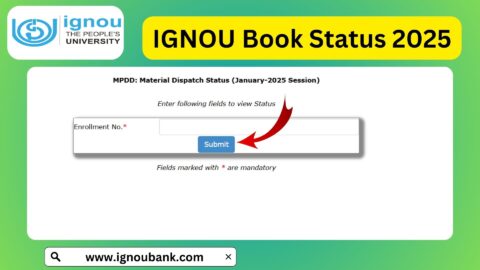
Step 3: Enter the Required Information
Enter the details requested by the status-checking facility. The exact fields may vary depending on the session or portal you use.
Check your entries carefully before submitting them. Incorrect information may prevent the system from displaying the relevant record.
Step 4: Submit the Details
After entering the required information, click the available submit, search, or status-check option.
Wait for the system to process your request. If the page does not respond, try refreshing it or opening it in another browser.
Step 5: Check Your Study Material Status
Review the information displayed on the screen. Depending on the available record, you may find information about the processing or dispatch of your books.
If dispatch details are available, save them for future reference. If a tracking or consignment number is provided, keep it handy so that you can use it to follow the parcel through the relevant postal tracking service.
If no information appears, do not immediately assume that your admission has been cancelled or that your books will never arrive. Check your session and enrolment details, and consult the official IGNOU support channels if the issue continues.
How to Check IGNOU Study Material Status for the July 2026 Session?
Students admitted during the July 2026 session can begin by visiting the university’s official material status page for that session.
Official July 2026 status link:
https://gradecard.ignou.ac.in/mpddstatus/Jul26/StudentMaterialStatus.aspx
Follow these steps:
- Open the official July 2026 material dispatch status page.
- Enter your enrolment number in the required field.
- Provide any additional information requested by the portal.
- Submit the details.
- Review the information displayed about your study materials.
If the portal cannot locate your details, check whether your admission is confirmed and whether you are using the correct enrolment number. You can also visit the official IGNOU website to locate the appropriate student service for your admission session.
Students from earlier admission cycles should use the relevant session-specific page wherever available. Do not assume that a status page for one session will display records for every admission cycle.
What Does IGNOU Study Material Status Mean?
The exact wording displayed on the portal may vary. The following table explains some common situations students may encounter when checking book status.
| Status or Situation | What It May Mean | What You Should Do |
|---|---|---|
| Status Available | Information about your study materials is present in the system | Review the displayed details |
| Dispatched | The books may have been sent through the relevant delivery service | Check any available dispatch or tracking information |
| Not Dispatched | Dispatch information may not yet be available | Check again later and verify your admission details |
| No Record Found | The portal could not locate a matching record | Verify your enrolment number and admission session |
| Partial Material Received | Some books may have arrived while others remain pending | Check the details available and contact the appropriate support office if necessary |
| Tracking Information Available | A parcel or consignment reference may be provided | Use the relevant postal tracking service if applicable |
| Portal Not Working | The website may be temporarily unavailable or experiencing a technical issue | Try again later or use the official IGNOU website |
These are general explanations, not a definitive list of official IGNOU status codes. Always rely on the actual information displayed by the relevant portal and instructions issued by the university.
Why Have You Not Received Your IGNOU Study Material?
Students may experience delays in receiving printed study materials for several reasons. A delay does not necessarily mean that there is a problem with the student’s admission.
1. Admission Processing Is Incomplete
Study materials are generally supplied after admission confirmation. If your admission is still being processed, your books may not yet be ready for dispatch.
Check your admission status separately if you are uncertain whether your admission has been confirmed.
2. Books Are Being Processed
Study materials may need to be prepared and organised before dispatch. Depending on the programme, course, and availability of materials, this process may take time.
3. Postal or Delivery Delays
After dispatch, delivery may be affected by postal operations, local delivery conditions, address issues, or other logistical factors.
If a consignment number is available, use it to check the parcel’s progress.
4. Incorrect Address Details
An incomplete or incorrect address can interfere with delivery. Check the address associated with your admission records and follow IGNOU’s official process if a correction is necessary.
5. Different Courses Have Different Materials
Students enrolled in different programmes may receive different sets of books. In some cases, materials may not all arrive together.
Compare the books received with the materials applicable to your programme before concluding that an entire set is missing.
6. Session or Portal Mismatch
If you are using a status page for the wrong admission session, your record may not appear. Confirm your admission session and choose the appropriate status page.
What Should You Do If IGNOU Books Have Not Arrived?
If your IGNOU study materials have not arrived, follow these practical steps.
First, check your study material status. Visit https://www.ignoubank.com/ignou-book-status/ and follow the available instructions. You can also check the appropriate official IGNOU material dispatch page.
Second, verify your admission details. Make sure your admission has been confirmed and that you are using the correct enrolment number and session.
Third, check for dispatch information. If the system provides a consignment number, use the relevant postal tracking facility to check delivery progress.
Fourth, contact the appropriate IGNOU office if necessary. If the books remain undelivered or the status does not resolve your concern, contact your Regional Centre or the Material Production and Distribution Division through the official contact information published by IGNOU.
The university’s published FAQs also provide guidance on study material distribution and non-receipt of books. You can consult the IGNOU FAQ document for further information.
When contacting the university, keep your enrolment number, programme details, admission session, registered address, and any available dispatch information ready. These details can help the concerned office understand your issue.
How to Download IGNOU Study Material Online?
Students do not always need to wait for printed books before starting their studies. IGNOU provides digital learning resources through eGyankosh, its digital repository.
Visit the official website:
Download IGNOU Digital Study Material – eGyankosh
To look for your course material:
- Open the eGyankosh website.
- Search for your programme, course title, or course code.
- Browse the relevant collection or study material listing.
- Open the available document.
- Download the file if a download option is provided.
The availability and format of resources may vary by programme and course. Check that the material corresponds to your current syllabus and course code.
Digital materials can be useful for reading on a computer or mobile device, preparing assignments, revising topics, and continuing your studies while printed books are in transit.
However, students should follow the latest assignment instructions and examination notices issued by IGNOU. Downloading a study material PDF does not replace the need to check assignment submission deadlines, examination schedules, or programme-specific requirements.
Benefits of Checking IGNOU Study Material Status
Checking your book status can help you plan your studies more effectively.
- Better study planning: You can check the available information about your books and plan your next steps.
- Early identification of delivery issues: Dispatch information may help you determine whether further follow-up is needed.
- Access to tracking details: Where provided, consignment information can help you follow the parcel.
- Less uncertainty: Checking the relevant portal can help distinguish a pending record from a confirmed dispatch.
- Access to digital alternatives: Students can use eGyankosh resources while waiting for printed materials.
- Improved communication: Having your enrolment and dispatch details ready can make it easier to explain a problem to the appropriate office.
Students should remember that checking the status regularly is useful, but repeated checks within a very short period may not reveal new information if the university’s records have not been updated.
Important Tips for IGNOU Students
Keep the following points in mind when checking your study material status:
- Enter your enrolment number carefully.
- Select the correct admission session.
- Use the official IGNOU website to locate university services and notices.
- Keep your admission confirmation and programme details accessible.
- Save any available dispatch or consignment information.
- Use eGyankosh to find digital study resources when available.
- Contact your Regional Centre or the appropriate university division if your issue remains unresolved.
- Check official notices for assignment, re-registration, and examination deadlines.
- Avoid sharing enrolment details publicly on social media or with unknown individuals.
- Do not rely on unofficial claims about delivery dates when the university has not confirmed a specific timeline.
FAQ about IGNOU Study Material Status 2026
What details are required to check IGNOU book status?
The portal may ask for your enrolment number and other details, depending on the status-checking facility. Keep your admission information ready and enter the details exactly as requested.
Is the IGNOU study material status check available online?
Yes. IGNOU provides online material dispatch status pages for relevant admission sessions. The information available depends on the session and the records maintained in the system.
What should I do if my IGNOU study material status is not showing?
First, verify your enrolment number and admission session. Then check whether your admission has been confirmed. If the record remains unavailable, consult the official IGNOU website or contact the appropriate Regional Centre or university division.
How long does IGNOU take to deliver study materials?
The delivery time can vary depending on admission processing, material availability, dispatch arrangements, and postal delivery. Students should check the status portal and official communications rather than relying on a fixed delivery estimate.
Can I download IGNOU study material before receiving printed books?
Yes. You can search for available digital study materials on eGyankosh. Check the course code and programme to ensure that you are using the appropriate material.
What is the difference between admission status and study material status?
Admission status relates to whether your admission has been confirmed or processed. Study material status relates to the information available about the distribution or dispatch of your books. One status does not necessarily provide all the information covered by the other.
What should I do if my IGNOU books have been dispatched but not delivered?
If a consignment number is available, check the relevant postal tracking service. Verify your registered address and contact the appropriate university office if the parcel remains undelivered or the tracking information does not resolve your concern.
Can I contact IGNOU if I do not receive my books?
Yes. You can contact your Regional Centre or the Material Production and Distribution Division using the contact details published on the official IGNOU website. Keep your enrolment number, programme details, and available dispatch information ready.
Are digital study materials available for every IGNOU course?
Digital resources are available for many IGNOU programmes and courses, but availability may vary. Search eGyankosh using your programme name or course code and check the resources listed for your course.
Does a missing study material record mean my admission is cancelled?
No. A missing record on the material status page does not, by itself, establish that your admission has been cancelled. Check your admission status separately and contact IGNOU if you need clarification.
Where can I find official information about IGNOU study materials?
Visit the official IGNOU website and its Student Services page. These resources can help you locate study material status services and other student support information.
Conclusion
IGNOU Study Material Status 2026 is useful for students who want to check the available information about their printed books and dispatch progress. After admission or re-registration, checking the relevant status page can help you understand whether information about your study materials is available and whether further follow-up may be needed.
To begin, visit IGNOU Study Material Status and follow the instructions on the page. Keep your enrolment number and admission details ready, and make sure you are checking the correct admission session.
If your books have not arrived, verify your admission details, review any available dispatch information, and contact the appropriate IGNOU office if necessary. In the meantime, you can search for your course materials on eGyankosh and continue preparing for your assignments and examinations.
Students should rely on official IGNOU notices for university-related instructions and deadlines. By checking the correct status page and using the available digital resources, you can stay informed and continue your studies while waiting for printed materials.