IGNOU Assignment Front Page 2026 PDF: Students enrolled at Indira Gandhi National Open University (IGNOU) are required to prepare and submit assignments as part of their academic programme, wherever applicable. Before submitting an assignment, students should make sure that their answers are organised properly and that the required student and course details are included.
One important part of an IGNOU assignment is the front page, also known as the assignment cover page. It helps identify the student, programme, course and assignment being submitted. A properly completed front page makes it easier for the relevant university staff to identify and process the assignment.
Students looking for an IGNOU assignment front page for 2026 can use the following link to access the cover page resource:
Download IGNOU Assignment Front Page 2026: https://www.ignoubank.com/ignou-assignment-front-page-2026-2/
This article explains what an IGNOU assignment front page is, which details students should include, how to prepare the cover page, common mistakes to avoid and how to submit assignments correctly.
IGNOU Assignment Front Page 2026: Important Information
The following table provides an overview of the IGNOU assignment front page and the information students may need before preparing their assignments.
| Particular | Details |
|---|---|
| University | Indira Gandhi National Open University (IGNOU) |
| Academic year | 2026 |
| Document name | IGNOU Assignment Front Page |
| Purpose | Identify the student, course and assignment |
| Applicable students | Students required to submit assignments for their programme |
| Download front page | https://www.ignoubank.com/ignou-assignment-front-page-2026-2/ |
| Official IGNOU website | https://www.ignou.ac.in/ |
| Information to prepare | Enrollment number, programme code, course code and student details |
| Assignment questions | Use the applicable assignment booklet for your course and session |
| Submission method | Follow the instructions of the relevant regional centre or study centre |
| Important reminder | Verify current assignment guidelines and submission deadlines |
The exact cover page format and submission procedure may vary according to programme requirements or instructions issued by IGNOU. Students should check the latest guidelines applicable to their course before submitting their work.
What Is an IGNOU Assignment Front Page?
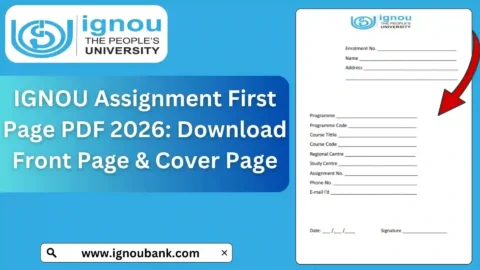
An IGNOU assignment front page is the first page of an assignment submission. It contains important information that helps identify the student and the academic work being submitted.
IGNOU offers distance and online education programmes in different academic disciplines. Assignments are an important component of many programmes because they allow students to demonstrate their understanding of the course material and apply what they have learned.
When preparing an assignment, students should ensure that the front page clearly displays the relevant details. These may include the student’s name, enrollment number, programme code, course code, assignment number and other information required by the university.
The front page should be neat, readable and consistent with the applicable assignment instructions.
A cover page does not replace the assignment answers. Students must also complete the questions correctly, follow any prescribed formatting requirements and submit the assignment through the designated channel.
How to Download the IGNOU Assignment Front Page 2026?
Students can follow these steps to access the assignment front page resource.
Step 1: Open the Download Link
Visit the following page: https://www.ignoubank.com/ignou-assignment-front-page-2026-2/
This page provides access to the IGNOU assignment front page resource.
Step 2: Find the Download Option
Read the instructions on the page and locate the available download link or button. The exact placement of the download option may depend on the page layout.
Step 3: Download the File
If a PDF or other downloadable file is provided, open it and use the available download option to save it to your device.
Choose a folder where you can easily find the document when preparing your assignment.
Step 4: Open the File
Open the downloaded document and check whether the text and fields are clear. If the document is a PDF, you can generally view it using a PDF reader or a compatible browser.
Step 5: Print or Edit as Appropriate
Follow the instructions provided with the document. If the format is intended to be printed and completed by hand, print a clear copy. If an editable format is provided and permitted, fill in the details carefully.
Do not assume that every downloaded template is an official university-issued form. Check the applicable IGNOU instructions to ensure that the format is acceptable for your programme.
Details to Include on the IGNOU Assignment Front Page
Students should carefully complete every field required by the cover page or assignment instructions. Common details include the following.
1. Student Name
Enter your name as recorded in your IGNOU admission details. Check the spelling before submitting the assignment.
2. Enrollment Number
Your enrollment number identifies your student record. Enter it correctly and avoid missing or changing any digits.
3. Programme Code
Write the programme code associated with your course of study. Use the code shown in your admission or other official university records.
4. Course Code
The course code identifies the particular subject for which you are submitting the assignment. Each course may have a different code.
If you are submitting assignments for several courses, check that the front page for each assignment contains the correct course code.
5. Course Title
If the front page requests the course title, enter the title corresponding to the course code. Verify the details using the applicable programme materials.
6. Assignment Number or Session
Some assignment formats require an assignment number, academic session or examination cycle. Complete these fields according to the assignment booklet and the instructions applicable to your submission.
7. Study Centre or Regional Centre Details
If the cover page requests your study centre or regional centre, enter the relevant details from your university records.
Do not enter an unfamiliar centre name simply because it appears on an example template.
8. Date of Submission
If a submission date field is provided, enter the actual date according to the required format. Do not use a future date or an inaccurate date.
9. Signature or Other Required Information
If the applicable format requires a signature or additional details, complete those fields as instructed. Do not add unnecessary information that is not requested.
Before submitting, review all the entries to ensure that they match your university records and the assignment requirements.
How to Prepare an IGNOU Assignment Correctly?
A good assignment requires more than a completed front page. Students should organise the entire document so that the answers are easy to read and the required information is present.
Read the Assignment Questions Carefully
Start by downloading or consulting the correct assignment booklet for your course and session. Make sure that you are answering the appropriate questions.
Assignment questions may change between sessions, so avoid relying on an old question paper without checking whether it applies to your course.
Use the Prescribed Study Material
Read the relevant IGNOU study blocks and other recommended learning resources before writing your answers. This helps you understand the topics and prepare responses that address the questions.
Write Clear and Relevant Answers
Organise your answers logically. Use headings and subheadings where appropriate, and explain important concepts in sufficient detail.
Avoid writing unrelated information merely to increase the length of an answer. Focus on addressing the question and demonstrating your understanding.
Follow the Required Format
Check whether your programme or study centre specifies handwritten assignments, typed documents, particular file formats or other presentation requirements.
Do not assume that one format is accepted for every programme or submission method.
Number the Questions Correctly
Use the same question numbering as the assignment booklet. This makes it easier to match each answer to the corresponding question.
Review Your Work
Before submission, check for missing answers, spelling errors, unclear sentences and incorrect course information. Make sure the front page and the assignment answers belong to the same course.
Keep a Copy
Save a copy of your completed assignment or retain a photocopy where practical. If you submit electronically, keep the final file and the submission confirmation.
These precautions can help you manage your assignments and resolve questions about submission later.
Important Links for IGNOU Assignment Front Page and Assignments
Students can use the following resources to locate the assignment front page, official university information and course-related materials.
| Purpose | Link |
|---|---|
| Download IGNOU Assignment Front Page 2026 | https://www.ignoubank.com/ignou-assignment-front-page-2026-2/ |
| Visit the official IGNOU website | https://www.ignou.ac.in/ |
| Access digital study materials | https://egyankosh.ac.in/ |
| Access the IGNOU online admission portal | https://ignouadmission.samarth.edu.in/ |
The front page download link is an information resource. Students should consult the official IGNOU website and their relevant regional or study centre for current assignment instructions, submission procedures and deadlines.
FAQ about IGNOU Assignment Front Page 2026
What is the IGNOU Assignment Front Page 2026?
It is a cover page used to identify a student’s assignment. It generally includes details such as the enrollment number, student name, programme title, course code and assignment number, depending on the applicable format.
Where can I download the IGNOU assignment front page?
You can access the front page resource here:
https://www.ignoubank.com/ignou-assignment-front-page-2026-2/
Open the page and follow the available download instructions.
Is the IGNOU assignment front page important?
Yes. The required identification details help the university identify the student and the assignment being submitted. Follow the cover-page instructions provided for your programme.
Is the assignment front page the same for every IGNOU course?
Not necessarily. The required details and formatting instructions may differ between courses or programmes. Check the relevant assignment booklet and university instructions before preparing your cover page.
Can I prepare the assignment front page on my computer?
That depends on the applicable instructions. If an editable template is provided and typed details are permitted, you can complete it on a computer. Otherwise, follow the prescribed format and method.
Which details should I enter on the cover page?
Common details include your name, enrollment number, programme code, course code, course title, assignment number and study centre information, where required.
Where can I download IGNOU assignment questions?
Visit the official assignment resources at https://www.ignou.ac.in/studentService/download/assignments or https://webservices.ignou.ac.in/assignments/index.htm. Search for the correct course code and verify that the assignment is valid for your session.
Can I use an old assignment front page?
You should use a format that meets the current requirements for your programme. Even if an older template contains similar fields, verify that it is appropriate for your current submission.
Where should I submit my IGNOU assignment?
Follow the submission instructions applicable to your course. Your assignment may need to be submitted through a designated study centre or an approved online submission process, depending on the university’s instructions.
Do I need a separate front page for every course?
If you are submitting separate assignments for different courses, prepare the required identification details for each submission and follow your programme’s instructions. Make sure each cover page identifies the correct course.
What happens if I enter the wrong course code?
Incorrect details can create confusion when an assignment is identified or processed. Review your cover page before submission and correct any errors. If you have already submitted an assignment with incorrect information, contact the appropriate study centre for guidance.
Should I keep a copy of my submitted assignment?
Yes. Retaining a copy of your assignment and any submission receipt is a useful precaution. These records may help you respond to questions about submission or evaluation later.
Conclusion
The IGNOU Assignment Front Page 2026 is an important part of preparing an organised assignment submission. Students should ensure that their cover page contains the correct identification details and follows the instructions applicable to their course.
To access the assignment front page resource, visit: https://www.ignoubank.com/ignou-assignment-front-page-2026-2/
For current assignment questions and official guidelines, visit the IGNOU official website or its assignment download portal.
Before submitting your assignment, verify the course code, enrollment number, assignment session and submission deadline. Prepare your answers carefully, follow the prescribed format and retain a copy of your completed work. These steps can help you manage your IGNOU assignment submission more confidently.