The IGNOU ID Card Download with Enrollment No is an important step for students who have recently taken admission to Indira Gandhi National Open University (IGNOU). After admission confirmation, students can create their account on the IGNOU Samarth Student Portal and download their digital student identity card.
The IGNOU ID card contains important student details such as the student’s name, enrollment number, programme and other identification information. Students should keep a digital copy of the ID card safely on their mobile phone or computer and can also take a printout for future use.
IGNOU’s official information confirms that students can use the Samarth Student Portal to create their student account and access services including the option to download the student identity card.
If you are searching for IGNOU ID Card Download with Enrollment Number, IGNOU ID Card PDF Download, or IGNOU Student ID Card Download, this article explains the complete process.
IGNOU ID Card Download Link
Students can download their IGNOU ID card through the official Samarth Student Portal.
Official IGNOU Student Portal: https://ignou.samarth.edu.in/
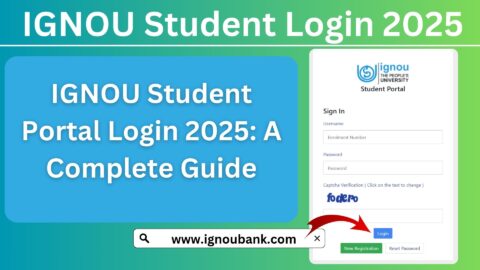
After opening the portal, students need to log in using their enrollment number and the password created during Samarth registration. After logging in, the ID card can be accessed through the Services section.
Important IGNOU ID Card Links and Information
| Information | Details |
|---|---|
| University | Indira Gandhi National Open University |
| ID Card | IGNOU Student Identity Card |
| ID Card Download Portal | https://ignou.samarth.edu.in/ |
| Login Username | Enrollment Number |
| ID Card Section | Services / ID Card |
| ID Card Format | |
| PDF Password | Enrollment Number, as instructed for the downloaded card |
| Registration | New Registration on Samarth Portal |
| OTP | Sent to registered email/mobile during registration |
| Official IGNOU Website | https://www.ignou.ac.in/ |
| Admission Portal | https://ignouadmission.samarth.edu.in/ |
IGNOU’s official prospectus specifically lists the Samarth portal as the portal to use for downloading the Student I-Card.
What Is the IGNOU Student ID Card?
The IGNOU Student ID Card is an identity document issued to students enrolled with the university. It helps identify a learner as an IGNOU student and contains important details related to the student’s admission and programme.
Students should download and preserve the ID card after their admission is confirmed. IGNOU regional-centre instructions also advise learners to download their digital ID card from the Samarth Student Portal and preserve it during their programme.
The digital ID card is particularly useful because IGNOU students may need their student identification details for different academic activities during their programme.
How to Download IGNOU ID Card with Enrollment No?
The process of downloading the IGNOU ID card with an enrollment number is straightforward once your admission is confirmed and your Samarth account has been created.
Step 1: Visit the IGNOU Samarth Portal
First, open the official IGNOU Samarth Student Portal:
Always make sure that you are using the official IGNOU Samarth website before entering your enrollment number or password.
Step 2: Complete New Registration if Required
If you have not previously created your Samarth student account, click on the New Registration option.
According to IGNOU’s published instructions, students need to provide their programme, name and enrollment number during registration. An OTP is then sent to the registered email address for verification.
You should enter your details carefully and use the information associated with your IGNOU admission record.
Step 3: Enter Your Enrollment Number
During the registration process, enter your correct enrollment number.
The enrollment number is important because it is used as the username for the IGNOU Samarth Student Portal. IGNOU’s student-portal instructions state that the enrollment number is used as the username after successful registration.
Make sure there are no extra spaces or typing errors when entering the number.
Step 4: Verify the OTP
After submitting your registration details, an OTP will be sent to the registered email address.
Enter the OTP on the portal and complete the verification process. After successful verification, you can create your student-portal password.
It is important to remember the password because you will need it when logging in to your Samarth account.
Step 5: Login to the IGNOU Student Portal
Once your registration is complete, return to the IGNOU Samarth Student Portal.
Enter:
- Username: Your Enrollment Number
- Password: Your Samarth Student Portal password
Then complete the login process.
After successful login, you should see your student dashboard and the services available for your account.
Step 6: Open the Services Section
After logging in, look for the Services option on the student dashboard.
IGNOU’s published student-portal instructions state that students can find various services under the Services section, including the option to download their student identity card.
Click on Services to continue.
Step 7: Select the ID Card Option
Inside the Services section, look for the ID Card, Download I-Card, or similar option available on your dashboard.
The exact appearance of the portal can change from time to time, but the ID card download option is provided through the student services area.
Step 8: Download the ID Card PDF
Click on the Download ID Card option.
The student identity card should be downloaded as a PDF file. Save this PDF on your mobile phone, computer or another secure location.
IGNOU’s published instructions confirm that clicking the Download I-Card option results in a PDF file being downloaded.
Step 9: Open the Downloaded ID Card
If the downloaded PDF asks for a password, use the password specified by IGNOU for the ID card. IGNOU’s student-portal guidance states that the enrollment number is used to open the downloaded ID-card PDF.
If the PDF viewer does not accept the enrollment number, check the instructions displayed by the portal or the downloaded document, as portal procedures can change.
Step 10: Save and Print Your ID Card
After successfully opening the PDF, save a copy for future use.
You can also take a printout of the ID card and keep it safely. It is useful to have both a digital copy and a printed copy available.
IGNOU ID Card Download Without Registration
Students who have not created their Samarth Student Portal account may not be able to directly access the ID card download service.
IGNOU’s instructions state that students should register on the Student Portal and create their student account. After logging in, they can access the Services section and download the student identity card.
Therefore, if you have received confirmation of your IGNOU admission but have never created your Samarth student account, complete the New Registration process first.
What Details Are Required for IGNOU ID Card Download?
Generally, students should keep the following information available:
- IGNOU Enrollment Number
- Programme details
- Name as recorded during admission
- Registered email address
- Registered mobile number, where required
- Samarth Student Portal password
- OTP received during registration
The enrollment number is particularly important because it is used as the student-portal username according to IGNOU’s published instructions.
What If You Forgot Your IGNOU Samarth Password?
If you have forgotten the password you created for the Samarth Student Portal, use the password-recovery option available on the portal.
Do not create a new account unnecessarily if you already have a registered student account. Instead, use the available account recovery or password-reset facility.
Also make sure that you have access to the email address or mobile number associated with your IGNOU records.
IGNOU ID Card Not Showing After Login
Sometimes students may log in successfully but not immediately find the ID card option.
There can be several reasons for this, including:
- Admission has not been fully confirmed.
- Student registration on the Samarth portal is incomplete.
- Incorrect programme or enrollment details were entered.
- The student account has not yet been properly updated.
- There is a temporary technical issue with the portal.
- The ID card has not yet become available for the student’s record.
First, verify that your admission has been confirmed and that your enrollment number is correct. Then log in again and check the Services section.
IGNOU’s FAQ advises students to register on the Student Portal after receiving confirmation of admission and create their student account.
Can I Download IGNOU ID Card Using Enrollment Number?
Yes. The enrollment number plays an important role in the IGNOU Samarth Student Portal process.
Students use their enrollment number as the username for their Samarth student account. Once logged in, they can access the Services section and download the available student identity card.
The enrollment number may also be required to open the downloaded ID-card PDF, according to IGNOU’s published instructions.
Is IGNOU ID Card Available Online?
Yes. IGNOU provides the student identity card through the Samarth Student Portal.
The university’s Common Prospectus specifically directs students to use https://ignou.samarth.edu.in/ for downloading the Student I-Card.
This means students do not necessarily need to wait for a physical card to access their digital identity card through the student portal.
Why Is the IGNOU ID Card Important?
The ID card is an important student document because it identifies you as an IGNOU learner.
You should keep your ID card safely throughout your programme. It is a good practice to keep:
- One PDF copy on your phone
- One backup copy on cloud storage or a computer
- A printed copy for situations where a physical document is useful
IGNOU regional-centre guidance also advises learners to preserve the digital ID card until completion of their programme.
Difference Between IGNOU ID Card and IGNOU Hall Ticket
Students should not confuse the IGNOU ID card with the Term-End Examination hall ticket.
The IGNOU ID card identifies you as an IGNOU student and is associated with your student record.
The hall ticket is related to a particular Term-End Examination and contains examination-related information such as the examination schedule and centre details.
Therefore, downloading your ID card does not mean that your examination hall ticket has also been downloaded.
Students should check the appropriate IGNOU portal or official notification when examination-related documents become available.
What Should You Do After Downloading the IGNOU ID Card?
Once you have downloaded your ID card, check all the information carefully.
Verify details such as:
- Name
- Enrollment number
- Programme
- Regional Centre
- Study Centre, where applicable
- Photograph and other displayed information
If you notice an error, keep a copy of the ID card and contact the appropriate IGNOU support or Regional Centre using the official communication channels.
Do not edit the information manually in the PDF because the ID card is an official student document.
Important Tips for IGNOU ID Card Download
Keep the following points in mind:
- Use only the official IGNOU Samarth Student Portal.
- Keep your enrollment number safe.
- Remember your Samarth portal password.
- Use your registered email address when completing OTP verification.
- Download and save the ID card PDF.
- Keep a backup copy.
- Print a copy if required.
- Check the information printed on the ID card.
- Do not share your Samarth password or OTP with anyone.
- If the ID card is unavailable, first check whether your admission and student registration have been completed.
FAQ about IGNOU ID Card Download with Enrollment No
How can I download my IGNOU ID card?
Visit the IGNOU Samarth Student Portal at https://ignou.samarth.edu.in/, log in using your enrollment number and Samarth password, open the Services section, and select the ID Card or Download I-Card option.
What is the official IGNOU ID card download link?
The official portal provided by IGNOU for downloading the Student I-Card is:
https://ignou.samarth.edu.in/
IGNOU’s Common Prospectus lists this Samarth portal for downloading the Student I-Card.
Can I download the IGNOU ID card using my enrollment number?
Yes. Your enrollment number is used as the username for the IGNOU Samarth Student Portal. After logging in, you can access the ID card through the Services section.
What is the password for the IGNOU ID card PDF?
IGNOU’s published student-portal instructions state that students should use their enrollment number to open the downloaded ID-card PDF.
I have my enrollment number but cannot download my ID card. What should I do?
First, make sure your admission has been confirmed and that you have completed New Registration on the Samarth Student Portal. Then log in again and check the Services section. If the ID card is still unavailable, contact the appropriate IGNOU support or Regional Centre.
Do I need to register on the Samarth portal before downloading the ID card?
Yes. IGNOU’s instructions require students to create their student account on the Samarth Student Portal before accessing student services such as the identity card download.
Is the IGNOU ID card available as a PDF?
Yes. The ID card can be downloaded as a PDF through the Student Portal.
Should I print my IGNOU ID card?
It is a good idea to keep a printed copy along with the digital PDF. Also save the PDF securely on your phone or computer.
What if my IGNOU ID card has incorrect information?
Check the details carefully. If there is an error, contact the appropriate IGNOU Regional Centre or official support channel and provide your enrollment number and relevant details. Avoid modifying the official ID-card PDF yourself.
Is the IGNOU ID card the same as the examination hall ticket?
No. The ID card is your student identity document, while the hall ticket is an examination-related document issued for a particular Term-End Examination.
Conclusion
The IGNOU ID Card Download with Enrollment No can be completed online through the IGNOU Samarth Student Portal. After admission confirmation, students should create their Samarth student account, log in using their enrollment number and password, open the Services section and select the ID Card option.
The official IGNOU Student Portal for this process is:
After downloading the ID card, save the PDF safely and keep a backup copy. You can also take a printout for future requirements. If the PDF is password protected, IGNOU’s published instructions state that the enrollment number is used to open the downloaded ID card.
Keeping your IGNOU ID card safely is important because it remains a useful student document throughout your academic journey. If your ID card is not available after login, first check your admission confirmation, Samarth registration and student details before contacting IGNOU for assistance.