IGNOU Student Portal Login with Enrollment No.: is an important online service for students enrolled with the Indira Gandhi National Open University (IGNOU). Through the student portal, learners can access several academic and student-related services without visiting an IGNOU Regional Centre or Study Centre.
Students commonly search for IGNOU student portal login with enrollment number when they want to access their online student account, check academic information, view examination-related details, access assignments, download important documents, or manage other student services.
The IGNOU student portal can be accessed online using the official Samarth portal. Students generally need their login credentials to access their account. If you are an IGNOU student and want to know how to log in using your enrollment details, this guide explains the process, required information, common login problems, and important IGNOU links.
IGNOU Student Portal Login
IGNOU uses online portals to provide various academic and administrative services to its students. The Samarth student portal is one of the important platforms used by IGNOU learners.
Students can access the portal using the following link:
IGNOU Student Portal: http://ignou.samarth.edu.in/
Before trying to log in, students should keep their enrollment number and other required login credentials ready. It is important to enter the information correctly because an incorrect enrollment number or password can prevent successful login.
The student portal should preferably be accessed through a modern web browser such as Google Chrome, Microsoft Edge, Mozilla Firefox, or another updated browser.
Important IGNOU Student Portal Information
| Information | Details |
|---|---|
| University | Indira Gandhi National Open University |
| Portal | IGNOU Samarth Student Portal |
| Login Information | Enrollment number and required login credentials |
| Portal URL | http://ignou.samarth.edu.in/ |
| Main Purpose | Student academic and administrative services |
| Enrollment Number | Student’s unique IGNOU enrollment number |
| Access | Online |
| Recommended Browser | Chrome, Edge, Firefox or another updated browser |
| Internet Requirement | Stable internet connection |
| Login Issue | Use the available password recovery/help option or contact IGNOU support |
How to Login to IGNOU Student Portal with Enrollment Number?
If you want to access the IGNOU student portal, follow the steps given below.
Step 1: Visit the IGNOU Student Portal
First, open a web browser on your mobile phone, laptop, desktop computer, or tablet.
Enter the official student portal address:
Make sure you are using the correct portal address before entering your personal login information.
Step 2: Open the Login Page
After opening the portal, look for the student login section. The portal may ask you to provide your enrollment number and password or other required credentials.
The exact appearance of the login page may change when IGNOU updates the Samarth portal.
Step 3: Enter Your Enrollment Number
Enter your IGNOU enrollment number carefully in the appropriate field.
Your enrollment number is an important identification number associated with your IGNOU student account. Avoid adding unnecessary spaces or entering incorrect digits.
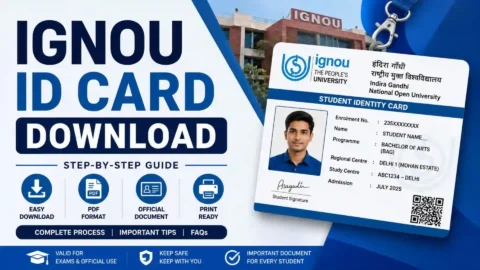
If you have your IGNOU ID card or other official student documents available, you can use them to verify the enrollment number before submitting the login form.
Step 4: Enter Your Password
Enter the password associated with your student account.
Passwords are generally case-sensitive, so check whether Caps Lock is enabled on your keyboard. If you recently changed your password, make sure you are using the latest password.
Step 5: Complete Any Security Verification
Depending on the portal’s current login system, you may be asked to complete a security verification such as a captcha or another authentication step.
Complete the required verification carefully.
Step 6: Click Login
After entering the required information, click the Login button.
If your credentials are correct, you should be taken to your student dashboard.
What Is an IGNOU Enrollment Number?
An IGNOU enrollment number is a unique number associated with an IGNOU student. It is used for identifying a student’s academic record and is required for accessing various student services.
Students should keep their enrollment number safely because it can be required for different IGNOU-related activities.
For example, students may need their enrollment number when checking examination information, accessing student services, communicating with IGNOU, checking academic records, or using online portals.
If you do not remember your enrollment number, check your IGNOU admission documents, student ID card, registration information, or other official university records.
Can I Login to the IGNOU Student Portal Using My Enrollment Number?
Yes, students can use their enrollment number as the required student identification information when logging into the relevant IGNOU Samarth student portal.
However, having an enrollment number alone may not always be sufficient. The portal can also require a password or additional authentication information.
Therefore, students should not confuse enrollment number with a password. The enrollment number identifies the student account, while the password is used to authenticate access to the account.
IGNOU Student Portal Login Password
The password is an important part of the student portal login process.
If you know your enrollment number but have forgotten your password, look for the password recovery or reset option provided on the portal.
When resetting your password, enter the information requested by the portal carefully.
Students should avoid sharing their password with other people. Your login credentials can provide access to personal academic information, so they should be kept confidential.
What Can Students Access Through the IGNOU Student Portal?
The services available through the IGNOU student portal can vary depending on the student’s programme, admission status, portal configuration, and current university services.
The portal can be used for different student-related activities and information.
Some commonly associated student services include:
- Student account information
- Academic information
- Admission-related information
- Examination-related services
- Assignment-related information
- Student profile details
- Online applications and forms
- Notifications and updates
- Other academic or administrative services
Students should check their dashboard after logging in because the services displayed can depend on their account and the current IGNOU system.
IGNOU Student Portal Login on Mobile
Students can also try accessing the IGNOU student portal using a mobile phone.
Open Chrome, Safari, Edge, or another updated mobile browser and enter:
Use your enrollment number and required login credentials to sign in.
If the portal does not display correctly on your mobile device, try enabling desktop mode in your browser or use a laptop or desktop computer.
A stable internet connection is also recommended because an interrupted connection can cause problems while submitting login information.
What to Do If IGNOU Student Portal Login Is Not Working?
Sometimes students may be unable to log in even after entering their enrollment number and password. Several reasons can cause a login problem.
First, check whether the enrollment number has been entered correctly. A single incorrect digit can prevent login.
Next, check your password carefully. Passwords may be case-sensitive, so make sure that uppercase and lowercase characters are entered correctly.
You should also check your internet connection. If the connection is unstable, refresh the page and try again after the internet connection becomes stable.
If the website is temporarily unavailable because of maintenance, heavy traffic, or a technical issue, you may need to try again later.
Clearing your browser cache and cookies or opening the portal in an incognito/private browsing window can also help with some browser-related problems.
Forgot IGNOU Student Portal Password
Forgetting your password is a common reason students cannot access their accounts.
If you remember your enrollment number but cannot remember the password, look for the Forgot Password, Reset Password, or similar option on the login page, if available.
Follow the instructions displayed by the portal.
You may be required to provide additional information to verify your account. Enter the requested information exactly as it appears in your IGNOU records.
After successfully resetting the password, return to the login page and try signing in again.
Common Problems During IGNOU Student Portal Login
Students can face different problems while accessing the portal. Some common problems include:
Incorrect Enrollment Number
Make sure that every digit of your enrollment number is correct. Avoid copying an incorrect number from an old document.
Incorrect Password
Check the password carefully. Pay attention to capital letters, small letters, numbers, and special characters if they are part of your password.
Forgotten Password
Use the password recovery facility available on the portal if you cannot remember your password.
Website Not Opening
If the website does not open, check your internet connection and try another browser. You can also try again later if the portal is temporarily unavailable.
Browser Problems
An outdated browser or stored cache can sometimes create problems. Try clearing the browser cache or using an updated browser.
Heavy Traffic
During important admission, examination, assignment, or result periods, many students may try to access IGNOU websites at the same time. This can sometimes make online services slower.
Important IGNOU Links and Information
The following table can help students quickly find some important IGNOU-related services.
| Service | Link / Information |
|---|---|
| IGNOU Student Portal | http://ignou.samarth.edu.in/ |
| Student Login | Use the IGNOU Samarth student portal |
| Enrollment Number | Use the enrollment number associated with your IGNOU admission |
| Password | Use your registered student portal password |
| IGNOU Main Website | https://www.ignou.ac.in/ |
| Examination Form | https://exam.ignou.ac.in/ |
| IGNOU Admission Status | https://isms.ignou.ac.in/changeadmdata/AdmissionStatusNew.ASP |
| Assignment Status | https://isms.ignou.ac.in/changeadmdata/StatusAssignment.asp |
| Assignment Downloads | https://www.ignou.ac.in/studentService/download/assignments |
| IGNOU Grade Card | Check the latest available IGNOU grade card service |
Difference Between IGNOU Student Portal and Other IGNOU Websites
IGNOU provides different online services through different websites and portals. Students should therefore use the correct website for the service they need.
For example, the student portal is intended for student account and related services, while examination services may be provided through separate examination portals.
Similarly, assignment status, admission status, results, and grade card information may be available through their respective online services.
This means that if you cannot find a particular service after logging into the student portal, you should check whether IGNOU provides that service through a separate official website.
Tips for Safe IGNOU Student Portal Login
Students should follow a few basic security practices when accessing their IGNOU account.
Always check the website address before entering your login information.
Avoid sharing your password with friends, classmates, cyber cafe operators, or other individuals.
If you use a public computer, do not save your password in the browser.
Always log out after completing your work on a shared or public computer.
Students should also avoid entering their login information on websites that claim to provide IGNOU login services but are not official IGNOU portals.
FAQ about IGNOU Student Portal Login with Enrollment No
What is the IGNOU student portal?
The IGNOU student portal is an online platform through which IGNOU students can access various student-related academic and administrative services.
How do I login to the IGNOU student portal?
Visit http://ignou.samarth.edu.in/ and enter the required login information, including your enrollment number and password.
Can I login to the IGNOU portal with my enrollment number?
Yes, the enrollment number is used as an important student identification credential for the relevant IGNOU student portal login process. You may also need a password or additional authentication information.
What should I do if I forget my IGNOU portal password?
Use the password recovery or reset option available on the login page, if provided. Follow the instructions shown by the portal to regain access to your account.
Where can I find my IGNOU enrollment number?
You can check your IGNOU admission documents, student ID card, registration information, or other official student records to find your enrollment number.
Can I access the IGNOU student portal on my mobile phone?
Yes, you can try accessing the portal through an updated mobile web browser. If you experience display or login problems, try using desktop mode or a computer.
Why is my IGNOU student portal login not working?
Possible reasons include an incorrect enrollment number, incorrect password, browser problems, an unstable internet connection, or temporary technical issues with the portal.
Is the IGNOU student portal different from the IGNOU examination portal?
Yes. IGNOU provides different online platforms for different services. The student portal and examination-related portals may have different purposes.
Can I reset my IGNOU portal password?
If you have forgotten your password, check the student portal login page for a password recovery or reset option and follow the instructions provided there.
Should I share my IGNOU enrollment number and password?
Your enrollment number may be required for student services, but your password should be kept confidential. Never share your password with another person.
Conclusion
The IGNOU student portal login with enrollment number process allows students to access their online student account and use various academic and administrative services. To access the portal, students should visit http://ignou.samarth.edu.in/ and enter their enrollment number along with the other credentials requested by the portal.
Before logging in, keep your enrollment number and password ready and make sure that you are using the correct portal address. If you cannot log in, check your enrollment number, password, internet connection, and browser. Students who forget their password should use the available password recovery option.
It is also important to remember that IGNOU uses different online platforms for different services. Therefore, examination forms, assignment status, admission status, grade cards, and other services may sometimes be available through separate IGNOU websites.
For regular IGNOU students, keeping the enrollment number, login details, and important official links safely stored can make it much easier to access online university services whenever required.