IGNOU Assignment Submission Online: The Indira Gandhi National Open University (IGNOU) is one of the largest open universities in the world, offering flexible and learner-centric higher education. One of the major components of IGNOU’s evaluation process is the submission of assignments, which contributes significantly to the final grades of every programme. With the increasing push toward digital transformation, IGNOU now allows most students to submit assignments online through its official Learning Management System.
This detailed article provides everything you need to know about IGNOU assignment submission online, including step-by-step instructions, important guidelines, key dates, the official submission link, common mistakes students must avoid, and answers to frequently asked questions. Whether you are a new learner or a continuing student, this guide will help you smoothly complete the online assignment submission process.
Official Link for IGNOU Assignment Submission
IGNOU students can submit their assignments online through the official LMS portal at:
Assignment Submission Link: https://lms.ignouonline.ac.in/
This link is used for TEE assignment submissions for various programmes. However, students must always verify instructions from their regional center, as in some cases offline submission may still be required. The LMS portal provides a centralized, user-friendly platform for uploading assignments securely.
Understanding IGNOU Assignments
Assignments are the first phase of the final evaluation for almost all IGNOU programmes. They are designed to assess the student’s understanding of the course content and promote analytical thinking.
Why IGNOU Assignments Are Important?
- Mandatory Component of Evaluation
Every student must submit assignments, as they carry weightage in the final result. - Eligibility for Term-End Examination (TEE)
Students who fail to submit assignments are not allowed to appear for the TEE. - Internal Assessment
Assignments constitute 30% of the total marks, while the TEE makes up the remaining 70%. - Improves Conceptual Clarity
Doing assignments helps in deeper understanding and better exam preparation.
Modes of Assignment Submission at IGNOU
Although many regional centers still accept assignments in offline (hard-copy) mode, the majority now encourage online submissions through:
- IGNOU LMS Portal – the main official link for online assignment upload.
Submission link: https://lms.ignouonline.ac.in/ - Regional Center Email or Google Forms (used previously)
Now mostly replaced by the LMS. - Offline Submission at Study/Regional Centers
In some cases, offline submission continues.
Before submitting assignments, students should always refer to the guidelines issued by their regional center.
Who Can Submit Assignments Online?
Online submission is generally applicable to:
- Students enrolled in online and ODL programmes.
- Students for whom the regional center has officially approved online submission.
- Students appearing for the upcoming Term-End Examination (TEE).
- Students who reside far from their regional center and are permitted online submission.
Step-by-Step Guide: How to Submit IGNOU Assignments Online
Below is a simple, clear guide to submitting assignments online through the LMS portal.
Step 1: Visit the Official Submission Portal
Go to the official IGNOU LMS portal: https://lms.ignouonline.ac.in/
Step 2: Login to Your Account
You will be asked to log in using the credentials provided by IGNOU. These may include:
- Username
- Password
If you do not have login details, your regional center or induction email will contain them.
Step 3: Select Your Course
After logging in:
- Choose My Courses.
- Select the programme for which you want to upload the assignments.
Step 4: Open the Assignment Submission Section
Click on:
- Assignments
- Then choose the course code (e.g., BEGLA-135, MCO-01, BSOC-131, etc.)
Step 5: Upload Your Assignment File
Ensure you follow these rules:
- Submit only in PDF format.
- File size should be as per portal guidelines.
- One PDF per course.
Click on Upload and attach your assignment file.
Step 6: Confirm Submission
After uploading:
- Click Submit.
- Wait for the confirmation message.
- Download or save your submission receipt for future use.
How to Prepare IGNOU Assignments for Online Submission?
Preparing assignments correctly is crucial to avoid rejection.
1. Use A4 Sheets
IGNOU prefers handwritten assignments on A4-size ruled or plain sheets.
2. Handwritten Assignments Only
Unless your regional center states otherwise, assignments must be handwritten.
3. Scan Clearly
Use a mobile scanning app such as:
- Adobe Scan
- Microsoft Lens
- CamScanner (clean scan mode)
Ensure the pages are clear and readable.
4. File Naming Format
Follow this format:
EnrollmentNumber_CourseCode.pdf
Example:
2104578900_BEGLA135.pdf
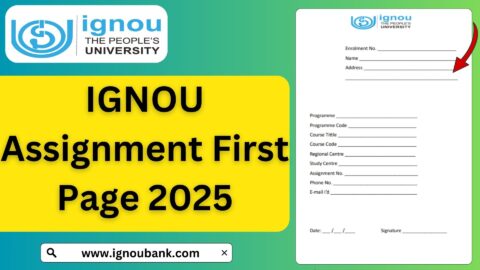
5. Add the First Page with Details
The first page should contain:
- Student Name
- Enrollment Number
- Programme Code
- Course Code
- Study Center Code
- Regional Center
- Mobile Number
- Email ID
- Session (e.g., January 2025 or July 2025)
6. Convert to a Single PDF
Combine all pages into one PDF using apps or online tools.
7. Keep Backup Copy
Always save a backup on your phone or laptop.
Important Instructions for IGNOU Assignment Submission
Before submission, keep these guidelines in mind:
- Do not copy assignments from the internet or other students.
IGNOU strictly prohibits plagiarism. - Submit before the deadline.
Late submissions may delay your exam results. - Use clear handwriting.
Examiners must be able to read your answers. - Write answers in your own words.
Avoid copying from the study material directly. - Follow word limits.
Many questions specify word counts. - Attach the question paper with the assignment (if required by RC guidelines).
- Check your submission status later to ensure it is accepted.
IGNOU Assignment Submission Dates
The submission deadlines vary for January and July cycles, but IGNOU typically follows these timings:
For January Session:
Assignments usually need to be submitted between March to May.
For July Session:
Submission period generally falls between September to October.
However, IGNOU often extends deadlines. Always check your regional center notifications for accurate dates.
Tracking the Status of Your Assignment Submission
Once you submit your assignment online:
- Login again after a few days.
- Check the submission status under the assignment section.
- If marked as Submitted, your assignment is accepted.
- Later, after evaluation, marks are updated on the Grade Card.
Common Mistakes Students Must Avoid
To ensure smooth submission, avoid the following:
- Uploading multiple files for one course.
- Sending blurry scans.
- Naming files incorrectly.
- Missing the first-page details.
- Submitting someone else’s assignment.
- Not checking whether the upload was successful.
- Submitting to the wrong course code.
- Using typed assignments without permission.
Benefits of Online Assignment Submission at IGNOU
Online submission offers multiple advantages:
1. Convenience
Students can submit assignments from home, avoiding travel to study centers.
2. Time Saving
The digital process speeds up submission and evaluation.
3. Centralized System
The LMS stores all submissions securely.
4. Environment Friendly
No need for printing, photocopying, or paper envelopes.
5. Reduces Administrative Burden
Helps study centers manage submissions more efficiently.
Important Links and Information
| Purpose | Link / Information |
|---|---|
| Assignment Submission Portal | https://lms.ignouonline.ac.in/ |
| IGNOU Official Website | https://ignou.ac.in |
| Assignment Question Papers | Available on IGNOU website under Programme section |
| IGNOU Grade Card | https://ignou.ac.in/gradecard |
| TEE Exam Form Submission | https://exam.ignou.ac.in |
| Hall Ticket / Admit Card | https://hall_ticket.ignou.ac.in |
| Re-registration Portal | https://onlinerr.ignou.ac.in |
| Student Login (Samarth Portal) | https://ignou.samarth.edu.in |
| Student Support Email | As per regional center |
FAQ IGNOU Assignment Submission Online
Can I submit IGNOU assignments online?
Yes. IGNOU allows online submission through its official LMS portal. However, verify with your regional center if online submission is applicable for your program.
What is the official link for online assignment submission?
The official link is: https://lms.ignouonline.ac.in/
Do I need to submit handwritten assignments only?
Yes, IGNOU requires handwritten assignments unless stated otherwise by your regional center.
Can I type my assignments?
Typed assignments are generally not accepted. Only handwritten ones are valid unless your RC approves typing due to disability or special programs.
What format should I use for uploading assignments?
You must upload assignments in single PDF format for each course.
How do I know if my assignment is successfully submitted?
You will receive a confirmation message on the portal. You can also download the submission receipt.
Can I re-submit assignments if I uploaded the wrong file?
Most regional centers do not allow re-submission after the deadline. Always double-check before uploading.
Is the online submission deadline the same for everyone?
No, deadlines vary by regional center and programme. Always refer to your RC notifications.
Are old assignments accepted?
No. You must submit assignments for the current session only.
Where can I check my assignment marks?
Assignment marks are updated on the Grade Card at: https://ignou.ac.in/gradecard
Conclusion
IGNOU’s decision to enable online assignment submission through the LMS has greatly improved convenience and accessibility for students across India and abroad. With a simple upload process, secure platform, and centralized record management, students can now complete this crucial academic requirement without visiting regional or study centers.
However, it remains important to follow IGNOU’s guidelines carefully—assignments must be handwritten, submitted on time, properly scanned, and uploaded in PDF format. Always verify instructions issued by your regional center, as procedures may differ between programmes and regions.
By following the steps and guidelines provided in this article, IGNOU learners can confidently submit their assignments online and ensure their eligibility for the Term-End Examinations. Proper submission not only contributes to internal evaluation but also plays a vital role in academic success at IGNOU.
If you prepare, scan, and upload your assignments correctly, the online submission portal becomes one of the easiest and most efficient tools available to IGNOU students.